SSH Tunnel / VPN Gateway / RDP connections

Hi!
Is there a good write up on how the SSH tunnel should work? We have it setup for one of our consultants that works for us, and they get the SSH tunnel up as a VPN connection but when they try to run RDP it fails. What should I double check in the SSH config & RDP config to make it work.
The RDM client that they are using is v12.6.8
/Kaj
All Comments (14)
Hello Kaj,
did you see this instructions for set up the tunnel and the remote connection?
Regards,
Min
I'm guessing I'm asking how to configure the RDP connection entry to automatically adapt the connection to if its beeing done over SSH tunnel or directly to the server. This since we are using the same repository for both types of connection cases and cant have a separate set of connections that should be used with SSH tunnel with its static SSH ports
Hello,
As I understand, you would like to know how to configure your RDP session to use the SSH Tunnel when needed at the connection. Am I correct?
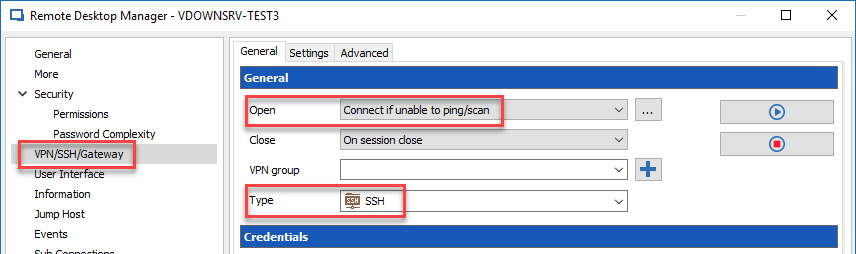
If it's the case, I suggest to select Connect if unable to ping/scan in the VPN/SSH/Gateway section for the Open field and SSH for the Type.
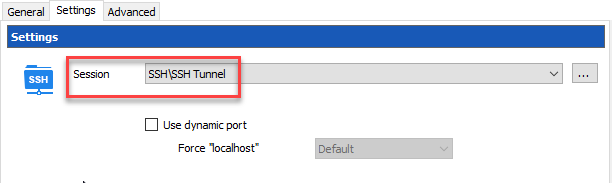
Then, in the Settings tab, select the SSH Tunnel session that you have created previoulsy.
With this configuration, the RDP session will connect directly if he's able to ping the computer and if RDM is not able to ping the computer, he will then open the SSH Tunnel automatically prior to establish the RDP session.
Best regards,
Jeff Dagenais
2017-10-26_10-17-29.png
2017-10-26_10-16-01.png
We cant really get this to work ....
We've tried specifiying the SSH tunnel under Group Properties on the folder one level up, then on the RDP connection object we've tried setting the setting to inherit.
The problem with having the detection set to if unable to ping/scan is that one of the problems that we are trying to get around is overlapping IP networks. Hence the PING response might as well exists but from the 'wrong' network - hence I need to inherit the setting from the folder above so that I there can configure it to always connect the VPN first.
But then the next question comes up on how does the RDP connection 'know' that it should send the traffic inside the SSH tunnel if it inherited the VPN from the folder above ?
We tried to set the Group Propertoes / VPN SSH Gateway & Settings to USE DYNAMIC PORT but then RDP tries to connect but fails to connect in the end.
Latest step is that I've started to look at VPN Connection type = Gateway which on the icon looks like the TS Gateway setting, but the setting screen shows a blank Gateway dropdown and I cant figure out where to populate that dropdown box .... Pressing the three dots to the right of the dropdown leads me to a search box which is empty ...
Hi,
You need to create an entry RDP Gateway with the Add button in the main ribbon. You will get it listed in the dropdown.
Regards
David Hervieux
OK thanks - that seems to have solved the RDP connectivity issues - Now the next couple of questions come up. How to proxy HTTP connections into our network from the service provider? I think I briefly saw that there was a SOCKS 5 proxy planned / implemented into RDM already? Or did I read it wrong?
/Kaj
Hello,
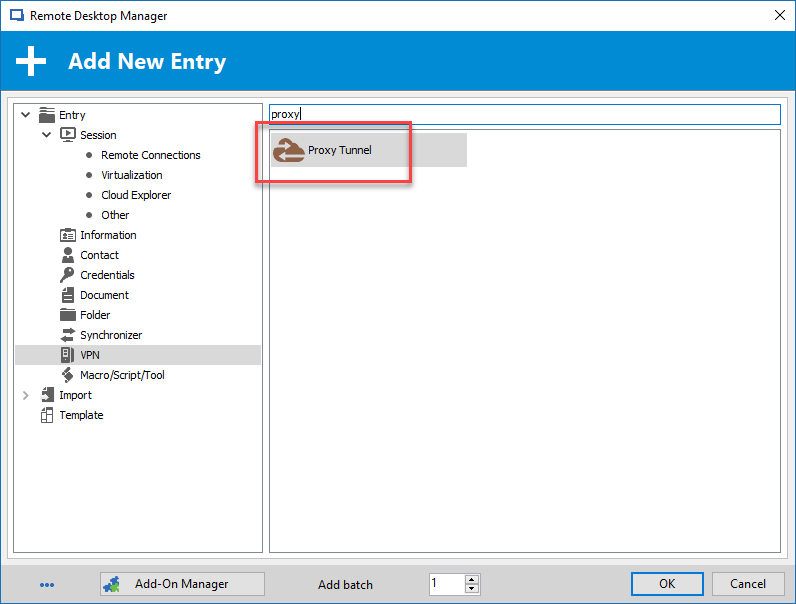
In the VPN section, you have the possibility to create a Proxy Tunnel session type. Is this what you are looking for?
Best regards,
Jeff Dagenais
2017-11-14_13-36-16.png
I was looking for a HTTP proxy setting for each folder/group that can be inherited downwards.
Hi Kaj,
We are not sure if the HTTP session are under the same folder as your RDP or if it's a new question?
Let imaging all the HTTP session are in a different folder. Let's go with a step-by-step.
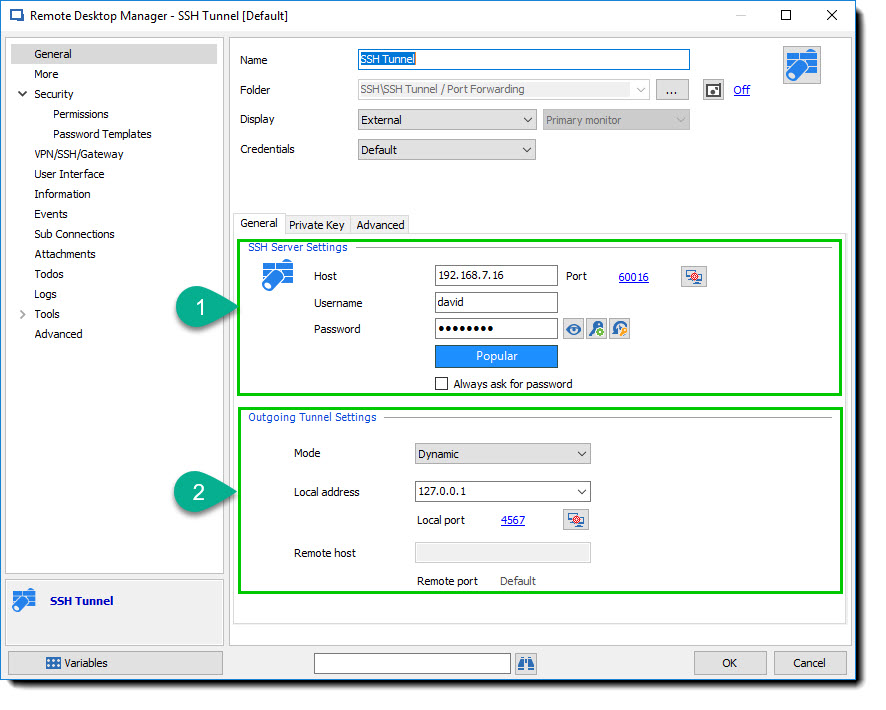
First we need to configure the SSH Tunnel for our SOCKS5 Proxy.
1. The first step is easy, just enter the SOCKS5 Server that you want to connect to. Normaly named bastion server.
2. For the second step, we will select a Dynamic mode which is SOCKS5 mode,
2.1 Set the Local address to your loopback address 127.0.0.1
2.2 Set the Local Port with a port that you want to use as the SOCKS5 PORT. I choose 4567 for the example but this isn't the best one. I suggest use a port higher than 50000.
Second step, configure the Folder to be the inheritance of the SSH Tunnel.
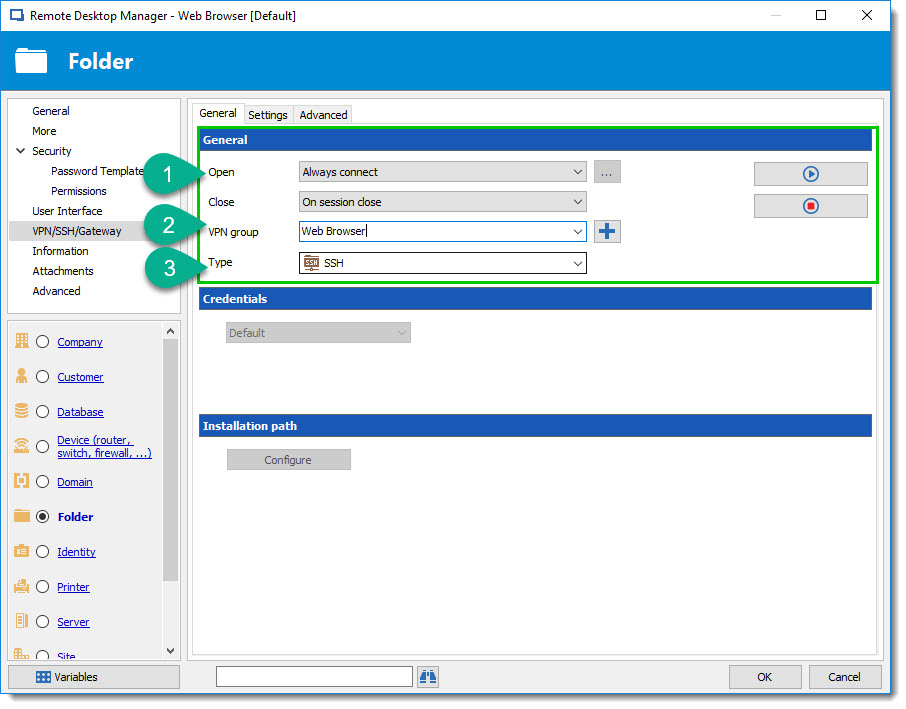
As my colleague explained before, open the properties of the folder and configure the VPN/SSH/Gateway section.
1. Set the Open mode to what wanted
2. Do not forget to add a VPN group otherwise each time you will open a session under this folder the SSH Tunnel will open.
3. Select Type to SSH
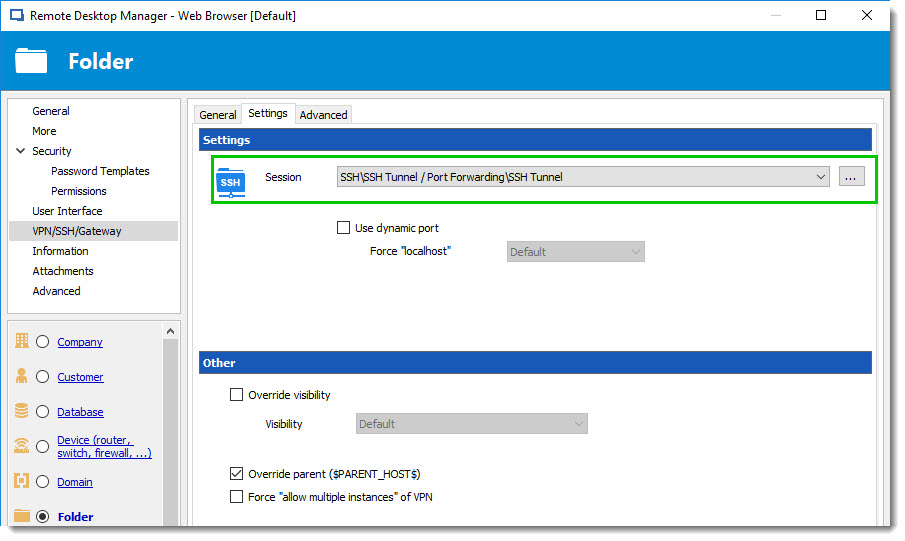
Always in the Properties of the Folder, go to Settings tab and Select the SSH Tunnel create in step 1.
Good 75% of the job is done, we now need to configure a Web Browser (HTTP/HTTPS) entry.
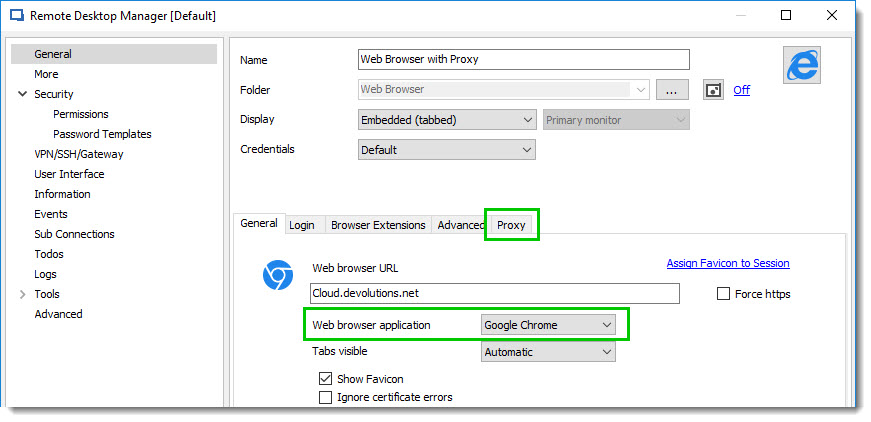
Create a Web Browser (HTTP/HTTPS) entry and select the Web browser application Google Chrome or Firefox, only these two support the Proxy feature. After let's jump to the Proxy tab.
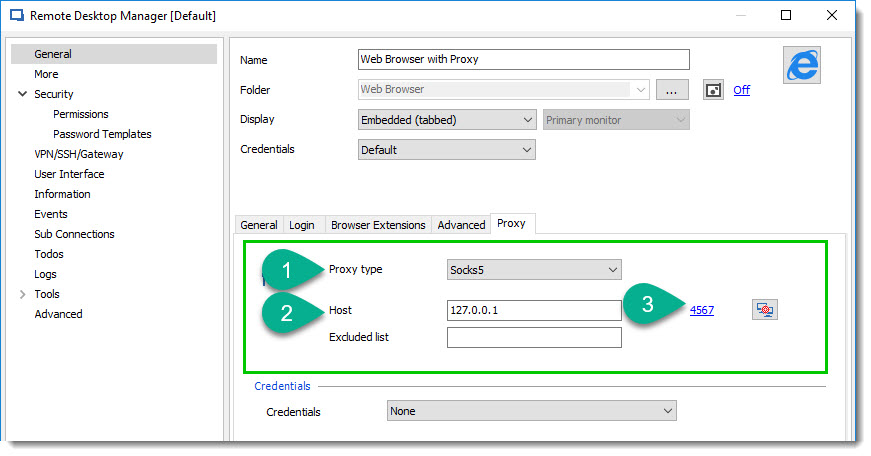
1. Change the Proxy Type to Socks5
2. Change the host with the loopback address 127.0.0.1
3. Finally use the same port as prevously configure in step 2.2 above. I used port 4567.
4. Click Ok and test it with Open Session.
Best regards,
David Grandolfo
web_browser__socks5_proxy.jpg
web_browser__socks5.jpg
ssh_tunnel_socks5_folder_settings.jpg
ssh_tunnel_socks5_folder.jpg
ssh_tunnel_socks5.jpg
Have you tried using Jump Hosts, i use those now as its less to setup that tunnels / gateways.
JK
JK
Devolutions Force Member (and Long time Devolutions Fan)
Yes and we didnt like it ....
1) Everytime I tried it / were to demo it - I got that the RDM Agent didnt respond - which ofcourse can be worked with support to fix.
2) It allows Admins to bypass RDM when entering our network by running RDP directly if they know the password - I know, make them not know the password .... but its 'easier' and a _bit_ more hidden from the Admins user perspective to go over the RDP Gateway route which seems to be working better for us than the agent.
/Kaj
Excellent write up thanks.
This was new, wasnt clear enough on previus articles.
Any chance to get support for inheritance on the Socks Proxy in the browser? I'e from folder. This so that we can reuse the same web connections from places that doesn't need the Socks proxy.
Unfortunately, this is not an available option but it could be a nice feature request.
For feature requests, kindly post them on the forums at https://forum.devolutions.net/forum17-remote-desktop-manager--feature-request.aspx
Best regards,
David Grandolfo