Export Private vault only from RDM old version.

Disabled
Hi,
We are moving from RDM old versions (11.1) to the new. I need to export my private vault and import to the new RDM. How can I do this?
I want to simply export my credentials list from my old RDM (11.1).
Best Regards,
Pesala Sampath
Operational Technical Engineer
99X
Schweigaardsgt. 14, 0185 Oslo
Postboks 9216 Grønland, 0134 Oslo
Mobile: +94 70 3999925
Skype: bopesala
pesala@99x.no
All Comments (3)
Hello,
As I understand, you will upgrade your RDM from 11.1 to RDM 12.5. Am I correct?
If it's the case, are you keeping the same database? If you are keeping the same database, no need to do an export/import of your Private Vault since they are saved in the database and that you will use the same database after the update.
Please note that there's a database upgrade between RDM 11 and 12. Please consult this help topic prior to the upgrade
https://help.remotedesktopmanager.com/database_upgrade.htm
Best regards,
Jeff Dagenais
Disabled
Hi,
Yes you are correct.
But We are not keeping the same database. So I need a way to export the private vault.
Best Regards,
Pesala Sampath
Operational Technical Engineer
99X
Schweigaardsgt. 14, 0185 Oslo
Postboks 9216 Grønland, 0134 Oslo
Mobile: +94 70 3999925
Skype: bopesala
pesala@99x.no
Hello,
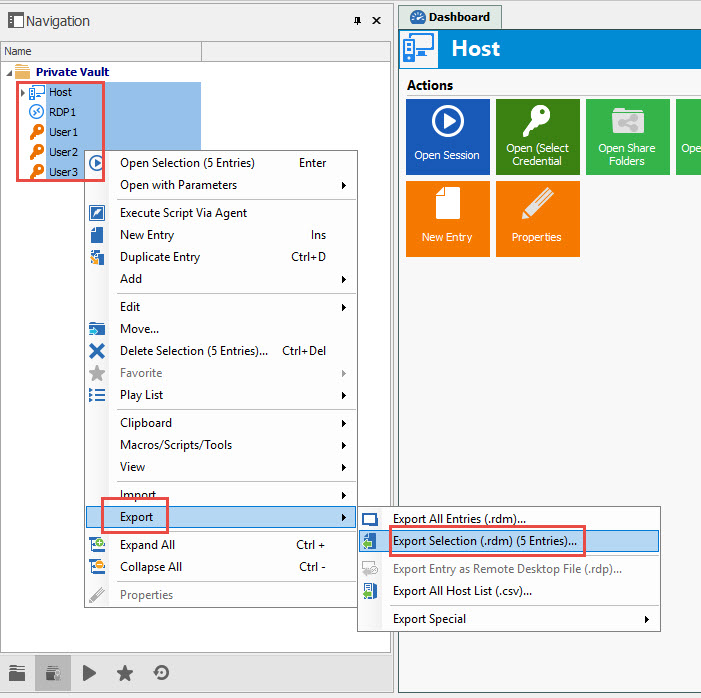
In that case, you would need to export your Private Vault in a .rdm.
To do so, select your sessions from the first to the last and do a right-click -> Export -> Export Selection. Don't forget to check the Include Credentials box to export the credentials as well.
Best regards,
Jeff Dagenais
2017-06-23_07-18-51.jpg