Telnet credential autofill

Hi, we have recently purchased RDM and I have got the job to populate it with all out infrastructure. Everything is going well so far apart from one issue I have found. When I open a telnet session the credentials are not autofilling i.e. it just stays asking for the username. If I enter the username and password it logins in fine. It is as if RDM is not passing the username and password to the telnet session. Please can you help? Thanks
All Comments (19)
Hi Adrian,
What kind of entry are you using ? Is it Telnet Rebex or Built-in Telnet entry ?
Also, could you send us a print screen of the entry's configuration please. Be sure to remove or to blur the host name.
Best regards,
David Grandolfo
Hi David,
We use puTTY. I am using a private credential, but I have also tried to enter it directly in the entry too.
PrtScr capture.jpg
Thanks,
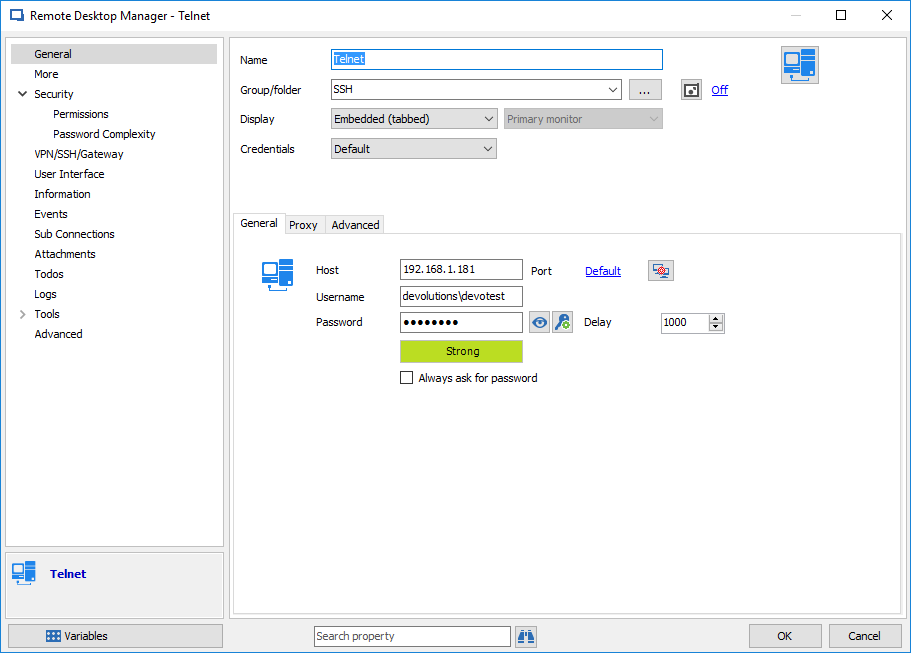
For information, the entry type is a Telnet entry.
Also, to have the possibility to send the credentials to the Telnet session you need to enter the Username/password in the Username and Password field or you could use the Credentials Type above to select another choice as Credentials Repository. Did you try with one of these options?
Best regards,
David Grandolfo
telnet.png
HI, I tried with the username and password. With no success. Oddly I don't have a Credentials box to select from. I am obviously doing something wrong.
Hi,
Could you look at the Scroll bar at the right of your windows.
Also you could try the Telnet (Rebex) Entry if it's work properly.
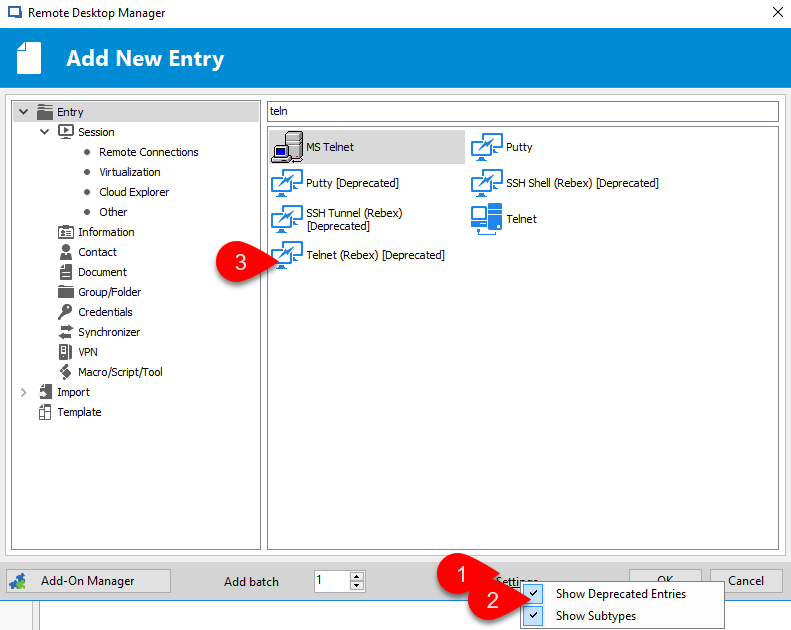
To add a Telnet (Rebex) entry click --> New Entry --> Settings at the bottom right --> Click Show Depreciated Entries --> and now you have the possibility to search Telnet (Rebex) in the search box, on the top of the Add New Entry windows.
Best regards,

David Grandolfo
Telnet_Rebex.png
scroll_bar.png
Thank you for your help. Now I feel a real fool - the credentials box was there, just need to scroll now.
I have tried Rebex Telnet and it didnt work, however, if I manually entered the username it auto entered the password.
Hi,
Could you send us a video of the error and the configuration of the entry please?
We have a record option in RDM if you would like to use it. Please follow this topic.
Best regards,
David Grandolfo
Please attached the video.
WMFS.mp4
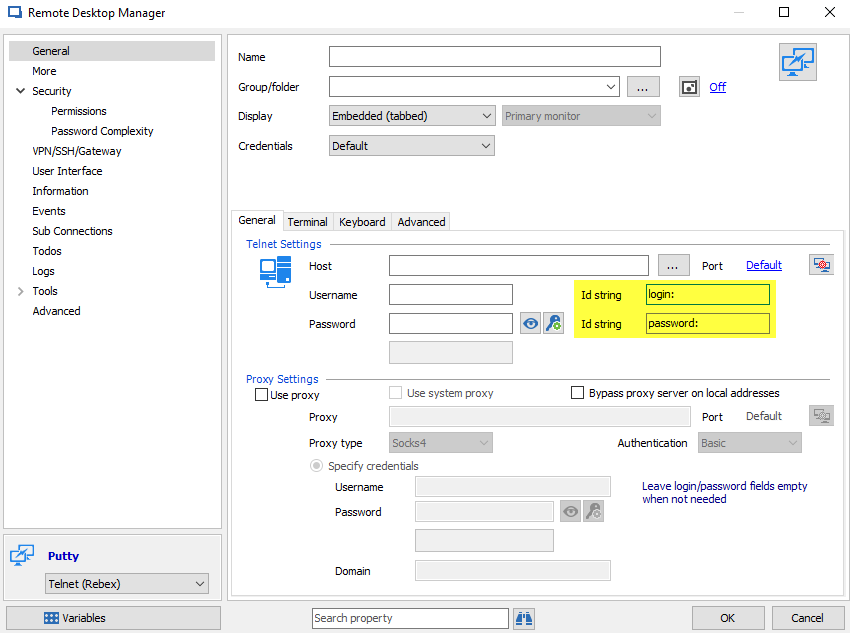
Probably the end device have a problem with the Username String used by Telnet or Telnet (Rebex) entries.
Could you, with a Telnet (Rebex), change the ID String by "Username:" please. Probably the device do not used login: as Id String.
Best regards,
David Grandolfo
Telnet_Rebex_String.png
Hi David,
Sorry for the slow reply. That work perfectly. I change the ID String from login: to username: and it logged straight in with my private credential. You are a star. Thanks so much for you help.
Now - is there a fast way to bulk change all my Telnet entries to reflect this change i.e. add the username: parameter and change to Rebux? I have 400 entries to change!
Thanks again for you help.
Hello,
Yes it is possible to bulk change this property with the Batch Action feature. You would need to select all entries you want to change, then right-click on it and select Edit -> Batch Edit -> Batch Actions -> Custom Powershell Command and enter the following script:$connection.Putty.LoginIdString = "Username:"RDM.Save();
For more information about the Batch Action feature, please consult the following online help pages.
https://help.remotedesktopmanager.com/batch_actions.htm
https://help.remotedesktopmanager.com/powershell_batchactionssamples.htm
Best regards,
Érica Poirier
Thats superb. Is there a way to batch change from Telnet to Putty Rebex?
Hi Adrian,
yes, this is also possible with Batch Actions:
Select all your entries you want to change, then right-click on it and select
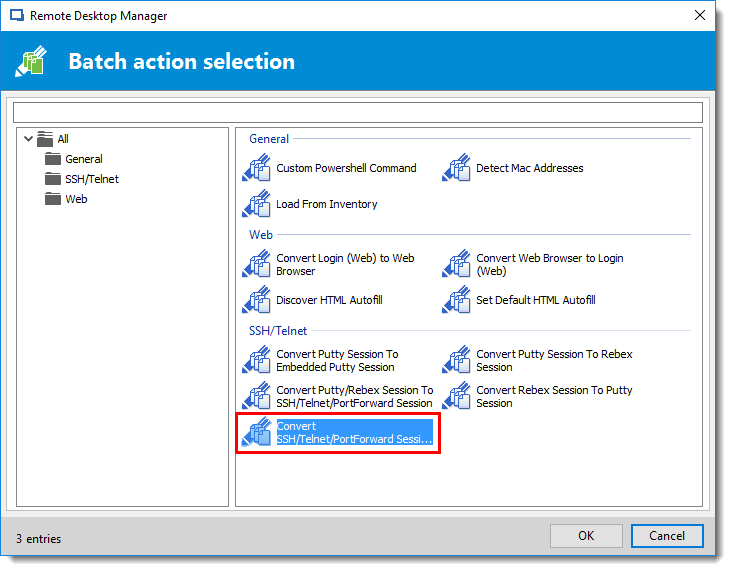
Edit -> Batch Edit -> Batch Actions -> SSH/Telnet -> Convert SSH/Telnet/PortForwars Session to Putty/Rebex Session -> Target Type:Telnet
Regards,
Min
Thank very much for all the support.
Min - I have run Batch Action, but I get an error "Batch action could not be executed".
Hi Adrian,
the source sessions are all "Telnet" configured?
Can you try to select about 10 Telnet entries and try the batch actions again?
Best Regards,
Min
Hi Min,
Yes the source is Telnet. I have tried with 10 entries and just 1 entry and I get the same message.
Regards,
Adrian
Hi Adrian,
The steps provide by Min works on my side with RDM 12.5 Could I confirm with you that you selected the right entry in batch action. Please see the image below.
Also, if it doesn't work could you record your test in RDM. Record option embedded in RDM
David Grandolfo
telnet_to_rebex.png
Hi David,
As you probably suspected I was dont it wrong. I have followed you instructions and it has successfully changed.
Thank you to all that have helped me with this. Devolutions is really going to help our team.
Thanks for the confirmation Adrian,
It's always a pleasure to help customers.
David Grandolfo