VMRC not working

Hi,
I got VMRC 9.0 installed to use it with esx 6.5 when I want to create a link in Remote Desktop manager I can only choose v8.0 I don't get it to work. I tested it with the esxi host ip address and the vcenter 6.5 ip address but nothing happens.
Can someone give me an example to show how it needs to be setup or is this also something that needs to change in a future version ?
All Comments (7)
Hello,
Could you please follow these steps in order to configure Power CLI that is necessary for getting VMRC 9.0 working
( https://help.remotedesktopmanager.com/index.html?kb_configuringpowercli.htm )
Best Regards,
Zacharia Ellaham
Hello,
We have not tested with vmrc 9.0, neither with v10 which came out today!
Please confirm that you have followed all the steps and it still doesnt work.
thanks
Maurice
Hi,
Powercli:
Connect-VIServer {your server}
this command works I get a credential box when I enter user administrator@vsphere.local and password I can connect.
Get-View -ViewType VirtualMachine | select -Property Name, {$_.Moref.Value};
this command works aswell and will list my vm's
But I cannot get a script to run
vmrc 10 is here
C:\Program Files (x86)\VMware\VMware Remote Console\vmrc.exe
Any help on this would be nice.
Hello,
Sorry but I do not understand when you say "cannot get a script to run"
Have you tried using our VMware console to first list the vm's, then use the connect button?
It works on my machine, but only when I'm NOT using the "Use Legacy PowerCLI" in File - options, Types, Other, vmware
My session looks like this:
I would recommend starting with a vmware console, we'll see if the vm's are listed properly first.
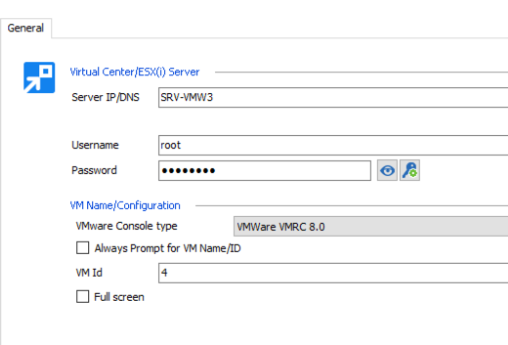
Maurice
2017-06-02_20-46-10.png
And I just though of something, the ESXI (being free) does not allow cloning an authentication ticket as is needed by the VMRC... [color=rgb(180, 38, 26)][font=Consolas]vmrc://clone:$($ticket)@$($vcenter)/?moid=$($vmid)[/font][/color][font=Consolas]\"[/font][color=rgb(180, 38, 26)][font=Consolas] }[/font][/color]
I will have to test a few things monday morning... maybe they have an alternate authentication method that we can use
Maurice
Hi,
Its fixed. I deleted vmrc v9.0 and installed v10.0 before I began to test again.
vrmc 10 update was not solving it. Then I checked the option legacy powercli also no luck.
Finally I found the issue, I needed to run Windows Desktop Manager as administrator and its working now.
Its tested on ESX 6.5 + vCenter appliance 6.5
settings.JPG
fix remote desktop vmrc.JPG
Hello,
The only thing I can think of is that the powerCLI was registered/configured with elevated privileges. When you use a plain-session RDM to launch that hidden powershell session it still lacks the initial config.
If it works to your liking we'll leave it at that.
Thank you for posting your findings.
Maurice