Dynamic SSH Tunnel

Hi,
I have created an SSH VPN Session with a dynamic local port and $PARENT_HOST$ as the remote host.
I then created a remote desktop connection, used the ssh session, using a dynamic port and overriding the parent which connects fine.
I now want to recycle the SSH connection for multiple servers so I created a second RDP connection utilising the same SSH session as before but this only allows me to connect to one RDP server at a time. I would like to connect to many simultaneously.
At https://forum.devolutions.net/topic27257-ssh-tunnel-with-variables-for-host-and-port.aspx I read that I need to select "Force allow multiple instances of VPN" in the VPN/SSH/Gateway Settings tab but alas I cannot find such an option in any of the tabs.
I'm running 12.0.8.0
Am I missing something?
Thanks,
Elton
All Comments (4)
Hi Elton,
Could you send me a printscreen of your Dynamic Port configuration in RDM please.
Best regards,
David Grandolfo
Hi Elton,
The option that you are looking at is called dynamic port but isn't dynamic port forwarding. Is more like a random number of ports. So with that option selected you have to use the variable $DYNAMIC_PORT$. If you talked about SSH Tunnel with dynamic port forwarding likethis topic. That option is available on our beta version of RDM 12.4.4. Presently only Firefox and Google Chrome are able to use the dynamic port forwarding (SOCKS) connection.
Best regards,
David Grandolfo
Thanks for the reply David. So if I want to use a single SSH VPN entry in RDM but reuse it for multiple RDP entries what's the best way to go about it?
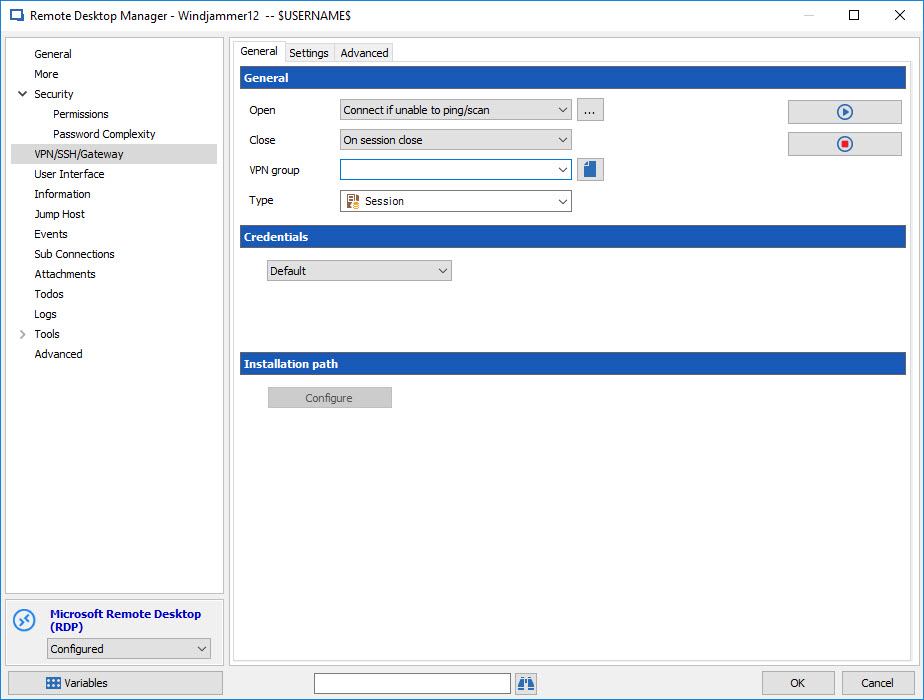
The simplest solution is to create the SSH VPN entry and after just go to the properties of your RDP session. In the VPN/SSH/Gateway tab configure the Type to Session as below.
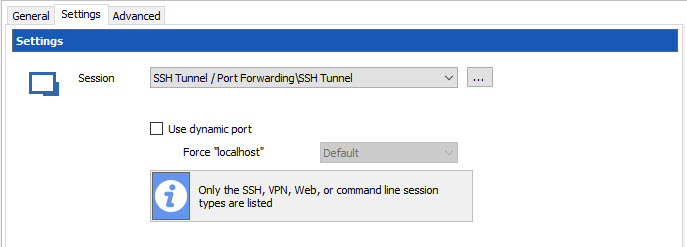
In the Settings tab you could select the SSH VPN Entry you create earlier.
Best regards,
David Grandolfo
Rdp_VPN_Settings.jpg
Rdp_VPN.jpg