Login to Azure Portal

Hi Devolutions Team,
here in Germany it's a grey sunday, so I have some free time to playing around with some tech stuff.
I found a solution here on the forum for a working "Autologin Websession" to Office 365.
https://forum.devolutions.net/topic27069-office--integration.aspx#post100702
But what I'm missing a solution for is the Azure Portal Login, I played around with some session settings but don't get it to work.
btw: Have a look on attached Error Screenshots
Regards
Philipp
19-03-_2017_15-56-50.png
19-03-_2017_15-55-26.png
All Comments (6)
Hello,
We use third party applications for the integration of Firefox and Google Chrome in embedded mode. For IE, we use a technology developed by Microsoft. It’s not the external window that it’s resize to fit in the tab. Because of that, the latest releases are not used. They are a few versions behind.
That being said, I have tried IE, Firefox and Chrome embedded and the 3 browsers provided me the same error message.
In that case, you would need to launch the website in external mode and use our Devolutions Web Login to send the credential to the website.
Devolutions Web Login can be downloaded here - https://devolutions.net/Home/BrowserExtensions
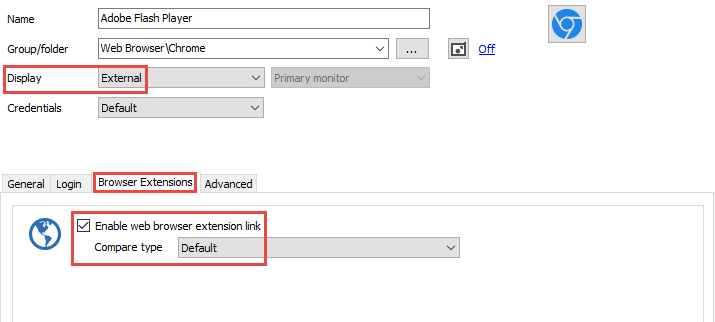
In your session, the display mode needs to be External. In the Browser Extensions tab, check the Enable web browser extension link
Best regards,
Jeff Dagenais
external.png
Hi,
We have made a fix to support the Azure portal in the embedded Chrome. It will be available in the next RDM version.
Best regards,
Olivier Désalliers
Olivier,
I've tried to create a web session to 'portal.azure.com' and I'm still unable to do so. I have the most current build of 12.5.6.0. I've tried to create the connection successfully using embedded Chrome and IE 11. Privacy and Incognito Modes are very much needed but aren't absolute hard requirements of any browser.
Rather than type all the session information out, I've attached screenshots for Chrome. One screenshot is the session in RDM which shows the password being passed but not the userID.
Thanks...Randy
ChromeEmbeddedAzureWeb.pdf
Hi,
Can you add cred_userid_inputtext in the Username ID field in the Html Control ID tab located in the Login tab?
Best regards,
Olivier Désalliers
Added as requested. No change. Tried External and neither field populated.
ChromeEmbeddedAzureWeb2.pdf
Hi,
Does it work with Chrome embedded?
For the external mode, as you may have noticed there is a redirection to login.microsoftonline.com when you go to portal.azure.com
Devolutions Web Login thus sends login.microsoftonline.com to RDM to get matches and won't find any sessions because the url in your session is portal.azure.com
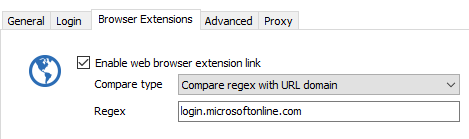
The workaround is to change the Compare type to Compare regex with URL Domain and write for example login.microsoftonline.com in the regex field.
Best regards,
Olivier Désalliers
RegexBrowserExtensionLink.PNG