Visibly Show Active VPN Connection
0 vote

Firstly, apologies if this has already been asked or suggested elsewhere. I did find a previous post relating to this but it doesn't look like a final outcome was decided, so thought I'd raise the question again - https://forum.devolutions.net/topic26709-workaround-found--cisco-anyconnect--detect-and-visually-show-a-running-session.aspx
We are currently trialing RDM and really enjoying what it has to offer so far. One thing we are struggling with however is finding a way in which we can easily identify what VPN connections are open within RDM. Most sessions we are using in RDM normally show a green play symbol when they are open/active but as the VPN connections do not open tabs (like most other sessions) this does not happen.
I have looked through the various options within RDM to see if there is a way to bold a session's text when its open, regardless of whether this opens a tab etc but cannot find anything that would achieve this.
Essentially we want to make it easier to tell whether there is an active VPN session running, and which one is active.
For reference, we are using different VPN clients (Cisco IPSEC, AnyConnect, Juniper Network Connect and Fortinet Client), all of which can be opened and ran perfectly well from within RDM, but do not show that they are connected.
Appreciate any feedback or advise on this.
Thanks
Rich
All Comments (13)
Hello Rich,
We have an idea on what we could change to support this. We will try to work on this soon as there have been multiple people requesting the same feature. I'll keep you updated.
Regards,
Hubert Mireault
Hi Hubert,
Sounds intriguing, I'll await to hear more from yourselves on this.
Thanks for the update this.
Regards
Rich
Hi Hubert,
Any news for this feature request? I'm also looking for a way to show the status of active Cisco Anyconnect VPN sessions.
Regerds,
John
Hello John,
This is still on our todo list but since it requires reworking how we handle VPNs internally we haven't had time to work on this yet.
Regards,
Hubert Mireault
Also a quick question, we discussed how we could implement this and it would require that you both open and close the VPN through RDM. If the VPN closes externally RDM wouldn't be notified. This would allow us to support this on all of our VPNs. Would this work for you?
Regards,
Hubert Mireault
Hi Hubert,
That will work for us. Our goal is to do as much as posible directly from RDM.
Regards,
John
Hi,
We added a new option for this that should be on by default. VPNs should be considered open until you use the close button. This will be available in the next patch.
Regards,
Samuel Baker
VPN opened detection.png
I have a problem after today's update. When i use cisco mobile security client and i click connect the vpncli opens and makes the connection. The status on RDM goes active but after 2-3 seconds it goes inactive but the vpn was successful and still working.
Why the status on RDM goes from active to inactive?
@kostask,
What version of RDM are you running exactly? Is it the Free edition?
Is it possible for you to send us a small video of the issue?
Best regards,
Jeff Dagenais
I am using the free version which worked perfectly before latest update
I uploaded a video. Please note that after the cmd window closes my vpn works perfectly. It is still connected
Untitled.mp4
Hello,
Thank you for your recording! A ticket on that matter has been assigned to our engineering department.
I will be in touch as soon as there will be an update on that matter.
Best regards,
James Lafleur
Hello,
If you go in File -> Options -> Types -> VPN, could you verify that this option is not selected ?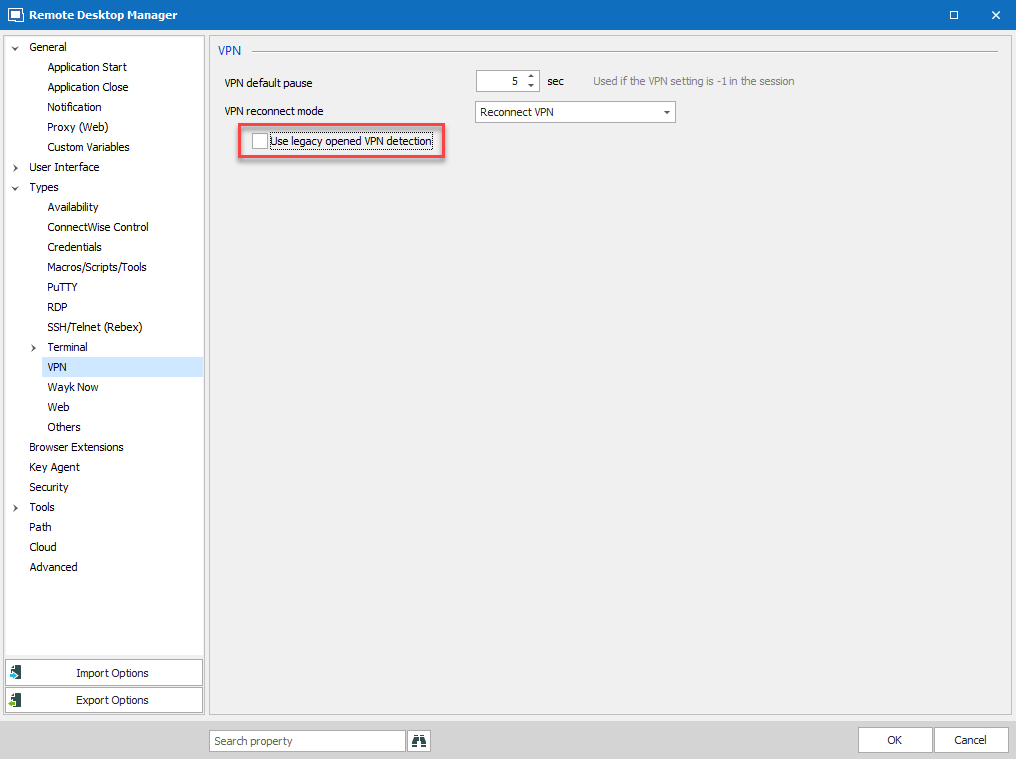
Please let us know if that solves your issue.
Regards
Jonathan Del Signore
vpnOpenState.png
Hello Kostask,
Is this issue still happening for you ? If so have you tried to disable the legacy detection as mentioned above ?
Regards
Jonathan Del Signore