Problems with Roles - Cannot Add/edit/Delete

Hi,
I have just exported all data from my old RDM installation in to the new one, and though that Roles would be better to use when adding all new users. However, I'm having some issues with it.
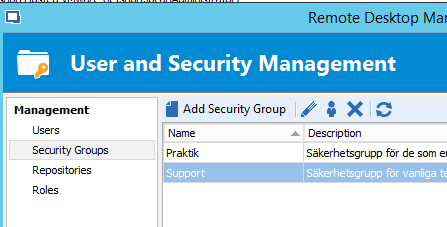
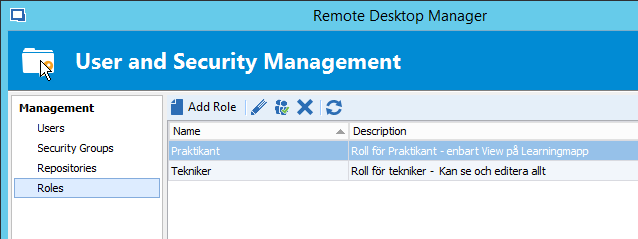
For example, I have two security groups created (Support and Praktik), and two roles created (Tekniker and Praktikant).
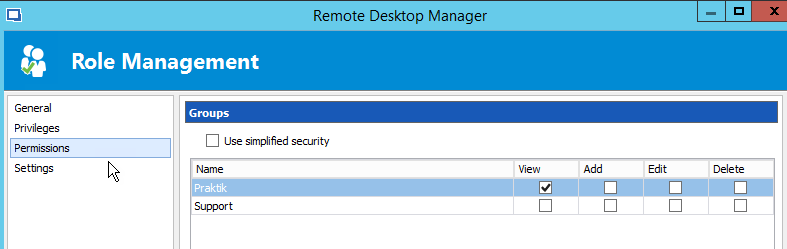
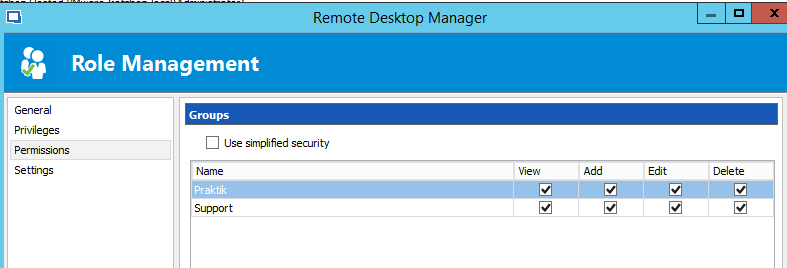
I have given the role Praktikant the permission View on the group Praktik, and given the role Tekniker View/Add/Edit/Delete on the group called Support and the group called Praktik.
Now, I have my own user created and added as member on the role Tekniker, but I cannot edit, delete or create any new entries in folders that have the security group set to Support.
I can manually override this by adding permissions manually on my user, but I'd prefer to have it done via Roles. Is this a known issue, or do I need to check the "Add", "Edit" and "Delete" under Permission->Rights for my user? I thought this was inherited via the Role I set up.
I have attached some screenshots below.
View of the Security groups:
View of the Roles:
SG for Role Praktikant:
SG for Role Tekniker:
Any ideas or suggestions?
2016-12-08_19-03-00.png
2016-12-08_19-02-40.png
2016-12-08_19-02-18.png
2016-12-08_19-02-01.png
All Comments (7)
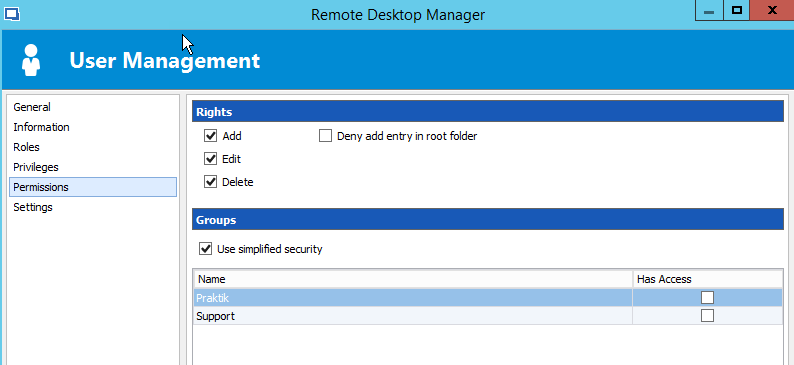
With these settings on my user I can Add/Edit/Delete stuff:
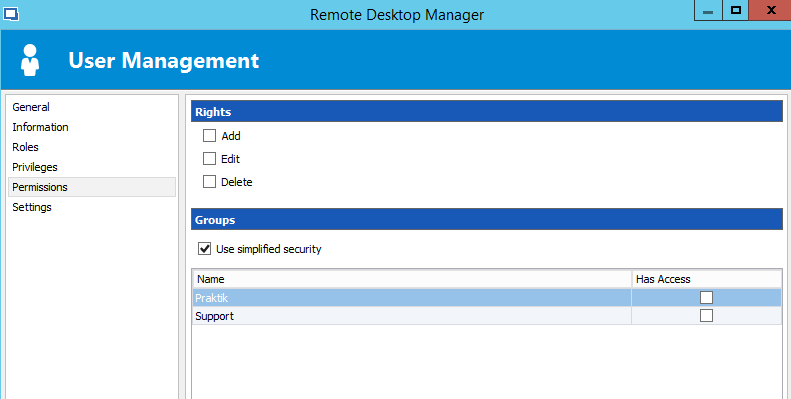
But with these settings I can only view, even though the role says I should be able to Add/Edit/Delete on that security group:
I had hoped that the Roles permissions would take precedence, but it seems I need to allow Add/Edit/Delete as well on all users, would be great if this was done via Roles.
2016-12-08_19-30-34.png
2016-12-08_19-30-11.png
Hello,
Have you enabled the Rights in the User Management dialog for this user?
Best regards,
Érica Poirier
Hello,
For more information on how it works, please consult the online help page about User Management Permissions.
Best regards,
Érica Poirier
Thanks for the quick reply!
So there is no way to assign those rights via a Role - I still need to manually set this on all users, the role only specifies what you can do once you have those rights?
Also, it would be great if those user permissions were batch editable, now I have to go through 80+ users :)
But I guess some of this is not an issue when using DVLS instead of regular RDM?
Hello,
We have a dedicated forum for feature requests at https://forum.devolutions.net/forum17-remote-desktop-manager--feature-request.aspx
This will allow the community to demonstrate interest in your idea. We use this interest to prioritize the features we implement.
Best regards,
Jeff Dagenais
Hi,
That's ok. I've already added this to our todo list.
Regards
David Hervieux