Connection history - Audit log

Hi team,
For an internal audit, we need to provide a connection history list.
This should at least include the following information:
Is there a place where I can find this information?
Thanks,
Rick
All Comments (7)
Forgot to mention:
The closest thing I found is View>Footer>Logs, but this doesn't seem to contain any data at all.. :(
Hello Rick,
Please go in View -> View Usage Log. You will found there the information that you are looking for.,
http://help.remotedesktopmanager.com/view_logs_global.htm
Best regards,
Jeff Dagenais
Thanks Jean-François.
I've checked that log, but I noticed that it's a plain text list of all the account activities.
Also, this log only contains the data of the agent who's logged in and is not being shared within the database.
The risk that I'll be missing data will be too big.
Any alternative?
Hello,
If it's in plain text, I think that you are not using an Advanced Data Source like SQL Server, SQL Azure or Devolutions Server as example.
Is it the case?
What type of data source are you using?
You will found the entire list of our advanced data sources here http://help.remotedesktopmanager.com/datasources_advanced.htm
Best regards,
Jeff Dagenais
We currently use a MS Access database. (Considering to migrate it to a SQL server somewhere next year)
Hello,
There's nothing we can do with Access because there's no logs table.
Using a SQL Server data source, you will see this
Best regards,
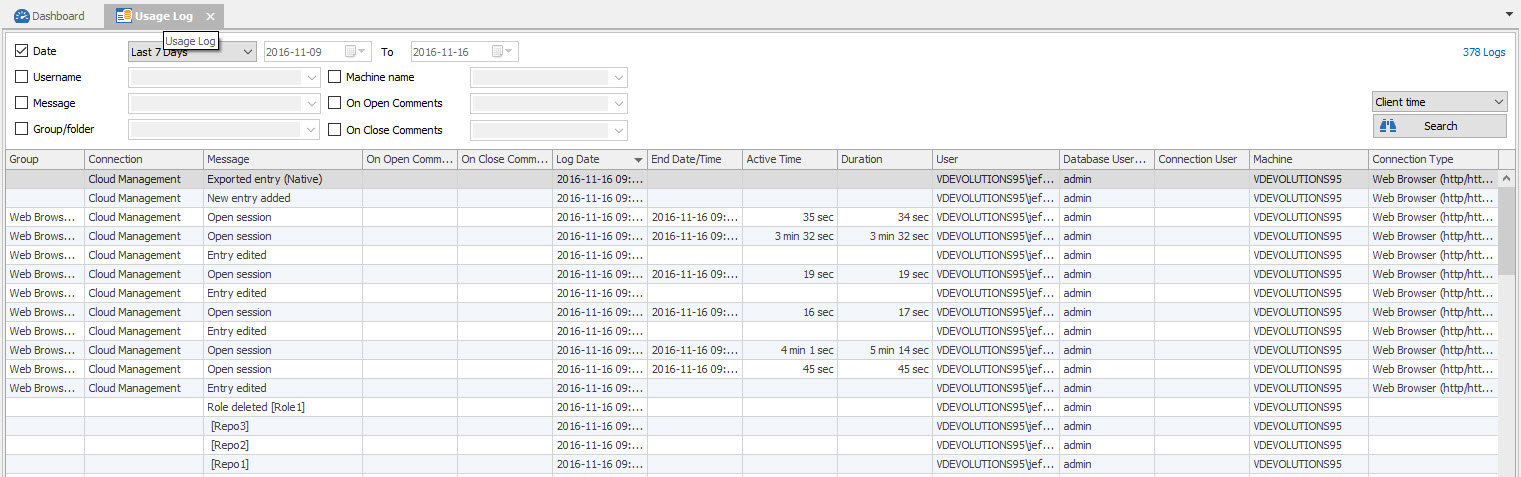
Jeff Dagenais
2016-11-16_11-17-12.jpg
Allright. Assumed that the functionality would be the same over every db type.
Will make sure that I'll migrate asap.