11.7.2.0 : Value cannot be null, Parameter name: id

Hi,
I just upgraded to 11.7.2.0 & Windows 10 latest patch (don't know if connected).
For some reason all my connections that rely upon Credentials stored now won't open with those creds.
I get ..
"Value cannot be null. Parameter name: id"
I've checked the credential entry, 1Password and even re-assigned the cred; nothing works.
Please advise.
All Comments (27)
What version were you using before? Have you checked this troubleshooting section?
http://help.remotedesktopmanager.com/troubleshooting_1password.htm
Regards
David Hervieux
Nope, it's not that; I tried that.
I also tried uninstalling 11.7.2.0 & re-installing from a fresh download.
Also, recreating a brand new credential entry, and assigning it to the existing connection.
I'm going to try 11.7.1.0 next, and see what happens there.
Any clues on what this error is actually referring to ? It's like the credential is not being injected.
What 1Password version do you use? Perhaps they changed something in the their file format.
Regards
David Hervieux
Nope, can't be that; they haven't updated in ages.
4.6.0.604 (build #604) – released 2016-02-23
Just tried to recreate the connection entry, and that didn't work either.
What's the error referring to ? Where is this 'id' field ?
Hello,
I have installed the same version of 1Password as you and I am not able to reproduce your issue.
Does your credentials in 1Password has been createad by you manually or by the extension?
If you create a login manually in 1Password, are you able to use this login in RDM?
Best regards,
Jeff Dagenais
I'm trying a new build of my VM, will let you know how it goes.
I have a feeling the Windows 10 anniversary patch update has broken something.
I might need to go back to the drawing board and redo it all.
Nope, it even follows with a new VM; and also a new credential entry (even a new entry in 1Password).
I found the RDM log under the AppData directory of my user, and it has this as an error.
Parameter name: id
at OnePasswordManagement.KeyResolver.Resolve(String id)
at OnePasswordManagement.KeychainItem.get_Data()
at OnePasswordManagement.KeychainItem.ToJson()
at OnePasswordManagement.KeychainItem.FindUsername()
at Devolutions.RemoteDesktopManager.Business.CredentialOnePasswordResolver.Execute(CredentialsConnection credentialConnection, Connection owner, CredentialRepositoryDestination destination)
Hello,
This error means the stored item's ID was not found in the 1Password vault. This is expected; the question is why the ID cannot be found.
Can you confirm a few things for me:
1. Can you get the list of your 1Password credentials in RDM, or is this where it fails?
2. In 1Password, go in File > Repair 1Password vault. In the past there have been some issues and repairing the vault fixed them.
3. What format are you using? Only agilekeychain is supported at the moment
Regards,
Hubert Mireault
Hi ..
Answers ..
1. Nope, I can go to the credential entry in RDM, and I can browse as normal and find the entry.
2. Yep, tried that. No bones.
3. Confirmed, it is an agilekeychain.
Is there a way to turn on better debugging or a trace to see what it's not finding.
Right now I am playing with using RDM creds for now, till it's fixed.
Can you try making a new 1Password vault and try to use it inside RDM as a test? I checked the code and what it does is it finds the credential from 1Password, but it doesn't have an ID inside the data. What this means is that the data cannot be decrypted so RDM can't use the 1Password entry. We'll add some more debug logs and try to reproduce the issue on our end but it's tricky since it seems to be related to the 1Password data we are getting.
Was your database first created with 1Password 4.6 or was it created with an old version? Any additional information about your 1Password setup would be helpful in reproducing it on our end.
Regards,
Hubert Mireault
OK, I'll give that a whizz.
Been meaning to clean it up anyways.
Hi, has this issue been resolved?
I'm currently facing the same problem, I'm on 11.7.6. all my credentials entries are working except one.
This problem started right after a Windows update a while back.
Things that I tried, but didn't work:
- Repairing the 1Password db
- Removing the 1P reference from the credential entry. It keeps trying to access 1Password even if the reference is removed.
- Linking a new 1P entry to the credential entry.
Is there anything that I can do to fix this?
Nope, I never did find the cause.
I ended up rebuilding my RDM, and my 1Password.
@D K
Could you try to create a new data source (XML or SQLite) and create a 1 Password entry in this new data source.
Is it working fine or you receive an error message?
Best regards,
Jeff Dagenais
My 'gut' feeling, is the issue is somewhere in the 1Password system.
At the time I was using one Datasource (XML) shared between two machines, with one 1Password database.
I tired creating a new XML for RDM, but keeping the old 1Password vault; and it didn't work.
But when I created 2 seperate XMLs and 2 seperate 1Password vaults, it all fixed.
And I did see that some 1Password entries worked, when others didn't.
Problem is .. there's nothing from a 1Password side to say what the issue is, as it's RDM that's trying to grab this entry.
Just my 2 cents.
Hi Jean-François,
I created a new test datasource and created a new credential entry which I linked to my 1Password credential.
Everything is working as expected.
The problem persists with the production database.
@DK
Could you try the opposite, I mean create a new 1Password database and try to use this new 1Password database with your prod envrionment of RDM.
Best regards,
Jeff Dagenais
Hi Jean-François,
This results in the same error.
@DK
What type of data source are you using in your prod environment?
Are you still on RDM 11.7.6.0?
Best regards,
Jeff Dagenais
@ Jean-Fraçois, I'm using Devolutions Server as a datasource. Meanwhile I also upgraded to version 12.0.2.0
I's only one (out of many) credential entry that has this problem.
Edit: My test database I used, was just the SQL Lite.
@DK
Could you post a print screen of the properties of your 1Password entry in RDM and a print screen of the properties of your credential entry in 1Password.
I would like to replicate this in our envrionment to try to reproduce your issue.
Best regards,
Jeff Dagenais
@Jean-François
Sure, nothing fancy however.
http://imgur.com/a/pmEbi


Hello,
Thanks for the print screens. Our office was closed last week because of Holidays, so I will have a look at this next week and get back to you after my tests.
Sorry for the delay.
Best regards,
Jeff Dagenais
Hello,
I have looked at your print screens and try to reproduce your issue, but unfortunately, I was not able.
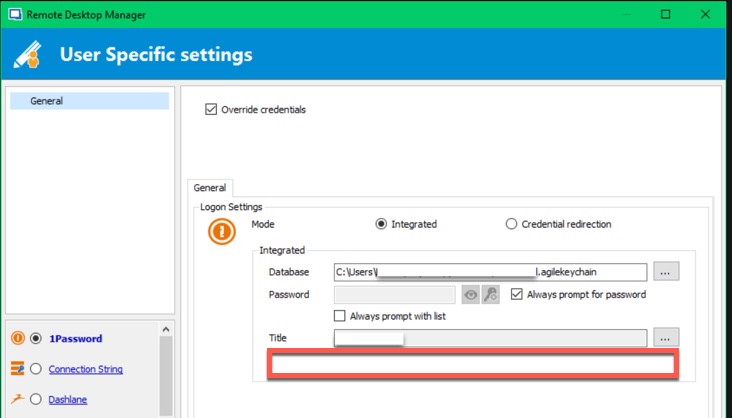
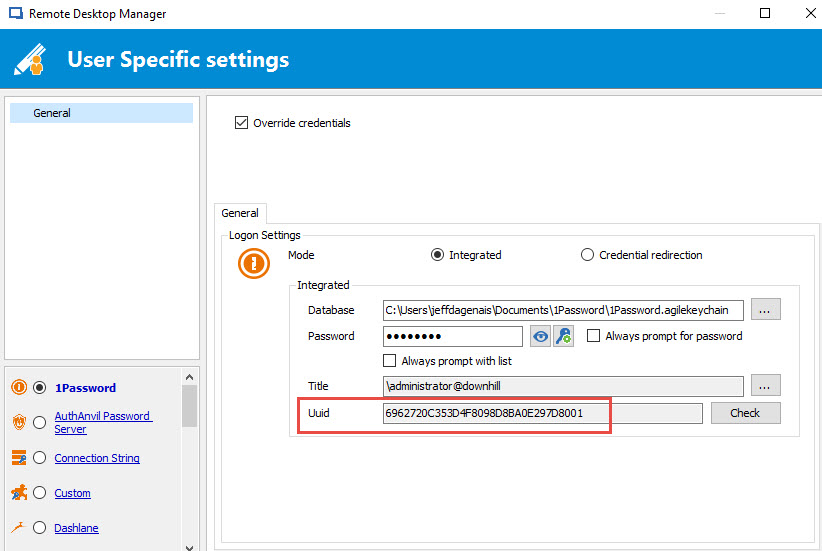
However, I found something strange in your last print screen. A Uuid field is missing compared to mine.
I have tried RDM 11.7.6.0, 12.0.2.0 and 12.0.8.0 and the field is always there for me. I may think that if the field is missing, it may caused your issue.
Have you tried to recreate your User Specific Setting?
When you override other credential entries, do you see that Uuid field?
Best regards,
Jeff Dagenais
2017-01-03_09-12-30.jpg
2017-01-03_09-10-06.jpg
Ji Jean-François
I indeed don't have the Uuid field, none of my credentials have got it.
I also tested by changing the user specific setting to a keepass db and also inserting the username and password directly in the credential entry, but that still results in the same error.
Kind regards
Dieter
I found the problem.
I also had a user specific setting on my connections folder that I've setup on my Mac. The connections folder was trying to connect to my Mac DB on a Windows machine. Which of course is a different path, resulting in the error.
I've disabled the user specific override on the connections folder and it took the credential user specific override instead.
Thank you for your help.