Right click -> Logoff fails.
Logging off by right clicking in tree or on tab results in an error:
"Windows cannot find ashutdown. Make sure you typed the name correctly, and then try again."
When this dialogue is closed, the run dialogue contains "ashutdown /l".
Version 11.1.0.0, Local Data Source
All Comments (19)
Hi,
Does it work if you retry after closing the run dialog?
David Hervieux
Hi David,
No, same behaviour.
Just to be sure, I tried closing the run dialogue without deleting the "ashutdown /l" text, and after deleting the text.
Hello,
Could you try to change the logoff method to Remote Desktop Services API in File -> Options -> Types -> RDP.
Best regards,
Jeff Dagenais
JF this could help if he get an access to the machine but if he use a Gateway it won't work.
It seems that there is a miss match between your local keyboard the server keyboard. Perhaps you could verify the keyboard layout in the RDP Advanced tab page.
Regards
David Hervieux
@JF - I changed from Automatic to Remote Desktop Services API. I then get the error "Unable to enumerate remote sessions".
@DH - I changed the keyboard layout in advanced to "English (United States)", on the server I tested against the language is set to "English (Australia)" but the input method is set to US. My local workstation is also set to "English (Australia) - US Keyboard".
Hi,
Could you try the start program like this:
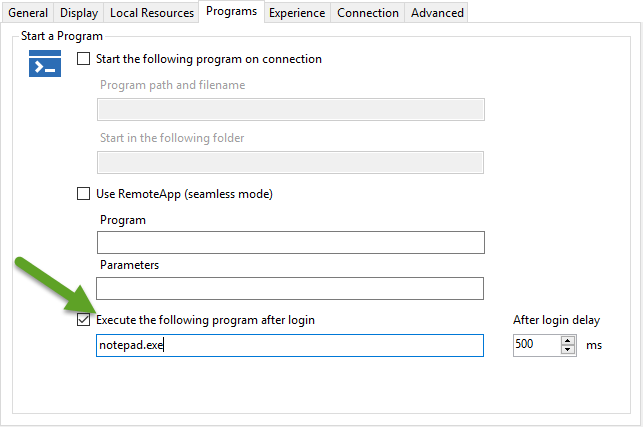
David Hervieux
Execute[1].png
Same error - "Windows cannot find 'anotepad.exe'. Make sure you typed the name correctly, and then try again".
I don't understand why you get an A before. By the way we are unable to reproduce this internally.
David Hervieux
Do you reproduce it on all your machines?
David Hervieux
I have an older version - 9.2.9.0 installed in aVM.
I loaded the original database, copied the sessions to the local database. Batch editing works.
Tried exporting everything, adding another datasource (sqllite) then importing,, issue remained.
I am experiencing this same issue with 2.6.3.0 of Remote Desktop Manager Free. Is there any update on this?
@Jared
When you try to do a logoff, does it open you the Run window with ashutdown inside?
If yes, could you try to uncheck the Disable run dialog check in File -> Options -> Types -> RDP.
Best regards,
Jeff Dagenais
Thanks @jfdagenais, I had this exact issue that that resolved it for me as well
Remote Desktop Manager Free - 2.6.4.0
This worked for me! Thanks!
Jared
Confirming that I also see the words "ashutdown" (yes, with the 'a' in front of shutdown) when I try to use the Logoff button or the right-click logoff feature from an RDP session. I am using 11.6.2.0 and this issue only started with 11.6.2.0. Previous to 11.6.2 I did not have any logoff issues with RDP.
The steps above:
uncheck the Disable run dialog check in File -> Options -> Types -> RDP.
Also resolved the issue for me.
Still an issue on 12.0.8.0
A appears before logoff, which causes an issue. Unchecking that resolves it.
@Eric Pelezo,
For your logoff issue, please consult https://help.remotedesktopmanager.com/troubleshooting_logoffissue.htm
Best regards,
Jeff Dagenais

just a "fixed for me as well". been one of those issues thats been bugging for a while but only decided to look into it today.
default RDM settings is to issue the ashutdown. disabling the run dialog check fixes it for us.