Azure SQL Database using Azure AD identities
0 vote
Hi,
Can you add support for Azure Active Directory Authentication Library for Azure SQL Server. More in at
https://azure.microsoft.com/en-us/documentation/articles/sql-database-aad-authentication/ Section 5. Configure your client computers
Thank you.
All Comments (43)
Hi,
I have entered a feature request.
David Hervieux
Is there any word about this feature? Azure AD login (with MFA) would be a nice option.
What also would be nice is the ability to use Azure AD accounts (with MFA) with Devolutions Server.
I know you can use google authenticator etc, but as we are using Office 365 users are already using Azure AD accounts protected with MFA, and it would be nice if they could just use that instead of configuring yet another two-factor solution/app.
Hi,
I will confirm with Martin if it's exactly what you want because I know that DVLS now support Azure MFA
Regards
David Hervieux
I've checked the information about DVLS and Azure AD, but there are some issues with this i think:
- I need to download some sdk from the azure portal, but we don't use multi-factor auth provider (our MFA is included in our Office 365 licenses).
- It only supports SMS or Phonecalls (who still uses that? :) ) , an azure AD based login should just use the settings the (azure AD) user has already set up (most likely he uses the Azure MFA app).
- allowing 'real' azure ad logins would circumvent the problems above, and would make for a better experience (but i have no clue about programming, so i have no idea if its even possible), integration azure ad login in webapp is (supposed to be) a breeze, but for applications things are probably not so easy.

Hi,
You are right about the MFA SDK, it needs a auth provider to be configure and download the SDK file from Azure and it only supports SMS and Phone call.
DVLS support MFA SDK for now!
Let me check different options
Best regards
Hi, guys!
It would be great, if we would have the ability to login to AzureSQL datasources using AzureAD accounts, even without MFA.
We really need it.
Hi,
Microsoft has just released the SQL Server Management Studio with this. We will add this to our todo list but it won't be for RDM 12 for sure. This version is planned for the end of September.
Regards
David Hervieux
+1 on this, Active Directory integrated authentication would be a great security improvement with Azure SQL
Hi David,
Any news on this? For us it would be an important feature to use AzureAD accounts on AzureSQL
Nothing new for now but that something we will investigate right after the RDM 12 release.
Regards
David Hervieux
RDM 12 has been released. Is there a time frame for this feature?
+1 on this feature. This is holding us back from deploying company wide.
It's the next feature on my to-do list. We start our holiday vacation break at the end of the week. Once back in the new year I will be starting on this. Should have something shortly after that. It's currently the most asked feature request.
Best regards,
Stéfane Lavergne
Hi all,
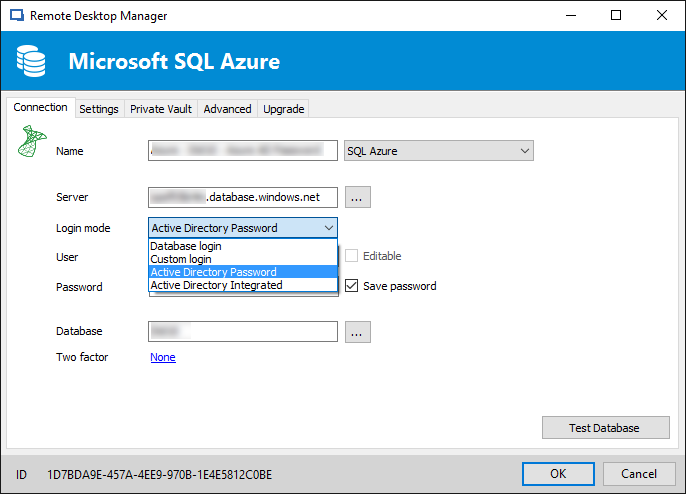
Good news I've started on the SQL Azure + Azure AD Authentication.
Login is working with SQL Server Data Source. Next up is user management issues encountered while logged in with AD Auth users.
Here is a screen shot:
Does any of you connect using "Active Directory Integrated", we have not been able to test this scenario. I'm hoping you of you could help us test it when time comes.
Best regards,
Stéfane Lavergne
2017-01-12_10-14-28.png
We do.
I'm done, this will be in the next minor release.
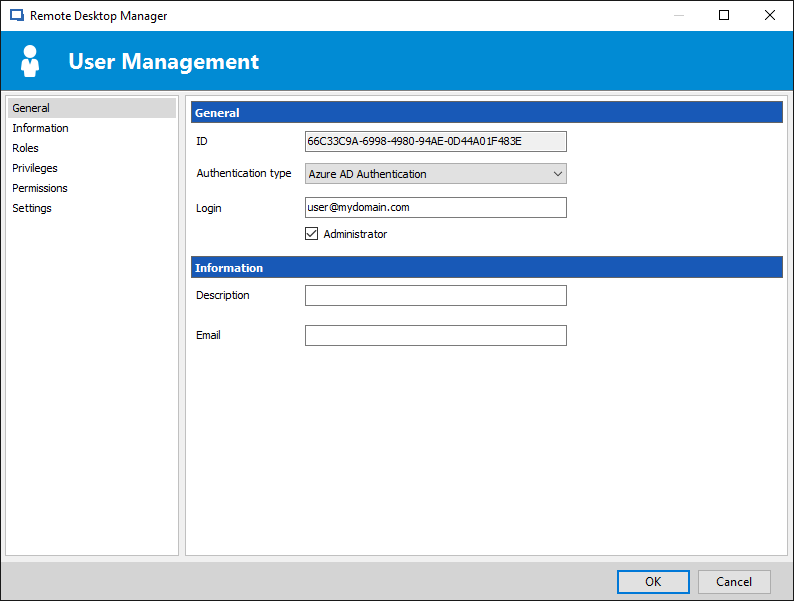
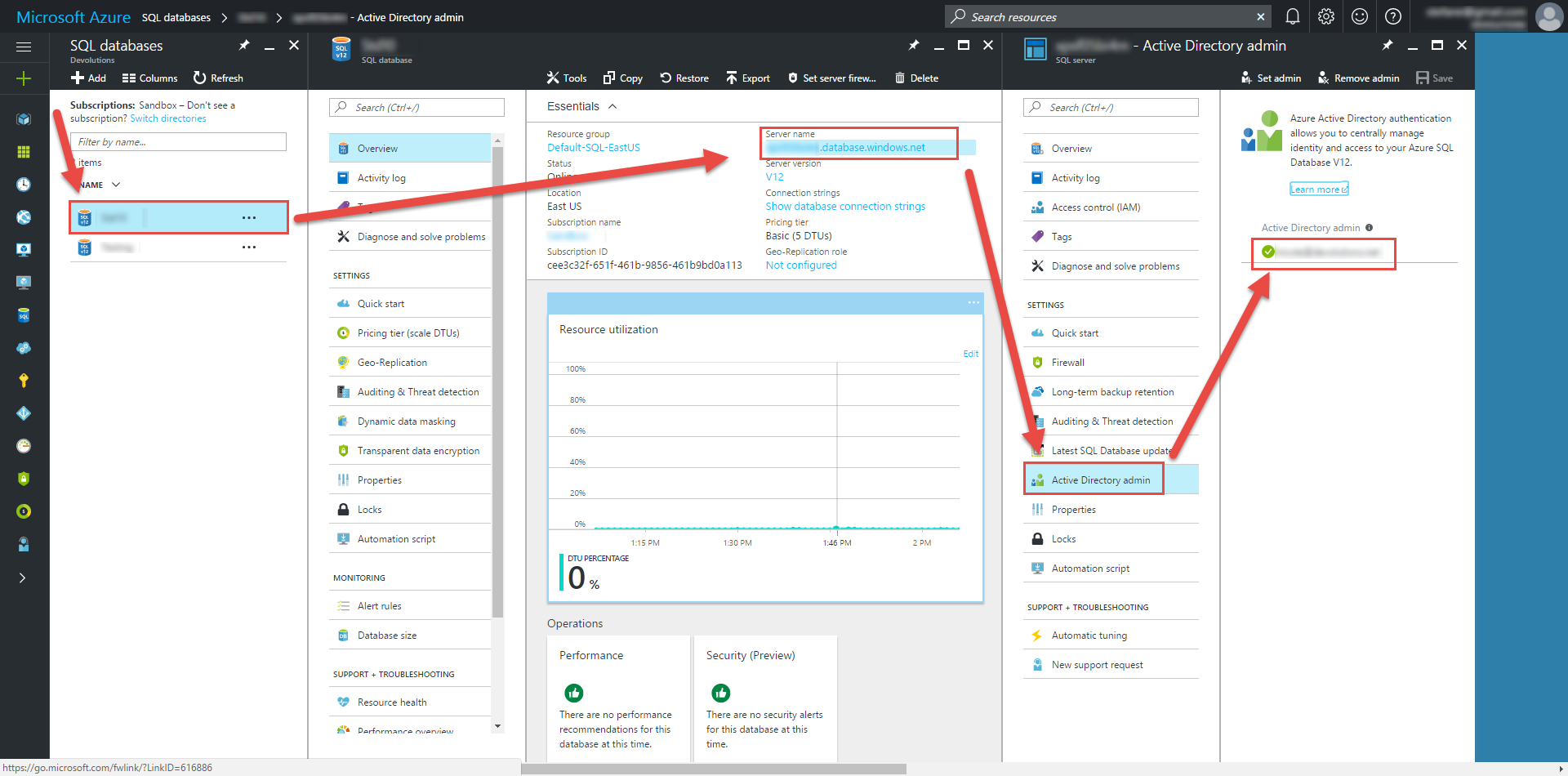
Create "Azure AD Auth" RDM user:
Note: When creating SQL AD users, you must be logged in with an Azure AD user if not it will fail and you be notified of the error.
Use the servers defined Azure AD Admin to create your other users (to start). Once you've created other admin users, you can use them to create more users.
Stéfane Lavergne
2017-01-16_14-06-58.png
2017-01-16_14-04-12.png
Hi Stefane,
Thanks for making it! I am more than happy to test it.
Zoltan
Thank you. When will the next minor release occur?
A new build should be out within the next few days. I will keep you posted.
Best regards,
Stéfane Lavergne
The latest beta has the SQL Azure AD integration.
Available here: https://remotedesktopmanager.com/Home/Download#Beta
Sorry, I'm late on the notification.
Best regards,
Stéfane Lavergne
Just tested it, as far as I see it doesn't seems to support Modern Authentication (ADAL) yet. We have Azure AD MFA setup...
The error message:
Unable to connect to the database!
Failed to authenticate the user NT Authority\Anonymous Logon in Active Directory (Authentication=ActiveDirectoryIntegrated).
Error code 0xCAA2000C; state 10
AADSTS50076: Due to a configuration change made by your administrator, or because you moved to a new location, you must use multi-factor authentication to access 'https://xyz.abc.com/'.
Trace ID: 615cbd65-3659-4faa-ac69-1a34431c1cfa
Correlation ID: a03aac05-567d-493a-935e-ebc1a5b9843a
Timestamp: 2017-02-15 21:47:42Z
@zomby - Do you two-factor enabled?
Stéfane Lavergne
I am using two factory authentication with Azure Active Directory, but am unable to add a data source using Azure Active Directory as I get the same message that zomby posted above.
Is AAD two factor auth supported with Remote Desktop Manager?
We currently don't support Azure Multi-Factor Authentication (MFA) login with the SQL Azure Data source.
Supporting Azure MFA is not straight forward as we would have hoped and will require some more investigation. It's on our to-do list.
Best regards,
Stéfane Lavergne
hi
any news on that feature request?
i see that it's 10 months old
does current edition of rdm enterprise supports azure sql with aad identities + mfa ?
I have to agree, still waiting for the solution, checking on every update.
Nothing yet, we are waiting on Microsoft to support it via the ADO.Net provider
We have another thread here: https://forum.devolutions.net/topic28005-feature-request--add-support-for-active-directory-universal-autentication---azure-mfa.aspx#post112804
As soon is it's made available we will implement the required changes.
Best regards,
Stéfane Lavergne
Good news Microsoft released today the an "Early Access build with the .NET Framework 4.7.2 Developer Pack"
SQL – Azure AD Universal and Multi-factor Authentication Support
We will start investigating so that we can release this as soon as the 4.7.2 update is officially released.
Best regards,
Stéfane Lavergne
About a month ago they released it fully aswell. Is there an update on when to expect this to be avaliable in RDM?
https://blogs.msdn.microsoft.com/dotnet/2018/04/30/announcing-the-net-framework-4-7-2/
Note that I am out of service atm so I can't upgrade, but this would make me and my team all update to the new version.
We are looking at an early fall release (October 2018). We will have a beta before October.
Unfortunately we can't move much faster than that since 4.7.2 is not supported on all Windows OS.
For example Windows 10 (pre-Anniversary Update) full list here
Best regards,
Stéfane Lavergne
Excelent! I'll plan for October then, thank you!
October has come and I don't see this in the latest releasenotes. Any news?
Fingers crossed
It's in the beta release
David Hervieux
Excellent, do you have an approximated eta for release?
We hope to release the final version this week.
Regards
David Hervieux
Sorry to be a pain, but it's now been two weeks. Any update on that ETA?
If I could work on implementing this in our organisation for next week that would be great. If not, I understand. I'm very grateful at the speed you reply to posts on the forum.
Hello Daniel,
The release is planned for today.
Regards
David Hervieux
Now you made me all jittery! Thanks David!
Installed the new version with a Trial serial, and now I'm in DLL-hell regarding adalsql.dll.
According to the forums you build against v1.0.2028.318, which is not the version I have, I have v1.0.2044.414. It worked with my older install, so no change has been made other than installing the new RDM-version.
So Instead of getting access to Azure with MFA, I'm fully locked out :(
v14 is built to work with the latest version of the DLL.
We don't bind directly to it but since the .NET framework prior to v4.7.2 didn't support the new version we were stuck on the older version.
v14 is built using the latest version of the ADAL.dll all should be good.
I have version 1.0.2044.0414 and all is working as expected
Anything in your application log? What error are you seeing?
Best regards,
Stéfane Lavergne
Our users have reported they needed to uninstall v14 of adal (= Active Directory Authentication Library for SQL Server in control panel ) and install https://www.microsoft.com/en-us/download/details.aspx?id=48742 (64bit)
Exception:
System.Data.SqlClient.SqlException (0x80131904): Unable to load adalsql.dll (Authentication=ActiveDirectoryPassword). Error code: 0x2. For more information, see http://go.microsoft.com/fwlink/?LinkID=513072
at System.Data.SqlClient.SqlInternalConnectionTds..ctor(DbConnectionPoolIdentity identity, SqlConnectionString connectionOptions, SqlCredential credential, Object providerInfo, String newPassword, SecureString newSecurePassword, Boolean redirectedUserInstance, SqlConnectionString userConnectionOptions, SessionData reconnectSessionData, DbConnectionPool pool, String accessToken, Boolean applyTransientFaultHandling, SqlAuthenticationProviderManager sqlAuthProviderManager)
at System.Data.SqlClient.SqlConnectionFactory.CreateConnection(DbConnectionOptions options, DbConnectionPoolKey poolKey, Object poolGroupProviderInfo, DbConnectionPool pool, DbConnection owningConnection, DbConnectionOptions userOptions)
at System.Data.ProviderBase.DbConnectionFactory.CreatePooledConnection(DbConnectionPool pool, DbConnection owningObject, DbConnectionOptions options, DbConnectionPoolKey poolKey, DbConnectionOptions userOptions)
at System.Data.ProviderBase.DbConnectionPool.CreateObject(DbConnection owningObject, DbConnectionOptions userOptions, DbConnectionInternal oldConnection)
at System.Data.ProviderBase.DbConnectionPool.UserCreateRequest(DbConnection owningObject, DbConnectionOptions userOptions, DbConnectionInternal oldConnection)
at System.Data.ProviderBase.DbConnectionPool.TryGetConnection(DbConnection owningObject, UInt32 waitForMultipleObjectsTimeout, Boolean allowCreate, Boolean onlyOneCheckConnection, DbConnectionOptions userOptions, DbConnectionInternal& connection)
at System.Data.ProviderBase.DbConnectionPool.TryGetConnection(DbConnection owningObject, TaskCompletionSource`1 retry, DbConnectionOptions userOptions, DbConnectionInternal& connection)
at System.Data.ProviderBase.DbConnectionFactory.TryGetConnection(DbConnection owningConnection, TaskCompletionSource`1 retry, DbConnectionOptions userOptions, DbConnectionInternal oldConnection, DbConnectionInternal& connection)
at System.Data.ProviderBase.DbConnectionInternal.TryOpenConnectionInternal(DbConnection outerConnection, DbConnectionFactory connectionFactory, TaskCompletionSource`1 retry, DbConnectionOptions userOptions)
at System.Data.SqlClient.SqlConnection.TryOpenInner(TaskCompletionSource`1 retry)
at System.Data.SqlClient.SqlConnection.TryOpen(TaskCompletionSource`1 retry)
at System.Data.SqlClient.SqlConnection.Open()
at Devolutions.RemoteDesktopManager.Business.DataSources.SQLServerConnectionDataSource.cb237041e20b5e69dd4663ff2ed975633(String c18973cea236a9feff75c32ca7d1697d5, String c5b591b7955deb9ddac9f502d298faf48, String ceb81d1ee93f91e0bc57f34876c263863)
ClientConnectionId:3391a1a1-68be-4923-8057-7e1d76112d8f
Thanks, we will investigate
Stéfane Lavergne