RDM hangs "not responding" at least once a week for me

I'm on 11.0.6.0, but this problem has existed for the entire time I've used the product at my company. (11 months)
I can see from searching the forums that I'm not the only one experiencing this issue, although I'm unable to discern any pattern.
All Comments (36)
Could it be possible that it while doing a logoff for an RDP session?
David Hervieux
Sure, but I know it hangs at other times too.
I will try and write down what I was doing at the time of the next hang and update this post with it.
Thank you this will help.
David Hervieux
Happened just now.
It was after logging off of an RDP session, like you said.
Hello Peter,
Thank you for the information. There is something with the logoff. We will try something soon.
David Hervieux
I'm having the same issue, typically at logoff of RDP. Sometimes, when I undock my laptop while I have sessions active.
FYI - this is still happening with 11.0.11.0
It's crashing when I logoff of an RDP session about once every couple days.
Yes agreed. At least a few times a week for me. Always when logging off a session.
Hi,
I am having similar issues, not responding sign, even when I am working on editing or adding items. Every now and then I get a not responding for 2 or 3 seconds and goes up again. I use the 64bit version and I tried also the 32bit, No change at all. It doesn't crash though when I am logging off
Same issues here. (Version 11.5.2.0 64-bit.) I work with embedded RDP Sessions a lot. After logging off, sometimes RemoteDesktopManager64.exe is hanging. Unfortunately not often enough to help narrowing it down.
Procmon.exe doesn't show any process activity, RemoteDesktopManager.log is not showing anything. I must kill the process and relaunch RDM again to continue working.
I've made a Minidump with procexp.exe. Is it of any use for you? Shall I publish it somewhere for you to download?
Edit: I have attached some info. It seems that the hang has something to do with mstscax.dll.
process_analysis.txt
debug.txt
Hello,
I did a lot of rework in the dispose process and I was able to reproduce the problem and remove it. Could you try the latest beta?
http://remotedesktopmanager.com/Home/ThankYou?f=RDMsetupBeta
Regards
David Hervieux
Hi,
same problem here. When logging off RDP. Using RDMfree 2.5.3.0.
It's very awkward when having several connections open and then one gets stuck and freezes the whole application. RDP sessions can be resumed by reconnect, but SSH connections are lost.
Hopefully the fix will be available soon for the RDM Free, too :)
Regards,
Markus Stein
Hi David,
I use version 11.7.2.0 and still regularly RDM freezes when just closing RDP sessions. It does not matter if I use RDM 32-bit or 64-bit or have a lot of sessions open or just 2. To me it seems randomly that during the day when I click away a session RDM starts to freeze.
Any ideas?
Cheers!
Sjoerd
Hello Sjoerd,
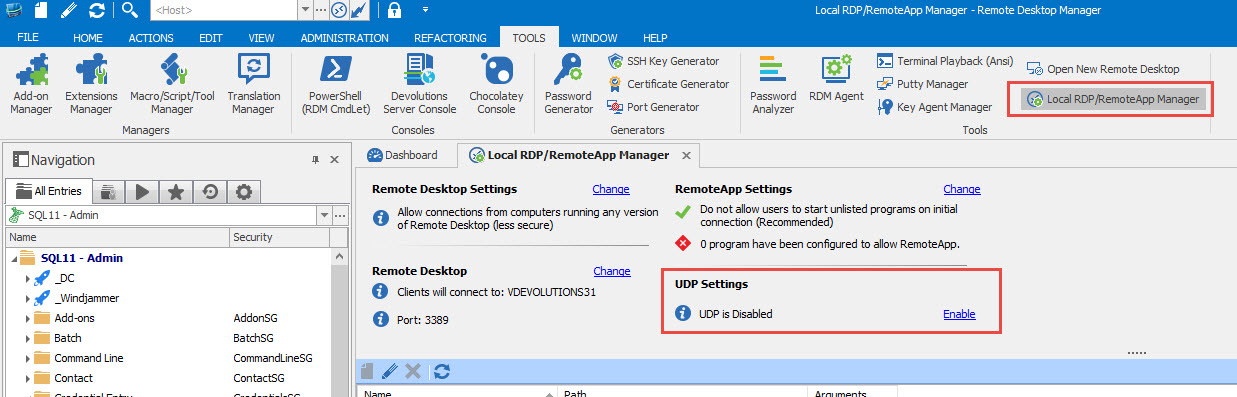
Could you try to disable the UDP settings on your computer.
To do so, open RDM as an administrator and click on Tools -> Local RDP/RemoteApp Manager. Click on Disable to disable the UDP settings.
Let us know if that help.
Best regards,
Jeff Dagenais
Hey folks,
unfortunately after update to version 11.7.2.0 the issue is still here. Under Tools > Local RDP/RemoteApp Manager I'm not able to set any UDP options. For example when I click on Local Remote Desktop Configuration (if it's that what you meant) I only get a "System Properties" window with the tab "Remote" openend. (We are on a Windows Server 2012 R2 connected to by Citrix.)
Am I doing something wrong?
Daniel
@Daniel
Could you post a print screen of your Tools tab in RDM please.
Best regards,
Jeff Dagenais
Voilà

001106.png
Hello,
I see what you mean. In Tools, you have Local Remote Desktop Configuration and RemoteApp Manager Console. In my environment, those 2 buttons equal 1 button.
Could you press on RemoteApp Manager Console and verify if you are not seeing an UDP Settings section there
Best regards,
Jeff Dagenais
2016-10-04_10-48-30.jpg
I've had this problem over several versions.
It always happens just after a remote desktop session is closed by using the remote host's Start button / Logoff (or equivalent in newer Windows versions), but there doesn't seem to be a way to predict on which remote machine or at what time it will happen.
The connection's tab page remains open with just the empty background color of the remote host.
The only way to get out is to kill RDM through task manager.
However, I read in a (very) old post that switching to the classic UI might solve it. I tried that for a couple of days and didn't have the problem in that period, but I haven't tried it long enough to be sure that it really solved it.
[Edit]PS: several of my RDP sessions are made over connections with a smaller MTU than the usual default of 1473 (1500 including IP header). I started doing that deliberately years ago, when I was having problems with RDP not working through OpenVPN tunnels if there was packet fragmentation.
Could the reason be something to be looked for in that direction -- i.e. MTU or fragmentation issues?
I have had this problem also since I've started using the software. I'm now on 12.0.5.0 and still have the issue.
I can reproduce it quite easily. When logging off an RDP session, if the Remote Desktop Manager window is not active when the tab is closed, the program will hang. I've only ever seen this issue when I logged off some RDP session and switched to another application before the tab was closed.
Same here, 95% of the time hang on closing, requires terminating, 4% crash on closing, 1% closes without issue.
Running latest paid enterprise Beta on Win10 Insider Fast ring.
Hi,
Have you checked this topic about the hang on logoff?
https://help.remotedesktopmanager.com/troubleshooting_rdphanglogoff.htm
David Hervieux
I've been running a day with UDP disabled, no hangs so far.
I've got UDP disabled, Plugins in embedded mode is default for all connections, in Options > Types > RDP the load plugins in embedded mode is false.
Still crashes.
When does it crash? Just when you logoff?
Regards
David Hervieux
Yeah, only when I log off and then quickly switch to another application so the Remote Desktop Manager window is not active when the tab closes.
I will completely honest here. I'm a little bit tired of all the bugs in the Microsoft ActiveX. We will start soon the integration of FreeRDP as an alternative on Windows. It will contains bug for sure, but at least we will be able to debug it and modify the code. We hope to have this after the Holidays.
Regards
David Hervieux
Hi,
same here... disabled UDP, too. But as Ruurd said, when switching to another application while log off, RDM freezes. And the bad is, all other sessions are lost then, too.
A stability idea could be, when one tab crashes, that the others would be unaffected. (like chrome does ist)
That would be a big improvement on such bugs.
Regards,
Markus
Indeed that would be nice. It's not a simple task but that could help for sure.
Regards
David Hervieux
Updated to 12.0.8.0, and now it hangs again, even with UDP disabled?
With the RDP logoff? By the way we are working on implementing FreeRDP instead of the Microsoft ActiveX.
Regards
David Hervieux
Yes, same problem as recent, app hangs when closing while a session is active.
HAve to right click close window, wait or close, close, collecting info, close.
I'm curious about the close method you use. Do you use the logoff from RDM or from the RDP session directly?
Regards
David Hervieux
I leave sessions open in the tabs, and close the main app by clicking X, when I open the app again, it asks me if I want to open the session I left open.
It is the main app that always hangs, not the RDP session running in a tab.
I use this method:
Start --> Logoff
on the remote system.
Hi,
I had the hang and crash today again. Version 3.0.6.0