Change Folder Icon

Hi,
I used to be able to change the images of each entry very easily.
Now when I go to the Properties of a folder, there is no option to change the image. It simply displays a picture of a folder, with no option to change it.
Can you assist?
All Comments (4)
Hi Jason,
What type of data source are you using?
If you are using an XML data source, the custom image feature is not available with this type of data source.
Best regards,
Jeff Dagenais
Hi,
Actually it's a setting in the data source configuration but with an Xml it's not recommended since it could slow down the loading if you have too many custom images.
David Hervieux
Hello,
I use an XML data source.
This feature appears to have disappeared when I updated to v10.5.4.0. The version before this allowed me to change the icon no problem.
Is there a reason this would disappear when upgrading to the newer version?
Was there any particular data source that you would recommend?
edited by jrodda89@live.com on 4/28/2015
Hi,
You can re-enable it in the File->Data Sources configuration
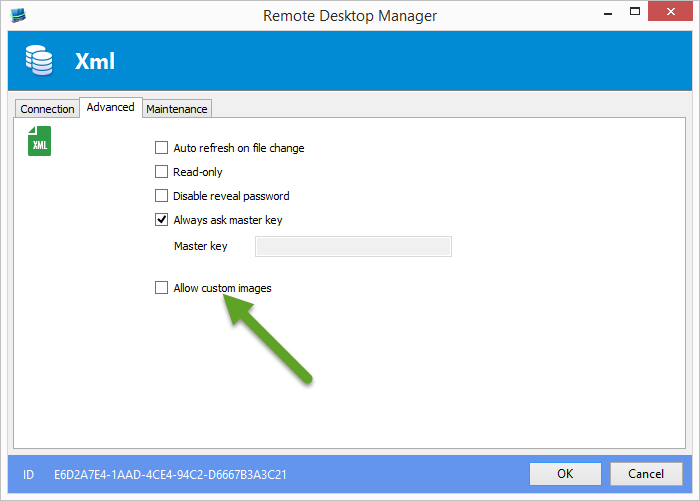
David Hervieux
AllowCustomImage.png