Add-on to manage ASA?
0 vote

Hi, I'm using your software on a daily basis and it's the most useful thing I've ever adopted to manage remote "stuff" :D
Is there any chance to have an add-on for an entry that can launch the ASDM-IDM (a java appliance that manages Cisco ASA)?
Thanks!
Marco
All Comments (37)
Hi,
This has already been asked but we haven't found a way to integrate it. Do you have an idea?
David Hervieux
as a starting point, as suggested here (https://supportforums.cisco.com/thread/2073337) we could execute the remote java binary.
The java binary called is javaws.exe, with the argument "https://<hostname>/admin/public/asdm.jnlp"
No idea on how to pass credentials, anyway :/
We already support Java Web Start in the application. Maybe you could configure an Auto typing macro in the Event tab page. This macro could send the credentials if this application prompt for it.
David Hervieux
Creating a RDM addin that would allow the launch of Cisco's ASDM program from within RDM would be great idea. Very useful.
Have you tried the Java Web Start add-on?
David Hervieux
hi, we solve it by doing following steps:
create entry "command line"
run: javaws "https://<hostname>/admin/public/asdm.jnlp"
on events-tab:
after connection
activate: execute automatically
enter following macro: {WINDOW:ASDM-IDM}{BS}$USERNAME${TAB}$PASSWORD${ENTER}
We store Username & Password in Credential-Entry. You can create with New-Entry, Username/Password
since 8.0.12.0 it works really great, past versions of RDM had Problem with Vars
edited by SMG on 1/14/2013
Kind Regards
Markus
======================
That's great. Thank you very much
David Hervieux
Hi SMG,
If i'm try to create a new command line entry, i only have three tabs 'General' 'More' 'Advanced' en not the 'event tab'
Or are you using the 'java web start entry' because there all the tabs are available.
i'm using version 8.0.12.0 with the java web start addon installed
edited by dgit on 1/23/2013
edited by dgit on 1/23/2013
edited by dgit on 1/23/2013
Could you post the a print screen please?
David Hervieux
Here is the link to the screendump
http://tinypic.com/r/s3nc7r/6
Hi,
Thank you for the print screen. You haven't used the right command line. You used the Macro/Script/Tool one and not the one linked to a session.
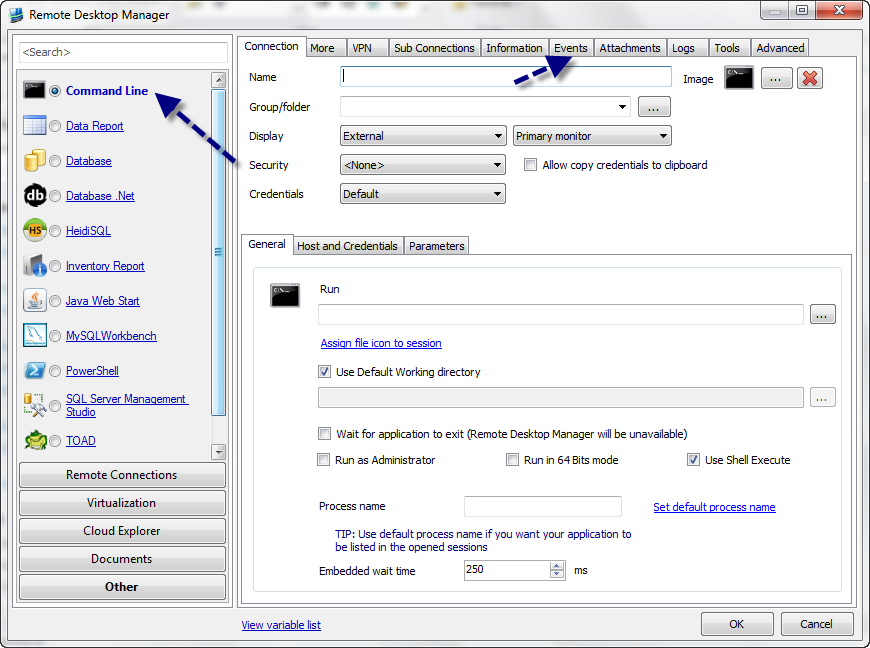
David Hervieux
CommanddLine.png
So I stumbled onto the fix because I was distracted at work... I would love for an addon to be made so that a field can be used to input the hostname/IP.... if anyone is good at that kind of thing...
Use command line session type with the following settings
Run - javaws.exe https://(hostname or IP Address)/admin/public/asdm.jnlp
Working Directory - Default works fine
use shell exec
You can also use javaws.exe https://$HOST_WITH_PORT$/admin/public/asdm.jnlp so that you can use the session setup... That is what I am doing now, but I hope we can get a session type for this.
EDIT: You may need to add a 5-10 second initial delay on the login macro, or it won't work....
edited by idbash on 1/23/2013
asdm.png
Hi Guys,
we also figured out a 2nd possibility which also works with pix:
Entry: Command Line
Credentials from Credential Repository
General Tab:
Run: %SYSTEMROOT%\SysWOW64\javaw.exe -Xms64m -Xmx512m -Dsun.swing.enableImprovedDragGesture=true -classpath lzma.jar;jploader.jar;asdm-launcher.jar;retroweaver-rt-2.0.jar com.cisco.launcher.Launcher
This works with 64bit-OS, you have to modify Path to javaw.exe for 32bit-OS
Working dir: %PROGRAMFILES(X86)%\Cisco Systems\ASDM\
This indicates -> you have to install ASDM, easiest way: connect to your asa,pix through browser and select "Install ASDM Launcher and Run ASDM"
Activate "Use Shell Execute"
Host and Credentials Tab:
Host: insert Hostname or IP + Port if not Standardconfiguration, ex. 8.8.8.8:444
In Events Tab:
Activate "Execute automatically"
Enter following Macro: {WINDOW:ASDM-IDM}$HOST${TAB}{DELAY}$USERNAME${TAB}{DELAY}$PASSWORD${TAB}{ENTER}
Initial wait & Delay can be changed, but works perfect 4 me with "initial wait": 1 sec and Delay 300ms
Thats it and its better solution if you are using both - asa and pix
edited by SMG on 1/24/2013
edited by SMG on 1/24/2013
edited by SMG on 1/24/2013
edited by SMG on 1/24/2013
Kind Regards
Markus
======================
Hi Guys,
Using the information you posted on this forum I created a new add-on.
Would you give a try please ?
I'm opened to suggestions.
*** I forgot something important !!!***
You will need the new version of the beta version.
Please wait for a future post about it.
Regards,
edited by asanscartier on 2/14/2013
André Sanscartier
CiscoASDM1.0.0.0.zip
Hi,
The new beta version 8.0.25.0 is available for download and it's now possible to test the new add-on of my previous post.
Regards,
André Sanscartier
how to use?
cannot find a add-on
Kind Regards
Markus
======================
Hi,
It's the attachment of my post of 6 days ago.
Here a copy. Just download it, extract it and copy it with the application executable.
When the official version will be release just remove this test version before install it.
Regards,
André Sanscartier
CiscoASDM1.0.0.0[1].zip
o, thx,
it was so tiny, havent seen
Kind Regards
Markus
======================
4me it works great,
both possibilities ASDM & JWS,
very good done: retry-button 4 Makro ;-)
Kind Regards
Markus
======================
Hey,
I can't find this Add-on in the Addon Manager :(
Hi,
Sorry about that. This is now available in the add-on manager.
David Hervieux
So I setup my connection, select 'Locally Installed ASDM' then find javaw.exe path. When I try to open ASDM connection it wants to log me automatically (script running). How do I disable it? I just want ASDM to prompt me for sign on. I don't want to store user/password.
Thanks
Hi,
I will ask andré to update the add-on to ignore empty credentials.
David Hervieux
Thank you. RDM is great app.
Hi,
It's now possible to supply username and password, only the username or none of both.
This new version is available in the Add-on Manager.
Regards,
André Sanscartier
Hi André,
what about only password? I'm trying with "blank" username, but nothing happens: I see the cursor moves from user field to passwords one, but it remains empty (I tried with a fake username and I saw both user and password fields filled up).
Thanks in advance,
--
Marco Dodi
edited by MrkDodd on 5/25/2013
edited by MrkDodd on 5/26/2013
Hi,
This is a new version (attached file) that normaly support a blank username.
Could you test it please?
Best regards,
André Sanscartier
CiscoASDM1.0.2.3.zip
Kind André,
it works perfectly! Your software is very useful and your customer support is awesome!
Many compliments.
Regards,
--
Marco Dodi
Howdy!
I stumbled across the new Cisco ASA add-on this morning. Considering that my team manages about five dozen firewalls, this will be a huge time saver! Another great bit of software from Devolutions.
I was able to configure the add-on quickly, and am in the process of converting over all of my Cisco ASA connections from a web page link to this new add-on.
Everything is working perfectly, except when the add-on presses OK the first time, it contacts the ASA, which rejects the credentials, then prompts again for the credentials. I can this cancel the credential reprompt, then get an error dialog box that says Unable to lunch device manager.
So I figure that I've entered the credentials wrong. I went back and retyped them and it worked fine. But it kept failing when using RDM. I then discovered that if I just cancel the credential reprompt and the error dialog box, I can just hit OK again using the same credentials that RDM entered, and it works fine.
To test further, I changed the login title, so that RDM never enters the credentials, and also leave the credentials blank, I then fill them in manually, and it still will not work the first time.
I can launch the same web page by going to the web URL: http://ipaddress and click the link to run the Java Web Start ASDM, and the credentials will take the first time.
I don't know how to describe it, but it appears somehow that opening the ASDM Java Web Start via RDM or via a web page is somehow slightly different. I'm totally thrown for a loop that I can just tell the same ASDM-IDM window to submit thsame credentials the seconds time and it works like a champ.
Help!
Thanh
Hi,
This is really strange. I will ask André to verify if he can support both opening mode:
- Java Web Start
- Web url
David Hervieux
Thank you for the quick reply!
I just tested some more and it works fine on ASDM version 7.1(3).
It does not work on ASDM 6.4(5) or 6.4(7). So I upgraded one of those two firewalls to ASDM 7.1(3) and it works fine now.
I am assuming that this is motivation to get it together, and get all of my firewalls updated!
Thank you for your time and consideration!
For further testing, I have installed the local ASDM client on my PC, and everything appears to function fine, but the Cisco ASDM-IDM Launcher window hangs indefinitely after RDM hits the OK button. There is also no data being moved by the javaws.exe process in Task Manager.
Thanks!
Hi,
Did you try the alternative login method or change the delay ?
Regards,
edited by asanscartier on 7/8/2013
André Sanscartier
I believe that I have exhaustively tested those two options, but will certainly test again with specifics if you like.
Hi,
When the windows hangs indefinitely is it still possible to you to continu the process ? Is it really frozen ?
Could you send me print screen of your session configuration?
Thanks,
André Sanscartier
Hi,
What is the version of the local ASDM client on your PC ?
Regards,
André Sanscartier
I am running 1.5.50 and my coworker is running 1.5.64. Mine hangs and his does the prompt for credentials thing.
We have updated all of our managed firewalls to ASDM 9.1(3).
I would say that it's definitely hung. It will sit there as long as I let it sit.
edited by trodke on 7/22/2013