Using Secret Server as a credential repository

I am trying to connect to Secret Server as a credential repository in RDM but I seem to have some connection issues. This is a test of Secret Server and how it can integrate with RDM so I may be missing something. Is there some documentation or do you have some advice on how to make this integration work? This is the error I am getting.
WebException - Unable to connect to the remote server
at System.Net.HttpWebRequest.GetRequestStream(TransportContext& context)
at System.Net.HttpWebRequest.GetRequestStream()
at System.Web.Services.Protocols.SoapHttpClientProtocol.Invoke(String methodName, Object[] parameters)
at Devolutions.RemoteDesktopManager.SSWebService.SSWebService.Authenticate(String username, String password, String organization, String domain)
at Devolutions.RemoteDesktopManager.Business.SecretServerReader.GetToken(String organization, String username, String domain, String password)
at Devolutions.RemoteDesktopManager.Business.SecretServerReader..ctor(CredentialsConnection credentialConnection)
at Devolutions.RemoteDesktopManager.Forms.FrmSelectSecretServerEntry..ctor(CredentialsConnection credential)
at Devolutions.RemoteDesktopManager.Frames.CredentialSettings.FreCredentialResolverSecretServerSettings.butBrowse_Click(Object sender, EventArgs e)
at System.Windows.Forms.Control.OnClick(EventArgs e)
at System.Windows.Forms.Button.OnClick(EventArgs e)
at System.Windows.Forms.Button.OnMouseUp(MouseEventArgs mevent)
at System.Windows.Forms.Control.WmMouseUp(Message& m, MouseButtons button, Int32 clicks)
at System.Windows.Forms.Control.WndProc(Message& m)
at System.Windows.Forms.ButtonBase.WndProc(Message& m)
at System.Windows.Forms.Button.WndProc(Message& m)
at System.Windows.Forms.Control.ControlNativeWindow.OnMessage(Message& m)
at System.Windows.Forms.Control.ControlNativeWindow.WndProc(Message& m)
at System.Windows.Forms.NativeWindow.Callback(IntPtr hWnd, Int32 msg, IntPtr wparam, IntPtr lparam)
------------------------------------------
SocketException - A connection attempt failed because the connected party did not properly respond after a period of time, or established connection failed because connected host has failed to respond 172.27.1.156:80
at System.Net.Sockets.Socket.DoConnect(EndPoint endPointSnapshot, SocketAddress socketAddress)
at System.Net.Sockets.Socket.InternalConnect(EndPoint remoteEP)
at System.Net.ServicePoint.ConnectSocketInternal(Boolean connectFailure, Socket s4, Socket s6, Socket& socket, IPAddress& address, ConnectSocketState state, IAsyncResult asyncResult, Int32 timeout, Exception& exception)
I am running enterprise version 7.4.6.0.
As always keep up the good work on this tremendous product. Our company would be lost without it.
Thanks,
Larry
All Comments (12)
Hi,
It seems to be a connection error:
A connection attempt failed because the connected party did not properly respond after a period of time, or established connection failed because connected host has failed to respond 172.27.1.156:80
Is it configured to use an SSL link?
David Hervieux
No, at this time it is only hosted internally for our testing. I have no problems connecting to the Secret Server website from the same host that I am trying to connect with RDM. No firewall between the hosts at this time and using SQL Express for this test database.
Have you tried to not set the port in the hostname?
David Hervieux
If you type 172.27.1.156 in IE, does it work?
David Hervieux
I do have some progress. I have updated to version 7.5 in RDM. Now when I attempt to add a credential and I use the Test Settings button I am prompted for a password. I have tried different users from server admins, password users and SQL admins. Not sure what information ii is asking for. I do see login attempts in the Secret Server application.
What information is required for the following fields?
Organization
Domain
Username
André did the integration and he is currently in vacation (he is lucky :)) I will try to contact him.
David Hervieux
No problem I will wait until the lucky man returns.
I got the same problem with RDM keeps prompting me for password, (and secret server 7.6 shows sucessfull logon from my user)
when i cancel it, it shows an empty list of credentials list.
any suggestions? its currently holding us back from buying the product.
edited by dlo on 9/6/2012
Hi,
Are you using the latest version of RDM (7.6) ?
Could you send us a print screen of your Secret Server session settings ?
Exemple :
Regards
edited by asanscartier on 9/6/2012
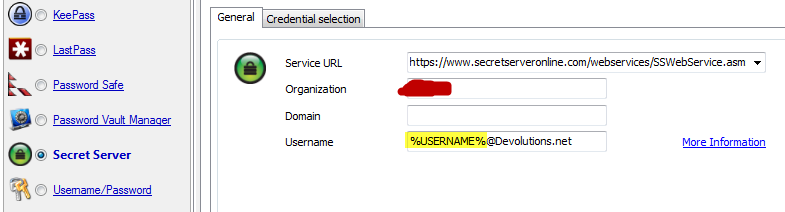
André Sanscartier
SecretServer.png
We are using the latest trial ver. 7.6.00
The only thing that is not configured is Organization (not sure what to enter here..)
and directly after choosing template button, it prompts for password again.
at secret server, under the choosen user account, it logs.
Date Recorded,Full Name,Action,IP Address
9/6/2012,"<username>","LOGIN SUCCESS","10.150.xx.xx"
so it sounds like its authenticating sucessfully.
edited by dlo on 9/6/2012
dasdasdasd.png
Hi,
I think I found the solution.
We use web services to retreive credentials information from the server.
Therefore you have to enable webservices in your server. Otherwise RDM will be able to login but the remaining of the operations would fail.
I hope it will help.
Regards
edited by asanscartier on 9/6/2012
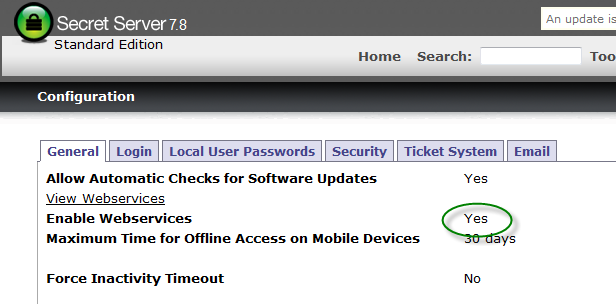
André Sanscartier
exemple.png
Hi André
It worked like a charm.
Thank you for the fast support.
Regards
Dennis