user and security management - I can't get this to work as expected
user and security management - I can't get this to work as expected

I have been a single user on this system for some time now. I have now added my first salaried technician. I am trying to configure so it asks for the user name and password that I have created now in the users. It doesn't. I just opens up the same as it always has.
I am connecting to Azure SWL and have KeePass plugin. Thanks.
All Comments (7)
Hi,
Have you configured the user in Azure?
David Hervieux
I am not sure what you mean. I created a SQL database with an SA-ish admin password.
Yes but you need to create each user login to the database and not just in RDM.
David Hervieux
Does this require hosting a virtual machine in Azure? I am only running the SQL database.
No it doesn't. Have you configured the File->Data Source with the newly created user?
David Hervieux
No SQL Azure is support, no need for a vritual machine.
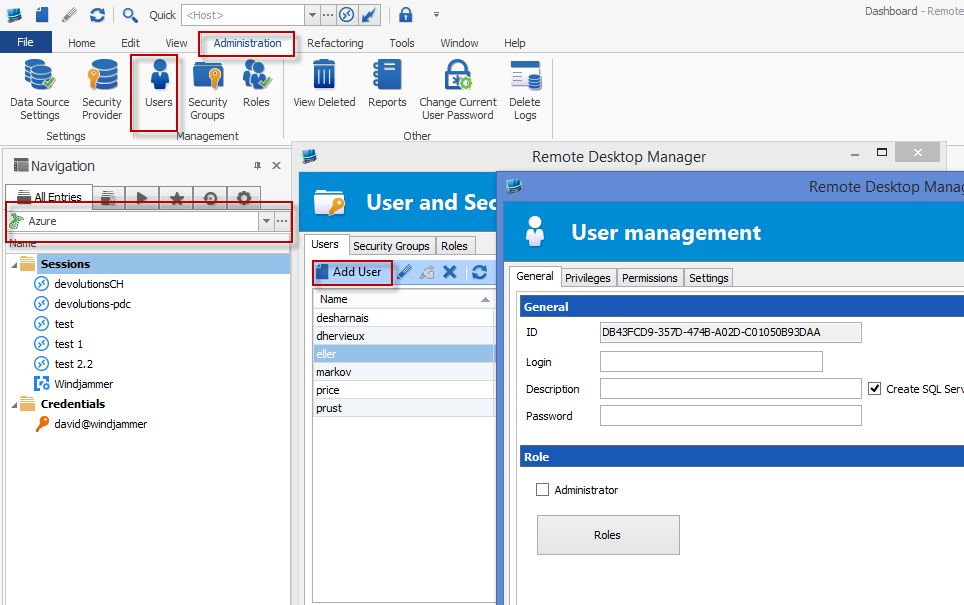
You need to create a second user, do the following:
- while connected to your SQL Azure data source
- Administration tab
- Users
- Add User
- enter the information to create a new user and give it rights, you can set the user as Administration for now for testing
Now you can create a new data source (or clone the current one) and change the credentials to use the newly created user.
Does that work for you?
Best regards,
Stéfane Lavergne
1-21-2015 3-51-19 PM.png
Okay, I got it figured out with your help. I had originally created the user before I moved everything to Azure SQL so the checkbox for "create login and user in SQL" was not there. I deleted the user and recreated and it appeared. So, users need to be created after the database setup.
Thanks.