Remote Desktop Manager 7.5 Beta
Hi,
We are happy to announce a new beta for Remote Desktop Manager. This version contains many enhancements and bug fixes.
Please take a look at our new blog. Max is working hard on many new interesting posts. Stay tuned please:
http://blog.devolutions.net/
You can download it here:
http://remotedesktopmanager.com/download/Setup.RemoteDesktopManager.7.4.2.0.exe
http://remotedesktopmanager.com/download/Devolutions.RemoteDesktopManager.Bin.7.4.2.0.zip
Change history:
- Added more details (username, machine name and opened since) in the "Warn for open connection"
- Added the security right for to view the shared logs
- Added the possibility to specify more sessions separated by a ; in command line
- Added a VMware dashboard
- Added a macro specific password ($MACRO_PASSWORD$)
- Added a log when sending an email from information
- Added an option to disable the NTFS encryption in offline mode (better performance)
- Added the possibility to specify the parameters for the command line type
- Added a basic inventory type using WMI
- Added an option to preview or not the text session type in the description
- Added a button to add a credential entry in selection list
- Added import PasswordSafe passwords
- Added a filter in the select credential dialog
- Added support for more than 2 monitors
- Added the possibility to add multiple connections in batch
- Fixed an issue with the inherited group security
- Fixed an issue with SSH and Telnet resize
- Fixed a batch edit issue with multi-group select
- Fixed some issues with multi monitors
- Data entry (account) can now be used in the credential repository
- Logoff RDP session now executed in another thread
- Credentials are now listed within the sessions
- It's now possible to view/open a data entry from a command line
- Global email template can now uses variables
- Official German translation
- Official Russian translation
- Integrated and improved VMware Remote Control (VMRC)
edited by dhervieux on 6/5/2012
David Hervieux
All Comments (48)
Thank you for a new beta.
If started to test it, and more specifically the function for user/group management. The function meets my needs, so thank you.
During the tests, I also found a few bugs in this feature.
When an user has general add,edit and delete rights and view rights to a group, but no add, edit or delete in the group:
- he/she is allowed to create an entry using the option 'New entry (INS)'. The 'Add'-function correctly shows a pop-up and blocks any updates.
- When a user selects an entry and uses batch edit, the different details can be updated by the user.
- The user is able to change the 'Status'-message of an entry
- The user is able to move (menu and drag-n-drop) an entry to any group
And a feature, which I haven't decide on if it's desirable functionality:
- For a user to allow add, edit or delete within a group, the user needs the global right. With this right, the user can create an entry on any location, not secured by a security group.
Possible solution would be to have 'root' as a security group where users can be granted the rights if/when needed.
Like I said, thanks for the function. I'll keep testing!
Regards, Paul Molensky
can't create free account for Online Backup if I use non-English symbols. I try with cyrillic only and button "OK' is not active.
Version: 7.4.3.0 beta
Hi,
Could you send me an email with some cyrillic symbols, I will try it.
David Hervieux
Hi David
Love the new features. Just having a minor issue with one of them
When I run the new Inventory Report i receive a message that says "Unable to access Inventory Report" and then it goes back to the dashboard.
Does this require any specific WMI settings or Firewall settings?
Thanks
SW
Simon Watz
Senior Support Engineer | Strategic Group
Graduate Certificate in Networking & Systems Administration,
Microsoft Certified Technology Specialist
Hi,
We use WMI to generate the report. So you need to open the WMI port and have the administrative right. You can configure the credentials in the Tools tab page of the session settings.
http://msdn.microsoft.com/en-us/library/windows/desktop/aa822854(v=vs.85).aspx
http://www.poweradmin.com/help/enableWMI.aspx
David Hervieux
Hi David
All my settings are OK but I am still getting the message, any other ideas?
Thanks
Simon Watz
Senior Support Engineer | Strategic Group
Graduate Certificate in Networking & Systems Administration,
Microsoft Certified Technology Specialist
Could you verify the application error log in Help->View Application Log
Maybe we will find a different error
Also, if you try a WMI explorer, does it work?
http://download.cnet.com/WMI-Explorer/3000-2094_4-190455.html
David Hervieux
This is the application log:
at System.IO.__Error.WinIOError(Int32 errorCode, String maybeFullPath)
at System.IO.File.Encrypt(String path)
at Devolutions.RemoteDesktopManager.Managers.SecurityManager.SaveObjectToEncryptedFile(String fileName, Object value, String salt, Boolean ntfsEncrypt)
[6/13/2012 10:21 PM]ERROR SILENT System.IO.IOException: Recovery policy configured for this system contains invalid recovery certificate.
at System.IO.__Error.WinIOError(Int32 errorCode, String maybeFullPath)
at System.IO.File.Encrypt(String path)
at Devolutions.RemoteDesktopManager.Managers.SecurityManager.SaveObjectToEncryptedFile(String fileName, Object value, String salt, Boolean ntfsEncrypt)
[6/13/2012 10:21 PM]ERROR SILENT Unauthorized access: Access is denied. (Exception from HRESULT: 0x80070005 (E_ACCESSDENIED))
I will try the WMI explorer
Thanks
Simon Watz
Senior Support Engineer | Strategic Group
Graduate Certificate in Networking & Systems Administration,
Microsoft Certified Technology Specialist
I don't think that those errors a related.
David Hervieux
WMI Explorer works OK
Simon Watz
Senior Support Engineer | Strategic Group
Graduate Certificate in Networking & Systems Administration,
Microsoft Certified Technology Specialist
Hi,
Spicework has great WMI troubleshooting guide:
http://community.spiceworks.com/help/Troubleshooting_WMI
David Hervieux
I don't understand why you don't have an error in the log. I've just verified the code and you should at least have an entry in the log. I will ask André to send you (if you don't mind) a simple program to test it. This will be very based on the prototype we made for the inventory
David Hervieux
I am restarting the server with RDM installed on it and the test machine to see if it makes any difference. I will let you know how it goes.
Simon Watz
Senior Support Engineer | Strategic Group
Graduate Certificate in Networking & Systems Administration,
Microsoft Certified Technology Specialist
After a reboot still the same, the first time it runs it takes a few seconds before it shows the error. After that it is almost instantaneous. I am happy for Andre to send me a program to test. Happy to help where I can, this is a great product.
Simon Watz
Senior Support Engineer | Strategic Group
Graduate Certificate in Networking & Systems Administration,
Microsoft Certified Technology Specialist
Hi,
As promised here is a sample program to test WMI connection.
Simply unzip it in a folder and start it the same way as RDM.
Regards
André Sanscartier
ShowWMI.zip
Hi Andre
Just wanted to clarify I should run this from the 'Client machine' not the Target
Thanks
Simon Watz
Senior Support Engineer | Strategic Group
Graduate Certificate in Networking & Systems Administration,
Microsoft Certified Technology Specialist
Worked fine.
Simon Watz
Senior Support Engineer | Strategic Group
Graduate Certificate in Networking & Systems Administration,
Microsoft Certified Technology Specialist
Hi,
I will add all queries of the Inventory report to the sample. It's probably one of them.
Regards
André Sanscartier
Hi,
In the inventory report, did you try selecting only the "system information" and let all others choices blank ?
It would help to do this test before adapting the sample program.
Regards
André Sanscartier
Same result
Simon Watz
Senior Support Engineer | Strategic Group
Graduate Certificate in Networking & Systems Administration,
Microsoft Certified Technology Specialist
Any other ideas?
Thanks
Simon Watz
Senior Support Engineer | Strategic Group
Graduate Certificate in Networking & Systems Administration,
Microsoft Certified Technology Specialist
Hi,
I'm not sure if I already asked but have you tried to configure the credentials in the Tools tab page?
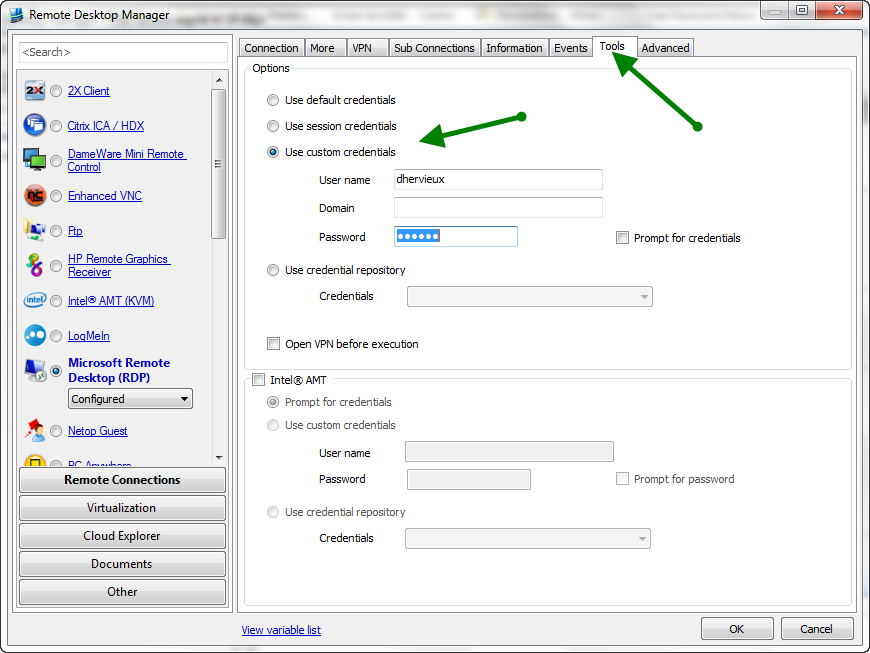
David Hervieux
ToolsCredentials.png
yes I have tried this already.
Simon Watz
Senior Support Engineer | Strategic Group
Graduate Certificate in Networking & Systems Administration,
Microsoft Certified Technology Specialist
Hi,
Could you try the new beta release 7.4.4? It contains a fix that might help you. You still need to set the credentials in the Tools tab page.
David Hervieux
The update fixed my issue :)
Simon Watz
Senior Support Engineer | Strategic Group
Graduate Certificate in Networking & Systems Administration,
Microsoft Certified Technology Specialist
Hi,
Here is the beta version 7.4.6.0. This should be the last beta before the final release.
http://remotedesktopmanager.com/download/Setup.RemoteDesktopManager.7.4.6.0.exe
http://remotedesktopmanager.com/download/Devolutions.RemoteDesktopManager.Bin.7.4.6.0.zip
David Hervieux

looks realy good! during the hole beta period of 7.5 i had only one or two crashes thank you!
Hi,
I can't get the Vmware dashboard to work. I have ticked in the session: Is VMWare server. The Vmware dashboard item is not longer gray. However, I do not see any information in the dashboard at all. The Vmware servers I connect to are Esxi 5.0 servers.
Kind regards,
Ray
@Rayman
Have you entered in the Tools tab page the credentials required for Vmware?
David Hervieux
Hi David,
I have set this to use session credentials, but still no info in dash..
Could you verify the application log in Help->Application Log
David Hervieux
could you add the following filed the shared connection log:
connection type
and could you create the active time for all session with a start and disconnect time? e.g. for teamviewer?
[12-7-2012 12:27]ERROR System.IO.FileNotFoundException: Kan bestand of assembly VMware.Vim, Version=5.0.0.0, Culture=neutral, PublicKeyToken=10980b081e887e9f of een van de afhankelijkheden hiervan niet laden. Het systeem kan het opgegeven bestand niet vinden.
In installation path, Vmware, VMware infrastructure Client, it shows the installation path and it says Application is ready.
Hi,
@Xanacas
I have entered feature request for the connection type. However the active time is available only for an embedded product. For what type of connection do you want this?
@Rayman
You need to install the VMware PowerCLI: http://www.vmware.com/go/PowerCLI
David Hervieux
in my case im looking for the activetime of our teamviewer sessions....
Works now, thank you.
Kind regards,
Ray
Hi
Tested beta version 7.4.6.0. Custom routes for Microsoft VPN works great.
Found only a GUI issue. When opening a Microsoft VPN-session type, the green open indicator next to the session in the session list is not shown.
Kind Regards
Magnus
Any idea when the next version will come out? I'm currenly on 7.5
Getting a lot of bugs when editting a session, and also with importing from .csv
edited by Cody24 on 8/13/2012
Could you give me more details? I have updated the binaries last friday but it still the version 7.5
David Hervieux
Below is one I just encountered. I was going through the Import Csv Wizard. I selected VNC for the template, and then when I hit finish got this error.
edited by Cody24 on 8/14/2012
And after that you can continue or you need to restart the application?
David Hervieux
I have to restart the application, if I take the Ok on the error box it will just keep popping up.
I have fix coming that should resolve this issue. The crash comes from the offline mode. If you don't need it, you could disable it or maybe only when you import a lot of data.
David Hervieux
I disabled offline mode... I don't ever need that, I'll let you know if I get any errors after doing that.
When I disable the offline mode... I don't get the previous error, at least have not yet.
but I get 2 new errors while offline mode is disabled.
I think that my fix will help. I will try release a beta soon. Thank you again. The second message is weird, it seems that the xml content is currupted
David Hervieux
Awesome, Thank You.
You guys have a change log for the 7.6.1 release?
thx
edit: never mind, found it in the included readme:
edited by alphanimal on 9/10/2012