Override function to Secret Server not working

Dear Madam/Sir,
we have issue regarding the override function when we use mutiple logins on one SAP GUI (ABAP) connection. The first logon is the regular one and the other one is the personal user. In both cases we use a secret (with username/password) from Secret server. The first time during setup of the override all works fine (test connection succesful) but the first time you double click on the connection the regular username/password is selected during logon to the SAP system. When you than check the User specific settings the override function has been deactivated (see second printscreen in attachment).
Is this a bug or are we doing something wrong?
Hope to hear from you soon!
Regards
Patrick van de Kasteelen
Attachment added
edited by patrick on 4/7/2014
Reposted the original post message, it was accidentally deleted.
edited by stefane on 4/7/2014
Override issue RDM[2].docx
All Comments (10)
Can you please (re)post the attachment.
Regards,
Stéfane Lavergne
Attachment added
Override issue RDM[1].docx
Thanks, I'm looking into it.
Stéfane Lavergne
This looks like a UI bug, I will double check and fix the issue.
I will ask André, our Secret Server expert, to have a look at the issue and help me with the diagnostics. We will get back to you once we have something.
Regards,
Stéfane Lavergne
Hi,
We really tried to reproduce your issue but we are unable to.
Could you please send us screen captures of every step you do ?
That way we should be able to find out the reason of the problem.
Best regards,
André Sanscartier
Hi
I have updated the document so it should be more clear. If not please let me know :-)
Regards
Patrick
edited by patrick on 4/9/2014
Override issue RDM[3].docx
Partick,
Thank you for the information. André is now able to reproduce the issue and is working on the fix.
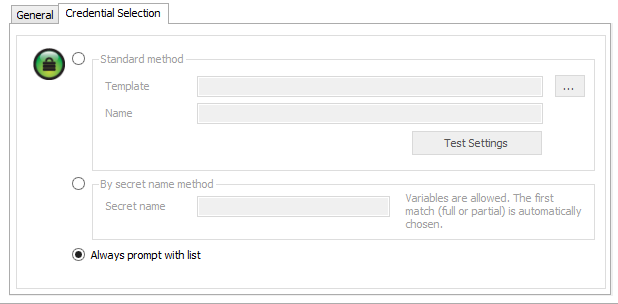
The good news is he also found a work around. Since the issue only affects when you configure the main credentials as follows:
"Alays prompt whit list"
If you specify a fully qualified credential entry, you wont have the issue.
Example:
Regards,


Stéfane Lavergne
4-9-2014 11-14-52 AM.png
willnotwork.png
willwork.png
Hi Stefane,
thanks for the update. The workaround mentioned is not an option for us because it will mean lots of additonal setup and it's just temporary until the fix is available.
Could you please indicate when the fix could be available?
Regards
Patrick
No problem I understand.
As for the fix. It's done and will be available in the next build which should be available in 3-4 days.
Regards,
Stéfane Lavergne
The build is now available v9.2.5.0 download here:
http://remotedesktopmanager.com/Home/Download
Stéfane Lavergne