ScreenConnect "Unable to connect to server" Error

Hello,
I am having issue getting ScreenConnect setup in RDM. I am using ScreenConnect v4 and the latest version of RDM. I am using the following information to setup ScreenConnect:
Host: https://share.domain.com/RemoteSupport (where domain is our companies domain)
Username: ScreenConnect username (NOT using Active Directory)
Password: ScreenConnect password
The information above is the exact way I would log in to ScreenConnect through our website. For the host I have also tried http://share.domain.com, the internal and external IP's of the server running ScreenConnect (both with and without the ScreenConnect port we use which is 8041). Nothing works at all. I am curious what I am doing wrong?
Thanks
All Comments (13)
Hi,
I just did some tests with the latest version of ScreenConnect (4.2.6162.5161) and everything is working well.
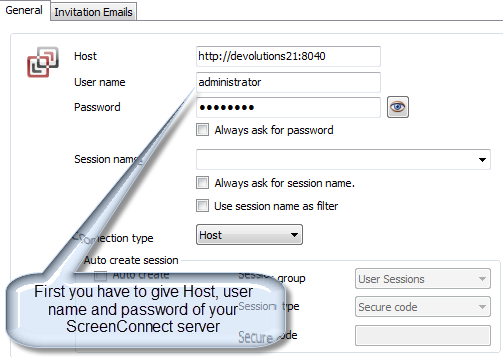
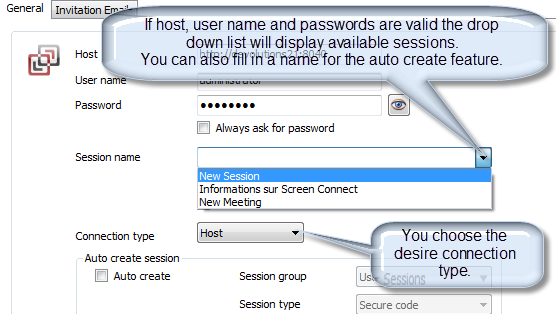
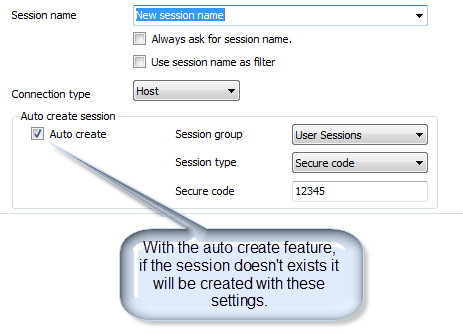
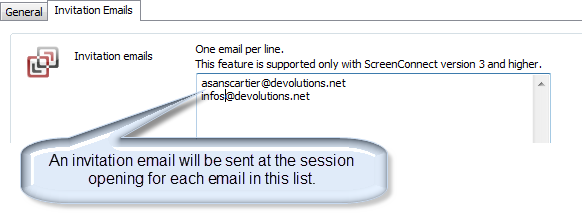
Here some explanations about Screen connect sessions. Hope it will help.
Always ask for session name : With this option the system will ask you which session you want to start each time you open the session.
Use session name as filter : Like the previous option but using the session name as a filter to reduce choices.
Best regards,
André Sanscartier
Help4.png
Help3.png
Help2.png
Help1.png
I appreciate the reply but it doesn't really help me at all. The host, user, and password that i am using are the exact same ones I use to log in through the web but they do not work in RDM. Clicking on the session drop down box with the correct information just gives me a "Unable to connect to server" error. The only difference I am seeing between the pictures you have posted and our setup is that we are using HTTPS and connect to ScreenConnect using a domain name instead of a host name with a port. As a side note, I can connect through the web using https://internalip with no port just fine but using https://internalip:port does not work. I'm not sure if RDM requires the host to include a port in the formatting or not as we connect to ScreenConnect without using a port number.
Hi,
Maybe it's a security issue. Are you using an administrator account to connect ?
Regards,
André Sanscartier
Yes, the account is an administrator account.
Hi,
Then you could create an embedded Web Browser session with the url of your ScreenConnect server and see if you can connect and log within RDM. A SreeenConnect session connects to ScreenConnect in background almost the same way you do. Maybe you could see an error message.
At least it could give us a hint to find a solution.
Best regards,
André Sanscartier
I have tested using an embedded web browser and I am able to log in with no issues.
Hi,
Could you send us the application log ?
Maybe some "ERROR SILENT" occur.
We're really trying to understand your issue.
Best regards,
André Sanscartier
I have sent a private message to you containing the contents of the log.
Hi,
It looks like a firewall or security issue.
This message occurs many time: "No connection could be made because the target machine actively refused it".
Could you verify your firewall and security setting.
Best regards,
André Sanscartier
Our hardware firewall has no rule preventing access to our ScreenConnect server or any of the ports that it uses. The windows firewall on the server itself has been disabled. I have full rights to the server and ScreenConnect itself.
Hi.
Is any antivirus could be active ?
André Sanscartier
I am using Windows Defender (MSE) but disabling does not resolve the issue. The server has no antivirus on it.
Hi,
Is your ScreenConnect server accessible for us?
Maybe you could give us a temporary admin account to let us do some tests.
Best regards,
André Sanscartier