RDM 11.6.2.0 : Embedded Chrome : Flash Player Permission

Hi ..
Since upgrading to 11.6.2.0 I cannot use RDM embedded Chrome for anything that needs Flash Player.
It comes up with a nice "Adobe Flash Player needs your permission to run" message, but no way to grant permission.
Running in external mode is a workaround, but one of the reasons for RDM is to have a nice embedded env.
Thanks
All Comments (12)
Hello,
In RDM 11.6.3.0, an option to enable/disable plugin in Chrome has been added.
Could you try to install RDM 11.6.6.0. You can download this version here
http://remotedesktopmanager.com/Home/Download#beta
Best regards,
Jeff Dagenais
Where is this option at?
@Chris Clos
The option is called Enable Plugins. This option is located in File -> Options -> Types -> Web.
Best regards,
Jeff Dagenais
Yeah this doesn't work with 11.7.1.0. Using Chrome and vCenter (which requires flash) and it comes up with "Adobe Flash Player needs your permission to run". Right clicking and choosing Run this plugin doesn't yield a solution.
Running Chrome outside of RDM and going to the same url works fine.
Hello,
You may also need to install Adobe Flash player with PPAPI.
To do so, please follow the steps below:
1- Open Google Chrome
2- Navigate to https://get.adobe.com/flashplayer/?fpchrome
3- Download Adobe Flash
4- Lauch flashplayer22pp_xa_install.exe from your download folder
5- After the installation, close and restart RDM
Best regards,
Jeff Dagenais
That appears to have done the trick. Thanks!
With current Chrome Version Flash is blocked by default. You have to unblock Flash for each site.
Can you add a option to allow Flash for the Session.
@Thomas Kritzinger,
In File -> Options -> Types -> Web, does the Enable plugins option is selected?
If yes and that you still encounter your issue, please provide us a URL that you encounter issue with so that we test it in our environment.
Best regards,
Jeff Dagenais
Yes Plugins are enabled.
The Problem appears with vSpher vCenter Web Client. The URL is local.
But you can use the Adobe Flash Player Test Page: https://helpx.adobe.com/flash-player.html
It will tell you that Flash ist installed but not activated.
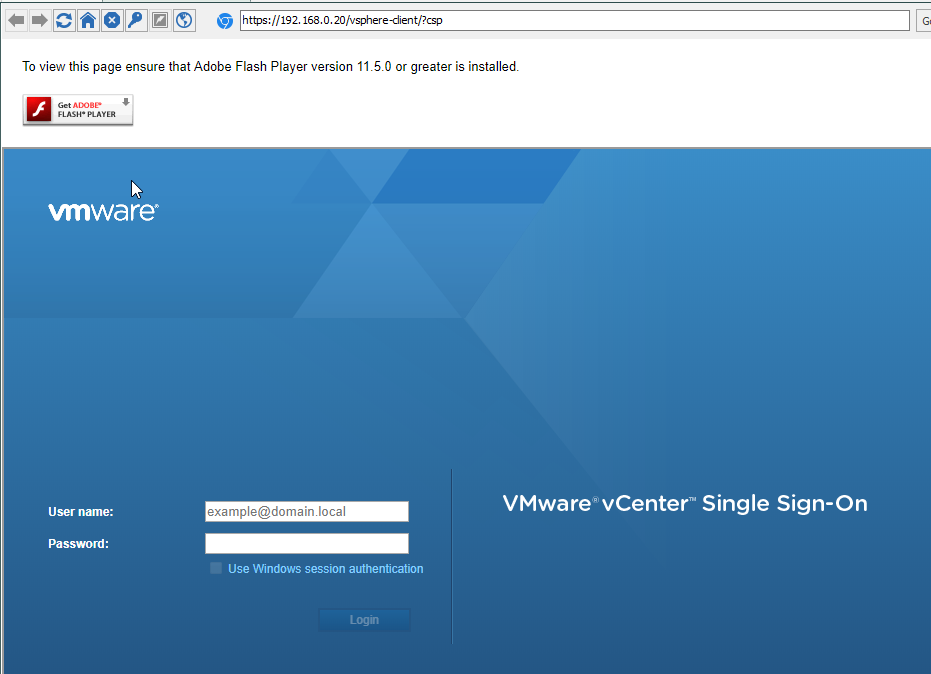
vcenter.png
Hello,
Could you try the steps in the first section of this article to see if it help or not
https://help.remotedesktopmanager.com/troubleshooting_googlechrome.htm
Best regards,
Jeff Dagenais
Ignore Certificate Errors is checked.
I have downloaded and installed Flash Plugin extra. And now it is working.
So RDM can not use the integrated flash plugin from google chrome?
Hello,
This is probably caused by the third party that we are for embedded Google Chrome.
Glad that is now working.
Best regards,
Jeff Dagenais