RDM 14.1.3.0 crashes when opening either multiple RDP connections, or more past the first
RDM 14.1.3.0 crashes when opening either multiple RDP connections, or more past the first

for the past ~2 months or so, i have been experiencing an RDM crash that occurs in either of the following two scenarios:
1. type a partial name into the filter list (like "appserver-"); select the several machines i would like to RDP connect to (like "appserver-1", "appserver-2", and so on); hit "enter" on the keyboard; one or two sessions will begin to sort of load in their tabs, then the ui hangs, then RDM crashes
2. have several (2, 3, 4, whatever) RDP connections open; bring up a host in the filter list; double-click it or hit "enter" the same hang-then-crash occurs
i've checked RDM's "application logs" feature but there is nothing relevant in there. the best i've been able to find so far is an entry from windows event viewer, which i've attached here.
machine specs: VM, windows 10 x64, 3 vcpu's, 8gb ram, rdm 14.1.3.0 74-bit
thanks,
anthony
rdm-crash.evtx
All Comments (5)
Hello,
Here's the error from Event Viewer
Faulting application name: RemoteDesktopManager64.exe, version: 14.1.3.0, time stamp: 0x5c421dea
Faulting module name: Windows.UI.XamlHost.dll, version: 10.0.17763.1, time stamp: 0x0e34a79b
Exception code: 0xc0000409
Fault offset: 0x000000000000c696
Faulting process id: 0x18e0
Faulting application start time: 0x01d505bedd5dc901
Faulting application path: C:\Program Files (x86)\Devolutions\Remote Desktop Manager\RemoteDesktopManager64.exe
Faulting module path: C:\Windows\System32\Windows.UI.XamlHost.dll
Report Id: 9f3303ff-4ea5-4ad4-bfac-dfe663660a81
Faulting package full name:
Faulting package-relative application ID:
A few peoples of our community have reported this same faulting module as you can see below
https://forum.devolutions.net/topic30992-faulting-module-path-cwindowssystemwindowsuixamlhostdll.aspx
https://forum.devolutions.net/topic29166-frequent-crashes-on-.aspx
As you can see in this specific post, it's something related to .Net.
https://forum.devolutions.net/topic29166-frequent-crashes-on-.aspx?Page=1#post125095
The only thing that I can propose is to try to perform a .Net repair and to make sure that your Windows 10 is up to date.
Best regards,
Jeff Dagenais
Hello,
We have the same issue with this version.
We are looking for a solution.
Regards,
Gidus
@license01,
Since it's an issue on Microsoft side, the only thing that we can proposed are the following:
Best regards,
Jeff Dagenais
hello,
two weeks ago i decided to completely delete my VM and reinstall it from scratch. i still have the exact same problem as i had been before.
i performed a fresh install of Windows 10 Enterprise x64, got it completely up-to-date on patches, and then installed nothing but RDM, and after a few tests, the issue presented itself. i am now on version 2019.1.25.0 and the issue persists. i have not installed or modified any .NET runtimes, only letting RDM install the VC++ Redistributable that it comes packaged with. based on my testing, this does not appear to be an issue with .NET itself.
what information can i provide to help find a solution?
Hello,
Unfortunately, as my colleague mentioned above, this issue is not something that can be fixed on our side.
That being said, we recently came across another report of this issue in another application. This forum thread can be consulted here: https://support.royalapplications.com/support/discussions/topics/17000013612
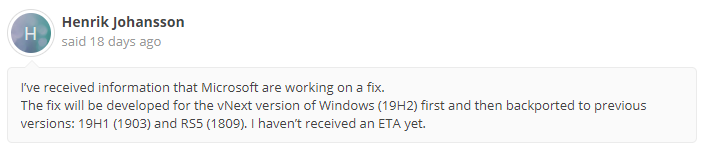
In it, the user @Henrik Johansson mention something interesting on that issue:
It seems that Microsoft are currently working on a fix to solve this issue. For this reason, I would recommend that you watch this forum thread for further updates. We will ensure to do the same in order to be able to inform our community if a fix is indeed found by Microsoft.
As of now, this look promising since the Beta version that was provided to the user by Microsoft seem to have corrected this issue.
Best regards,

James Lafleur
Windows.UI.Update.png
Windows.UI.png