Frequent crashes on 13.0.6.0

Hi, we are seeing some random and fairly frequent (at least daily for most users) application crashes for multiple users with version 13.0.6.0 on Windows 10 x64 (1709 update). Event log application error logs the following:
Faulting application name: RemoteDesktopManager.exe, version: 13.0.6.0, time stamp: 0x5a273d89
Faulting module name: Windows.UI.XamlHost.dll, version: 10.0.16299.15, time stamp: 0x133cf20e
Exception code: 0xc0000409
Fault offset: 0x00005929
Faulting process id: 0x3fb8
Faulting application start time: 0x01d3aaece1da9386
Faulting application path: C:\Program Files (x86)\Devolutions\Remote Desktop Manager\RemoteDesktopManager.exe
Faulting module path: C:\Windows\System32\Windows.UI.XamlHost.dll
Report Id: b4ad8a3e-94b6-4463-b5e7-2ed22c813116
Faulting package full name:
Faulting package-relative application ID:
The crash often happens when attempting to establish a new connection, or closing an existing one. Anyone else see this and have any idea what's wrong?
Edit: Backed by Devolutions server 4.7.0.0 (latest)
All Comments (49)
Hello,
Could you try to run the .Net Framework repair tool on your workstation
https://www.microsoft.com/en-ca/download/details.aspx?id=30135
Best regards,
Jeff Dagenais
Hello,
I ran this, all it found was a need to restart the Windows Installer service. I doubt that makes much of a difference but will report back with findings.
Hi, RDM keeps crashing with the same error. Always happens right after attempting to open a new connection, and always with a reference to Windows.UI.XamlHost.dll in the application event log. Any other ideas?
Is it when you open an RDP connection or another type?
Regards
David Hervieux
Seems to be happening for RDP connections only.
Do you use FreeRDP or the default RDP?
Regards
David Hervieux
Default client shipped with Windows 10 x64 1709
Could you verify if you have those settings?
Regards
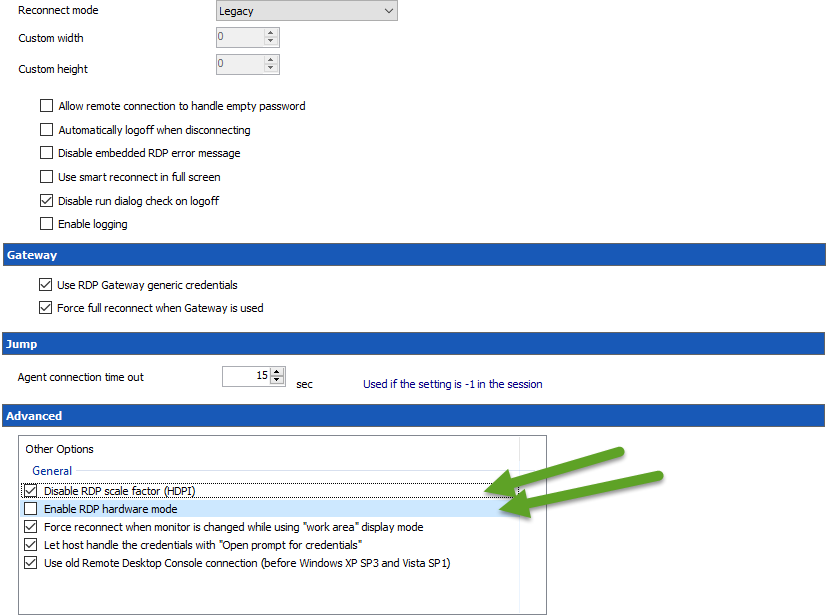
David Hervieux
RDPCrash.png
I did not have the first two options selected. Should they be enabled?
Could you try to Uncheck the first one for a test?
David Hervieux
Hi David, not sure I follow. Both the first two checkboxes are unchecked - should we try enabling them?
I've had the same problem with the same Faulting module path (Windows.UI.XamlHost.dll) for weeks with MS RDCM 2.7 hence why i switched to devolutions RDM. I'm saddened to say that i've had my first crash in RDM too today :(
It seems to happen when the manager reaches a certain memory treshold which happens when I open a lot of RDP's (20+)
The first (and currently only) crash i experienced with RDM happened at 22 RDP's. The MS crashed at 15ish...
@Eric Schenck,
Are you using RDM 32 or 64 bit?
Best regards,
Jeff Dagenais
I've downloaded the free and haven't noticed any option/choice for 32 or 64?
can't see any info in help-about either.. but in help-application logs is see "4.5.0.0 - 32 bits" mentioned
@Eric Schenck,
There's no choice of 32 or 64bit version in the Free Edition of RDM. The 64bit edition is only available using the Enterprise edition.
Best regards,
Jeff Dagenais
Eric,
This could also be a problem with the Microsoft ActiveX. You could try FreeRDP in RDM to see if you can open more connections.
Regards
David Hervieux
@Neonsun
Sorry my mistake. I don't think it will help to check the checkbox.
David Hervieux
euh.. where do i find freeRDP?
I don't see it when creating a new entry and it isn't listed at the addon manager?
Hello Eric,
you can configure it globally in the types settings (RDP) or granular / session specific in the advanced tab (RDP Version)
Regards,
Min
thanks, found it.. sadly that crashes too
time for a reinstall of windows i guess before i continue troubleshooting
Hello, any other suggestions? Our users are getting annoyed with this as it is happening several times a day for users so any ideas for improving the stability would be appreciated.
@Neonsun,
Do you encounter the same issue using Microsoft RDC Manager?
https://www.microsoft.com/en-ca/download/details.aspx?id=44989
I suspect a crash in the Microsoft ActiveX. RDM and RDC Manager use the same ActiveX to establish the remote connection in embedded mode.
Best regards,
Jeff Dagenais
Hi, we can try the RDC manager and see. I'll update the post again with findings.
Seeing same issue (frequent crashing) on 13.5.6.0 64-bit. Crashes only occur during creation of new RDP session (post submission of login prompt)
Seems like other products (mRemoteNG) might be having the same problem (see https://github.com/mRemoteNG/mRemoteNG/issues/853), so this is probably related to the underlying Windows XamlHost component. Error code 0xc0000409 indicates STATUS_STACK_BUFFER_OVERRUN, so seems to be related to memory management?
Indeed it seems to be the same problem. Have you tried FreeRDP?
Regards
David Hervieux
We'll try that now. :)
That didn't take long. Got a new crash with FreeRDP, but now failing module ntdll.dll:
Faulting application name: RemoteDesktopManager64.exe, version: 13.5.8.0, time stamp: 0x5aeb0399
Faulting module name: ntdll.dll, version: 10.0.16299.334, time stamp: 0xe508fc03
Exception code: 0xc0000374
Fault offset: 0x00000000000f879b
Faulting process id: 0x3d74
Faulting application start time: 0x01d3e775b4aae660
Faulting application path: C:\Program Files (x86)\Devolutions\Remote Desktop Manager\RemoteDesktopManager64.exe
Faulting module path: C:\WINDOWS\SYSTEM32\ntdll.dll
Report Id: ee444ca1-150f-48c4-a19d-759630c169e6
Faulting package full name:
Faulting package-relative application ID:
I will ask our dev to check if you can get logs from FreeRDP
David Hervieux
Hi,
To enable FreeRDP's logs, you have to go into File/Options/Types/RDP and check Enable logging.
The log could then be found in /*YourUsersFolder*/AppData/Local/Temp/RDM
Make sure to copy them somewhere else. RDM deletes them when closed normally since logs can get big really fast.
Jonathan Lafontaine
Thanks, we'll try that now.
Hello,
I have attempted to use freerdp, and I am still seeing crashes.
Here is the latest event log.
Log Name: Application
Source: Application Error
Date: 6/15/2018 12:57:55 PM
Event ID: 1000
Task Category: (100)
Level: Error
Keywords: Classic
User: N/A
Computer: LAPTOP-3HU2JPOK
Description:
Faulting application name: RemoteDesktopManagerFree.exe, version: 4.6.0.0, time stamp: 0x5b0da689
Faulting module name: ntdll.dll, version: 10.0.16299.402, time stamp: 0xd826f10d
Exception code: 0xc0000374
Fault offset: 0x00000000000f879b
Faulting process id: 0x4254
Faulting application start time: 0x01d404a6a47c3307
Faulting application path: C:\Program Files (x86)\Devolutions\Remote Desktop Manager Free\RemoteDesktopManagerFree.exe
Faulting module path: C:\WINDOWS\SYSTEM32\ntdll.dll
Report Id: cd356496-a6d8-4017-9cf8-4ce68745d8fd
Faulting package full name:
Faulting package-relative application ID:
Event Xml:
<Event xmlns="http://schemas.microsoft.com/win/2004/08/events/event">
<System>
<Provider Name="Application Error" />
<EventID Qualifiers="0">1000</EventID>
<Level>2</Level>
<Task>100</Task>
<Keywords>0x80000000000000</Keywords>
<TimeCreated SystemTime="2018-06-15T16:57:55.965755500Z" />
<EventRecordID>2493922</EventRecordID>
<Channel>Application</Channel>
<Computer>LAPTOP-3HU2JPOK</Computer>
<Security />
</System>
<EventData>
<Data>RemoteDesktopManagerFree.exe</Data>
<Data>4.6.0.0</Data>
<Data>5b0da689</Data>
<Data>ntdll.dll</Data>
<Data>10.0.16299.402</Data>
<Data>d826f10d</Data>
<Data>c0000374</Data>
<Data>00000000000f879b</Data>
<Data>4254</Data>
<Data>01d404a6a47c3307</Data>
<Data>C:\Program Files (x86)\Devolutions\Remote Desktop Manager Free\RemoteDesktopManagerFree.exe</Data>
<Data>C:\WINDOWS\SYSTEM32\ntdll.dll</Data>
<Data>cd356496-a6d8-4017-9cf8-4ce68745d8fd</Data>
<Data>
</Data>
<Data>
</Data>
</EventData>
</Event>
Hi Gerrard,
Would it be possible for you to send me the RDP logs after a crash?
To enable FreeRDP's logs, you have to go into File/Options/Types/RDP and check Enable logging.
The log could then be found in /*YourUsersFolder*/AppData/Local/Temp/RDM
Make sure to copy them somewhere else. RDM deletes them when closed normally since logs can get big really fast.
Jonathan Lafontaine
Yes, I have enabled logging, next time it crashes, I will copy the files and upload them
Where can I upload the log to? Somewhere secure?
@Gerrard Leach,
You can send us your file(s)/log(s) securely via this link
https://devolutions.sharefile.com/share/getinfo/rff57f59a7134e59b
Best regards,
Jeff Dagenais
Files uploaded
Hello,
Logs has been received and transmitted to Jonathan for investigation.
Thank you!
Best regards,
Jeff Dagenais
Was there ever a solution to this issue? I have a very similar issue.
Not to my knowledge, still occurs regularly.
Hello,
Could one of you monitor the task manager to see how much ressources RDM takes when the crash happens more often?
I've seen in a previous post that it happened when having 20 + RDP sessions opened. So if the memory get topped off, that might be why.
I just want to get the theory out of the way and make sure it is not what is causing ntdll.dll to be faulty.
Regards,
Alexandre Roy
Hi All,
I have the same issue since months ago, any news on this ?
Most of the time indeed it starts if i open more 10+ RDP connections, but sometimes it also happens with the "third" sessions.
Please let us know what the Developers found.
Btw, i did also a Windows Clean install, but its still pressent.
Thanks
@Slider-Override,
I suspect a crash at the Microsoft ActiveX level with the description above.
What version of RDM are you running?
Do you have something relevant in Event Viewer when the crash occurs?
Best regards,
Jeff Dagenais
I use the lates free version = Version: 5.1.3.0 (64bit)
Name der fehlerhaften Anwendung: RemoteDesktopManagerFree.exe, Version: 5.1.3.0, Zeitstempel: 0x5c34e966
Name des fehlerhaften Moduls: Windows.UI.XamlHost.dll, Version: 10.0.17763.1, Zeitstempel: 0x0e34a79b
Ausnahmecode: 0xc0000409
Fehleroffset: 0x000000000000c696
ID des fehlerhaften Prozesses: 0x2070
Startzeit der fehlerhaften Anwendung: 0x01d4b54d1e37f697
Pfad der fehlerhaften Anwendung: D:\OneDrive\Apps\Remote.Desktop.Manager\5.1.3.0\RemoteDesktopManagerFree.exe
Pfad des fehlerhaften Moduls: C:\Windows\System32\Windows.UI.XamlHost.dll
Berichtskennung: 786fd97d-a2b7-4a1b-9bb8-f96cf7150b29
Vollständiger Name des fehlerhaften Pakets:
Anwendungs-ID, die relativ zum fehlerhaften Paket ist:
This is an issue with .NET and it's not related to RDM:
https://github.com/mRemoteNG/mRemoteNG/issues/853
And
https://developercommunity.visualstudio.com/content/problem/352484/buffer-overflow-within-windowsuixamlhostdll-when-p.html
There is not much we can do.
Regards
David Hervieux
Is this problem solved? I see the link to the open case at Microsoft, but last post there is from 7th of February..
@ml01,
As mentioned by David in the post above yours, it's an issue with .Net and it's not related to RDM.
If your Windows workstation is up to date and the issue is still present, unfortunately, you would need to wait from Microsoft to resolve it in a next update.
You can also probably post inside the Microsoft link to get feedback from their end.
Best regards,
Jeff Dagenais
Hi, is this problem solved? I have a project where I use freerdp to establish a remote connection. However, after a while, the application crashes with the following error..png)
Screenshot (107).png
Hello,
What Remote Desktop Manager version are you using?
If you are not using Remote Desktop Manager, as the issue you are experiencing isn't related to our products, you could try the .Net Framework repair tool to see if that will help to fix your problem.
https://kb.devolutions.net/rdm_corrupted_system_file.html
Best regards,
Érica Poirier