taylordev
2026.3.1 - 2026.2.4 - Web apps won't start with Run As Account - Run As Account Attempting Interactive
Thank you, I appreciate the attention to this issue! Option 1 is not possible in our environment (Infosec policies), but we are using option 2 as a workaround for now. I look forward to seeing the results of the bug fix!
2026.3.1 - 2026.2.4 - Web apps won't start with Run As Account - Run As Account Attempting Interactive
[Reposting with fully sanitized screenshot because there's apparently no way to modify a screenshot or edit a post after making it]
Hi there,
New PSU user here. I am working through configuring our server, running PSU as a service on Windows Server, no IIS.
While running the PSU service as local system, I created a web app and configured Run-As credentials to use a domain account and had no issue.
When I moved converted PSU service to run as a service account, as it's documented that this is best practice, my web apps will no longer start. I already tried re-creating the run as account credential secrets while running PSU service as the service account; this is not the issue. The credentials validate successfully. The PSU Service account is a local admin on the server.
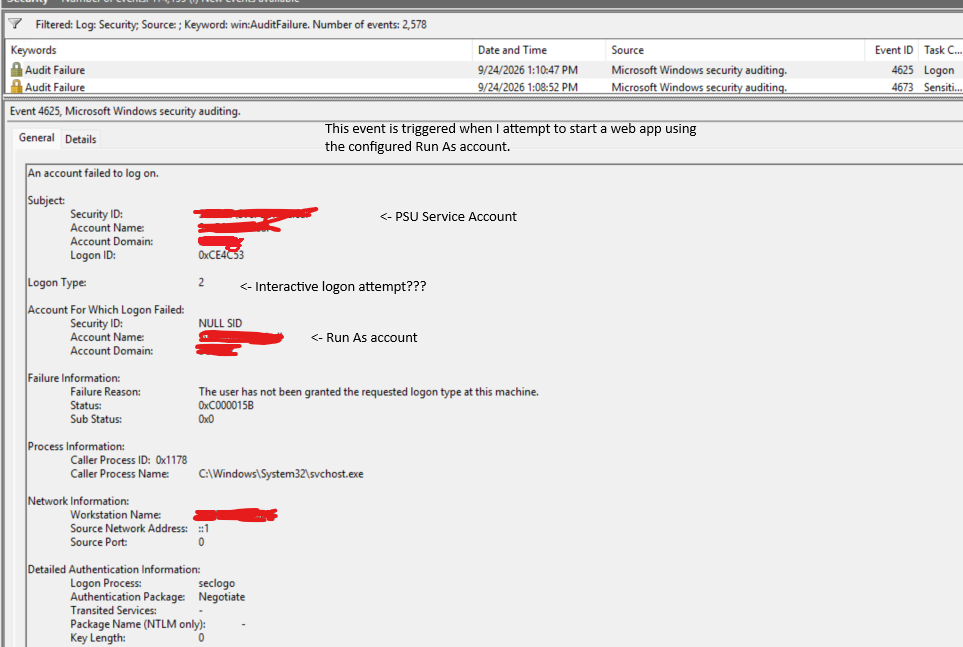
When I look in event viewer, I see that the Run As account is attempting to log into the server interactively (logon type 2), which is something we explicitly block for service account in our environment. Can someone explain to me if this is a bug or by design for some reason?
I don't understand why the Run As account is attempting to log in interactively. See attached screenshot for details.
I had this issue in 2026.2.4 and attempted an upgrade to 2026.3.1 but that did not fix the issue.