
denistiri
2026.3.3 workflowname that ends with whitespace
another thing I noticed: after renaming the workflows:
the workflows, who were linked to schedule. stopped triggering. the next runtime was correct, but it just didn't happen.
after restarting the service, I noticed that the schedules had an empty workflow. I had to relink that.
2026.3.3 workflowname that ends with whitespace
Very minor bug, but if you rename a workflow and you accidentally leave a whitespace as last char, then you can't reach the workflow anymore via the workflow screen (because it links to url without that whitespace) and you get a "not found"
Did $EventData in UDSelect change in 2026.3.0.0?
I removed my .trim solution in 2026.3.3 and it still works, so it seems fixed in 3.3
Did $EventData in UDSelect change in 2026.3.0.0?
Hello @denistiri
Thank you for reporting this.
I reviewed the published changes for PowerShell Universal 2026.3.0.0, and I do not see a documented change indicating that the value returned by $EventData for New-UDSelect -OnChange should now include double quotes.
Since you observed this behavior immediately after upgrading, I would like to validate it as a possible behavioral change before confirming whether it is expected.
We will attempt to reproduce this internally using 2026.3.0.0 and compare the $EventData value returned by the same New-UDSelect configuration against the previous behavior.
Could you please confirm the exact PowerShell Universal version you upgraded from, where the same code was working without requiring .Trim('"')?
References:
https://forum.devolutions.net/topics/56197/devolutions-powershell-universal-version-2026300-september-15-2026
Best regards,
Ruben Tapia
@rubentapia
I went from 2026.2.4 to 2026.3.0
gMSA broken in 2026.3?
I use a gMSA account as well, but I did not really see impact.
My scripts run succesfully.
The PSU service is running as the gMSA
Did $EventData in UDSelect change in 2026.3.0.0?
After updating to 2026.3.0.0 a screen didn't work for me anymore.
After debugging I found that the $EventData variable in the -onchange of the UDSelect now returns "string" instead of string.
So it includes double quotes in the variable itself.
So if I use my UDSelect to select for instance value abcdef then "abcdef" gets returned instead of abcdef in the $EventData
So char 34 in front and in the back.
Is this by design?
I fixed my screen by inserting a .Trim('"') later in the code where I needed that variable.
Continuous workflow runs steps at same time instead of step by step?
Thanks.
Guess I'll have to update sooner to newer releases to avoid lost time :D
Continuous workflow runs steps at same time instead of step by step?
Hi,
Running 2026.2.4
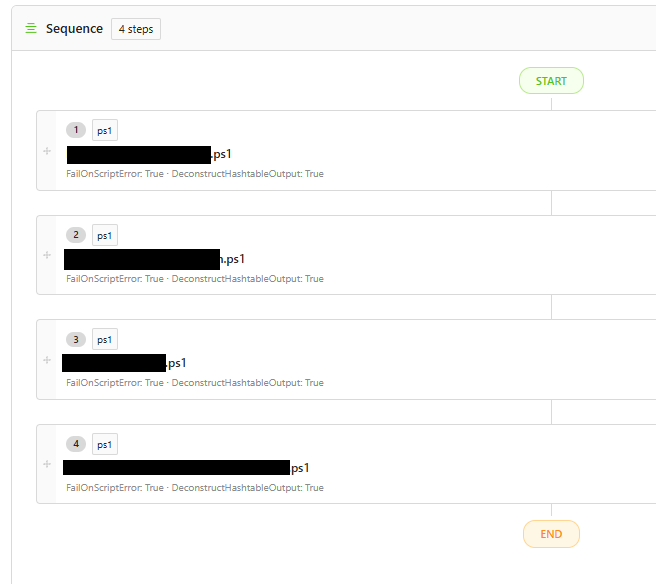
Regular 4 step workflow, see screenshot
Interval is repeat with delay of 10 minuts
It seems to happen to every run
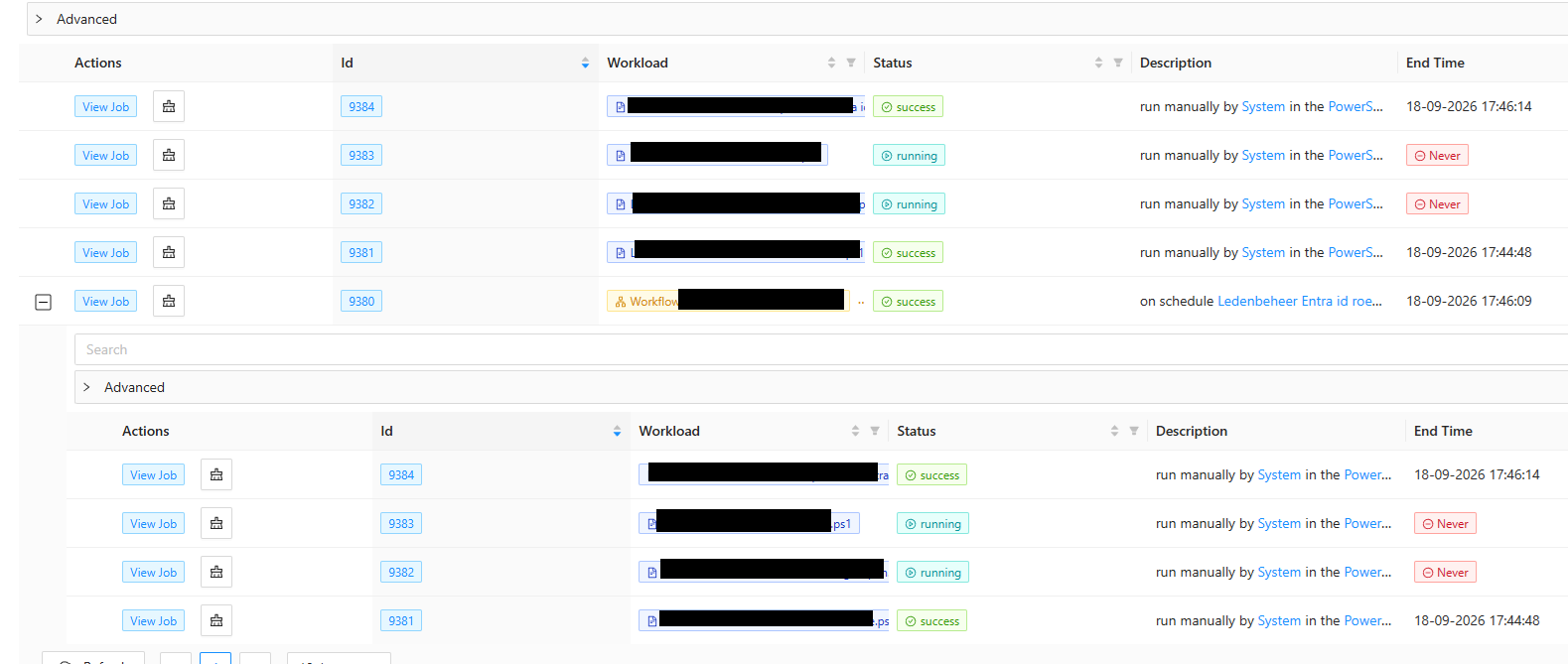
the 4 steps share the same parent job
the steps take some minuts to complete. The biggest (step 2) is 5 minuts and it ends after step 3, who is only 3 minutes.
Continuous workflow runs steps at same time instead of step by step?
I have this problem where I defined a workflow with 4 steps in a continuous schedule, but at least two steps run simultaneously.
Not only in this screen, but I can see live in the Job log due timestamps on that they are actually running at same time.
PSU and SentinelOne
I just wanted to let you know we have issues with PSU and SentinelOne (security platform) on 2026.2.4
Issues started when introducing a continouos schedule workflow (every 10 minutes)
After a few hours the PSU service stopped every time, and we also saw Sentinelctl.exe crashes in eventlog just before the timestamp.
We tried excluding PSU in SentinelOne but that didn't work.
Problem was resolved when completely uninstalling SentinelOne.
So I think we can conclude it was indeed related.