
tompiechota
Portal Permission Issues
PSU Version: 2026.2.5
If a script has been tagged and is displayed in the portal - but doesnt have permissions for execute and the user tries to run it, you just get a script with a preloader/spinner which sits there indefinitely. I'd suggest maybe a permission check on the resource to grey out the 'submit' button to execute in the first place, or alternatively some sort of error message / feedback when the execution tries but fails.
icon search not working
When editing a script, under 'Edit Script Properties' the icon field autocomplete doesnt work.
If you type in 'user' for example, it shows a blank list:
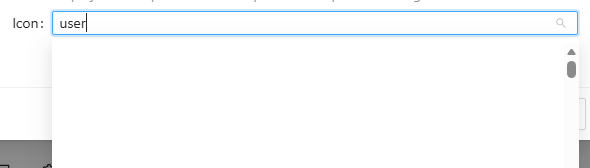
Rather than available options, 'user', 'user-add', 'user-remove' etc
Searching in the portal is case sensitive
PSU version: 2026.2.5
I believe that the Portal search should be case insensitive instead as it can be quite confusing when you don't immediately find results you expect due to casing issues.
UDTable On Row Click
I do this myself but personally just have an extra column with a button on it that opens a model and it serves my purposes.
Get-PSUEndpoint : Status(StatusCode="Unavailable", Detail="Error starting gRPC call
Hey,
Couple of questions that might help others identify your issue:
How/Where are you running the script?
What is your security mode?
Have you tried PSU cmdlets with the -Integrated flag?
Have you tried with with a token?
I've also found GRPC can sometimes be permission related (even though the error is sort of misleading), so ensure that you have the correct permissions to do the actions you're trying.