
jeffreyburdzel
PowerShell Universal - 5.6.13
That did not work either:
2026-01-09 14:05:09.603 -05:00 [ERR] Error deserializing D:\UniversalAutomation\Repository.universal\authentication.ps1. Parameter set cannot be resolved using the specified named parameters. One or more parameters issued cannot be used together or an insufficient number of parameters were provided.
I think the issue is that the -Domain parameter is in a different ParameterSet (Domain) than the -Native Parameter (Form) so it’s failing.
PowerShell Universal - 5.6.13
Hello,
I found a bug in Startup with the latest release. If you are using Form Authentication, and choose Native and Domain from the GUI, the Login Page won’t load the Username and password TextBoxes.
Set-PSUAuthenticationMethod -Type "Form" -ScriptBlock {
param(
        [PSCredential]$Credential
    )

    #
    #   You can call whatever cmdlets you like to conduct authentication here.
    #   Just make sure to return the $Result with the Success property set to $true
    #

    New-PSUAuthenticationResult -ErrorMessage 'Bad username or password'
} -Native -Domain "MyDomain"
The System Log shows this error on Startup:2026-01-09 10:52:59.014 -05:00 [ERR] Error deserializing D:\UniversalAutomation\Repository.universal\authentication.ps1. Parameter set cannot be resolved using the specified named parameters. One or more parameters issued cannot be used together or an insufficient number of parameters were provided.
It looks like maybe the Domain Parameter should be part of the Form Parameter Set?
Let me know if you need any more logs, or any testing to be done!
Thanks!
-Jeff
Best way to use Variables/Secrets in Security (Authentication and Roles)
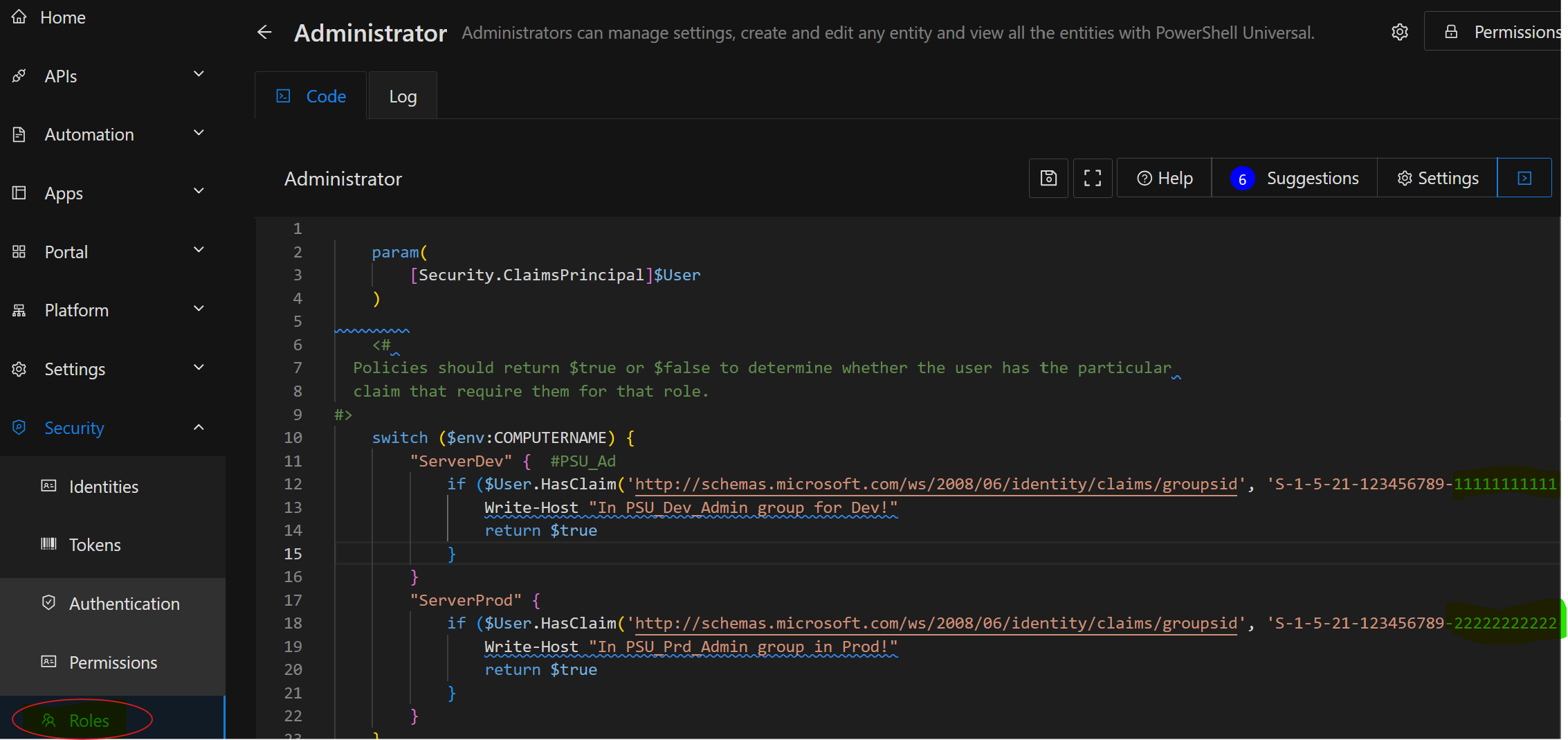
Hi, thanks for the Response! I am working a little earlier in the process when the users are logging in and they are getting their Roles assigned to them, and I think that is my problem. The variables file is getting loaded into PSU after the Security Files are loaded, and possibly loaded in a seperate thread/environment so they aren’t accessible in the Security Scripts since they are loaded earlier in the application startup sequence. I just attached a screenshot of my possible work around for my issue, and hopefully that will explain what I am trying to do better? I might be able to add it in the Initialize.ps1 that I just found a reference to, so I might wander down that path for a bit and see if it’s worth pursuing, or maybe just stick with what I have now.
Thanks again for your response!
-Jeff
Best way to use Variables/Secrets in Security (Authentication and Roles)
Product: PowerShell Universal
Version: 5.6.13
Hello! I am trying to integrate/use AD Groups for Authentication and Setting Roles. I have found the claims that are passed in for the user, so I can get the SID’s of the groups that the user is a member of. I have a Dev and a Prod PSUniversal server, and I am using different AD Groups for each one as I am being much stricter on who has access to my prod installation. I am hoping to re-use as much code as I can, so I don’t want to hardcode the SID’s into the Role checking code, so I was hoping to load the SID information into a HashTable and then store that as a variable (or a secret) that I could then use in the Role script to check against. Ideally I would like to do something like this:
foreach ($Claim in $User.Claims) {
if ($Claim.Value -eq $Roles.Administrator) {
return $true
}
}
The idea is that I can have that same code block in the Administrator Role Script for both environments, but I could just update the $Roles.Administrator value to the SID of the AD Group for Prod or Dev. I tried creating a variable, but it doesn’t seem to be accessible from the Security functions. I thought about setting up Windows Environment Variables, but that would require Admin Rights on the box and I was hoping to do this all through the app. I did see one thread about configuring security to run in a separate PowerShell environment that I could then inject the variables in to, but I feel like that would add a lot of overhead if we had to wait for a PowerShell environment to spin up every time someone logged in?
Hopefully that makes sense.
Let me know if you have any questions on what I wrote and if you have any thoughts on how to accomplish what I am trying to accomplish efficiently! I can also provide some more code for clarity, but didn’t want to bog the thread down too much.
Thanks in advanced!
-Jeff