
schif
Full customization capabilities on secret templates
Hello,
To be able to fully customize a secret, eg. create entry templates with fully customized tabs - fields - checkboxes - requirements - required.
There are many entry templates available but none of the entries fully fill our expectations and the lack of customization makes it a bit difficult.
Currently we can only add custom fields (text/password) on a normally hidden tab that is only visible in advanced view.
If there are "required" fields there then the user with simplified view can't even find it.
Any other item would also be nice --> checkbox /dropdown menu
Ideally we would love to be able to adapt the General tab to cater to our exact setup (adding checkboxes and dropdown menu's as well)
Screenshot:
1: to be able to customize table (rename/add/remove)
2: to be able to customize tabe(rename/remove/add)
3: Customize entries --> customize titles
4: Customize fields --> add remove custom fields --> add checkbox / add password field / add dropdown menu with values (from Devolutions itself like Users or custom) / required yes or no
5: Fully customize table --> Default entries/ hide tabs / remove unused tabs

Allow Devolutions Server Groups to be nested
Hello,
I confirm that would be great !
For example:
You link Devolutions Server to Entra.
You have your enterprise organization represented in Entra by groups (Group MIT, Dev, Team X, Team Y,etc) with a specific naming convention which is not specifically clear/human readable.
I.E -> COMPANY_SITEA_MIT_TEAMX, COMPANY_SITEA_MIT_TEAMY
For secret you should group differently or use a clear naming convention with local DS group like:
MIT - Consultant
MIT - Support
Software - Product A
Where behind it's nested group from Entra:
MIT - Consultant -> COMPANY_SITEA_MIT_TEAMX, COMPANY_SITEA_MIT_TEAMY, COMPANY_SITEB_MIT_TEAMX
Software - Product A -> COMPANY_SITEA_SOFTWARE_TEAMX, COMPANY_SITEA_SOFTWARE_TEAMY, COMPANY_SITEB_SOFTWARE_TEAMX
Another usecase:
You need additional specific group of person which is not present in Entra but in Devolution Server -> Simply add the DS group to an existing DS group which is linked also to other Entra group.
Import and export options in Devolutions Server
Hello,
We have the same issue to import bitwarden CSV to Devolutions Server.
I tried with Google Password CSV but same result as @Jsab :
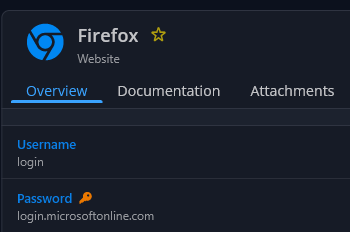
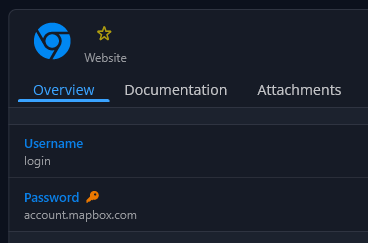
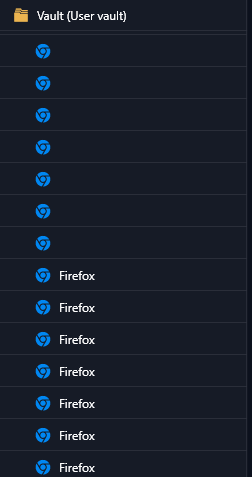
It could be useful to be able to made manual association for each column from the CSV to a specific field in new entry Devolutions server.
Also, be able to made a massive delete could be very helpful in this case.
-> No way to delete all wrong entry in root "user vault", only one-by-one which is problematic.
@Samuel Dery i can provide you a sample if you want.
Alternative:
I tried to export bitwarden and import to keepass + export keepass and import xml keepass to Devolutions Server.
-> Work better but all entries are imported automatically to Website - Legacy instead of new website format.