Import and export options in Devolutions Server

Hi,
Is there a way to import a CSV file into Devolutions Server? I couldn't find the import or export options under Help & Tools.
All Comments (11)
Hello,
Thank you for your feedback.
You can import CSV files when you click on the Add new entry button in a vault.
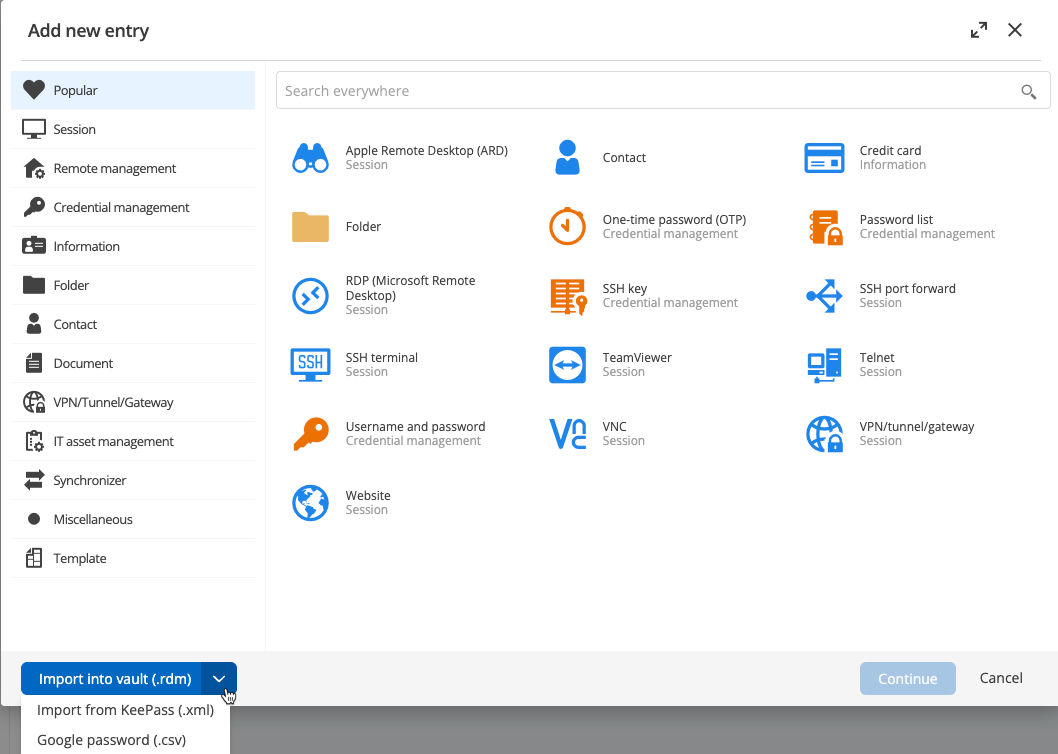
Let us know if that helps.
Best regards,
Érica Poirier
If I have a CSV file, should I pick Google password (.csv)?
And what does “Google password” actually refer to?
Hello,
Thank you for your reply,
Indeed, you can try this options,
It refers to the Google password manager,
From what password manager is your CSV Export from?
Let me know,
Best regards,
Samuel Dery
ok, thanks.
It's from Password state.
Hello,
Thank you for your reply,
No problem, let me know if you have further questions regarding this,
Best regards,
Samuel Dery
Hello,
I tried to import from CSV file but the mapping seemed to import some kind of html in the password field so it did not quite work for me. It seemed to map “Notes” from PasswordState to password!
Hello,
Thank you for your reply,
Do you also use RDM or only the DVLS Web interface?
Let me know,
Best regards,
Samuel Dery