
cliffwilliams44
IMport from Remminna not working
OK, I figured out what the problem is.
When you import an entry, it sets the Display to "External", if you do not have xfreerdp installed (Remmina only installs the libraries, not the binary executable) this doesn't work, you need to set display in the general tab to Embedded (tabbed).
You can do this during the import by clickinfg the Edit button, but this is NOT obvious for anyone not familiar with RDM. It would make sense to me that Embedded should be the default on an import, not External or at least prompt the user.
Installing freerdp-x11 or freerdp-wayland (depending on your system) will allow you do open external sessions.
Another drudgery that you run into when importing a large number of connection is the RDP configuration gets set to "Always ask for credentials" checked. I assume this is because the imported profile does not have a password. While you can do a batch edit for many settings you cannot do a batch edit for the RDP settings, if you have inheritance configured on folders for credentials/OTP, this means you have to touch every entry and turn this off.
IMport from Remminna not working
I atempted to do an import from my remmina configuration files. The import seemed to work fine, fodlers were created etc. When I launched on of the imported entries it asked about an installation path, I chose default and set that as the default.
Now the entry throws an xfreerdp not found.
If I create an entry manually it works.
I even tried exporting an entry from Remmina as a .rdp file, that also gives the same error.
While I don't have a problem manually recreating al my connection, importing them would have been nice.
All I need is host name and folder, did I do something wrong when being promppted for the installation path?
Support 2FA on RDP session with OTP
Gabriel,
I just downloaded and installed the latest version of RDM for Linux and this now works.
Much appreciated!
Support 2FA on RDP session with OTP
I am on the Linux client, I don't have an option for 'prompt'.
Support 2FA on RDP session with OTP
Here is the thing, I don't need all of this. I only need to be able to pass username-XXXXXX to the RDP session. Why won't that work?
I have no credential assigned to my entry and then enter them manually on launch.
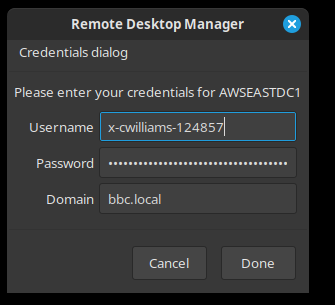
This doesn't work. This works in MSTSC, in Remmina but not in RDM.
Support 2FA on RDP session with OTP
The information you need to enter here is principally the key, which is required for the application generate the OTP. We only support generating Time-based OTP (TOTP), which from looking into it, Authlite does support: https://www.authlite.com/docs/2_3/id_1862925976
Other modes are not supported by RDM, as it's not possible for us to generate the OTP otherwise.
Regards,
@Hubert Mireault
Yes, thiis is how we have ours setup, what I don't understand is where I am supposed to get the value for the key field in the parent folder OTP setup.
Support 2FA on RDP session with OTP
Hello,
Your source is "current session's credentials" which, unless the main section of your entry has an entry with an OTP configured (like the username/password entry with the OTP tab filled out), means there is no valid configuration so the error is to be expected.
Regards,
@Hubert Mireault
Yes, that's where I am confused. what do I do in this form?
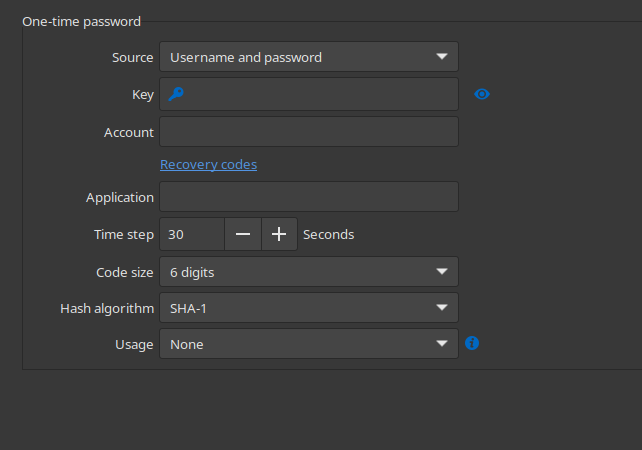
We use AuthLite with the MS Authenticator. I am not sure where to get this information from?
Support 2FA on RDP session with OTP
Hello @cliffwilliams44,
With the error you're encountering, I suspect that the OTP configuration in your entry is incorrect. How did you configure your OTP information in your entry?
Regards,
@Hubert Mireault
I think this is where my consfusion is.
Here is my entry OTP settings

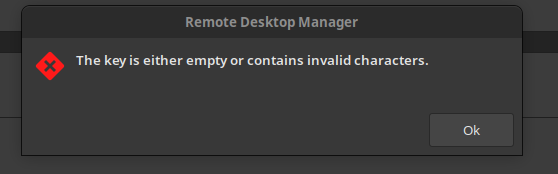
When I try to launch a session for this host I get
Support 2FA on RDP session with OTP
Sorry for revising a year old thread but we use AuthLite as well and I cannot figure out how to make this work.
How do I configure the OTP settings? If I just try to manually enter the information in the credential prompt as username-otp it does not work.
I've tried following these instructions but it doesn't work. It never prompts for the one time passcode.
I get the error "The key is either empty or contains invalid characters".