
damiendaco
REST API - Automation of server entries creation
Hello,
Thank you for your feedback. Yes, I am interested to know your detailed use case. We would like to add an API endpoint to be able to create, update, and delete RDP entries, but manage only a few parameters. Don't hesitate to provide details if some fields are mandatory for you.
Best regards,
@François Dubois
Hi François,
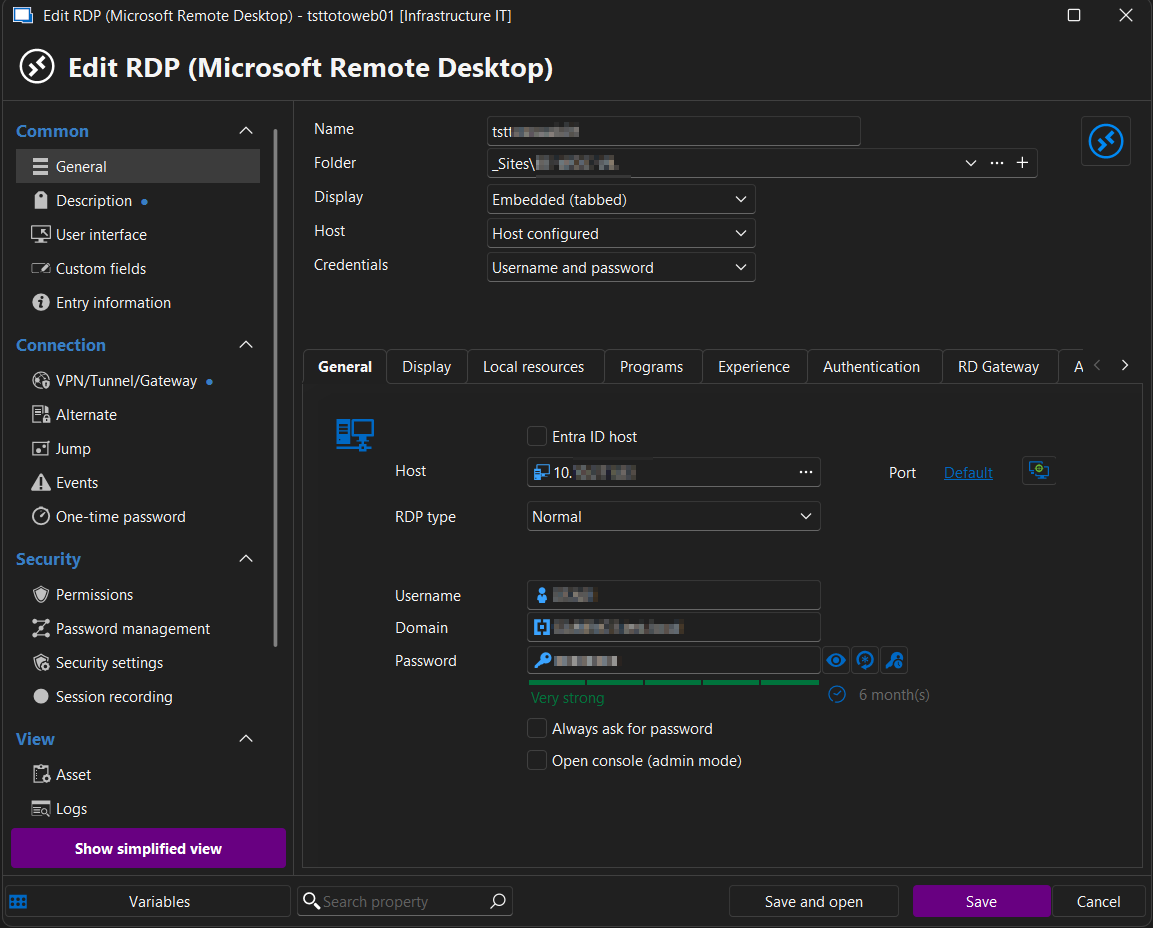
Here is the kind of entry we want to automate :
RDP Session
These are the parameters that we need:
Name : Custom value
Folder : Custom value
Display : Default (Embedded (tabbed))
Host : Default (Host configured)
Credentials : Default (Username and password)
OR :
Credentials : Find by name (user vault)
General tab parameters :
Host : Custom IPv4 address
RDP Type : Normal
Username : Custom user name
Domain : Custom domain name
Password: Custom password
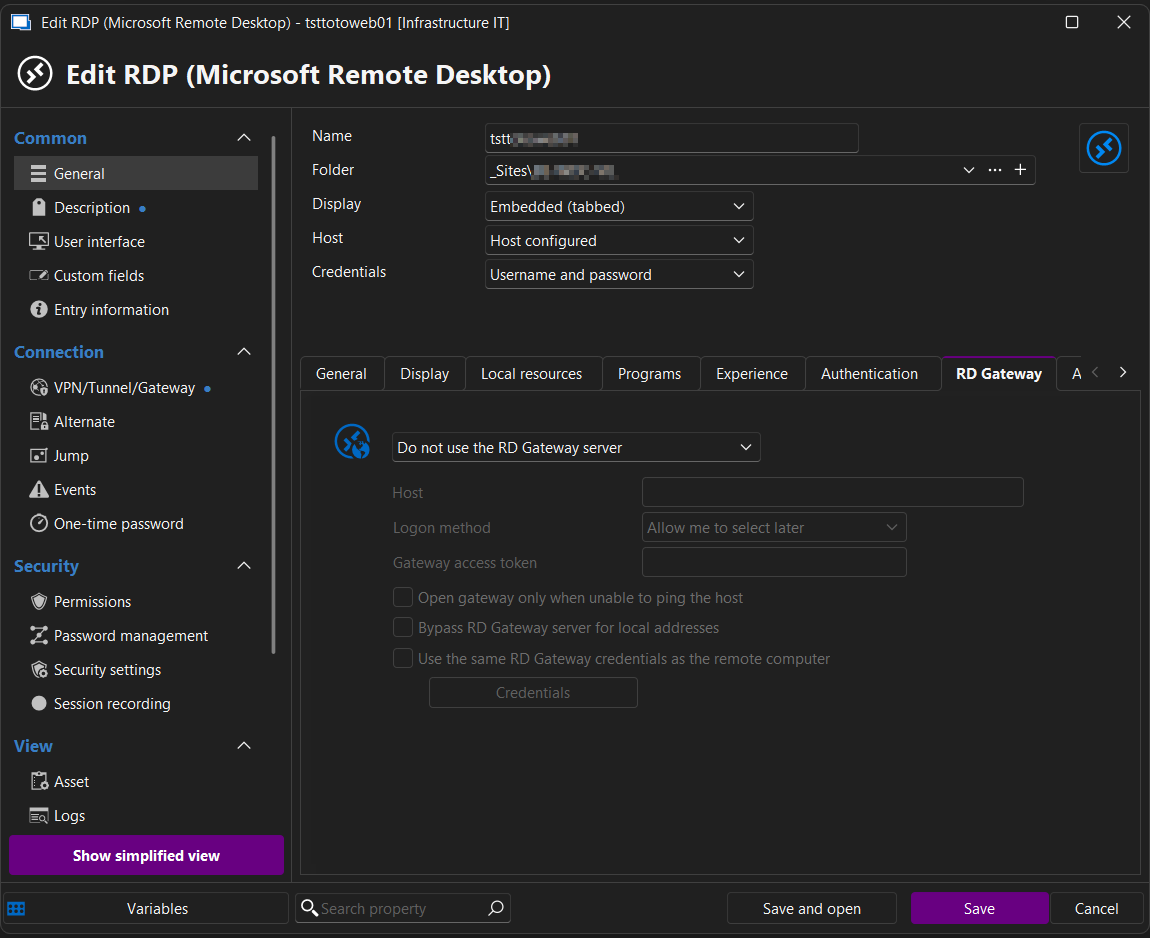
RD Gateway tab:
Automatically detect RD Gateway settings
OR:
Do not use the RD Gateway server
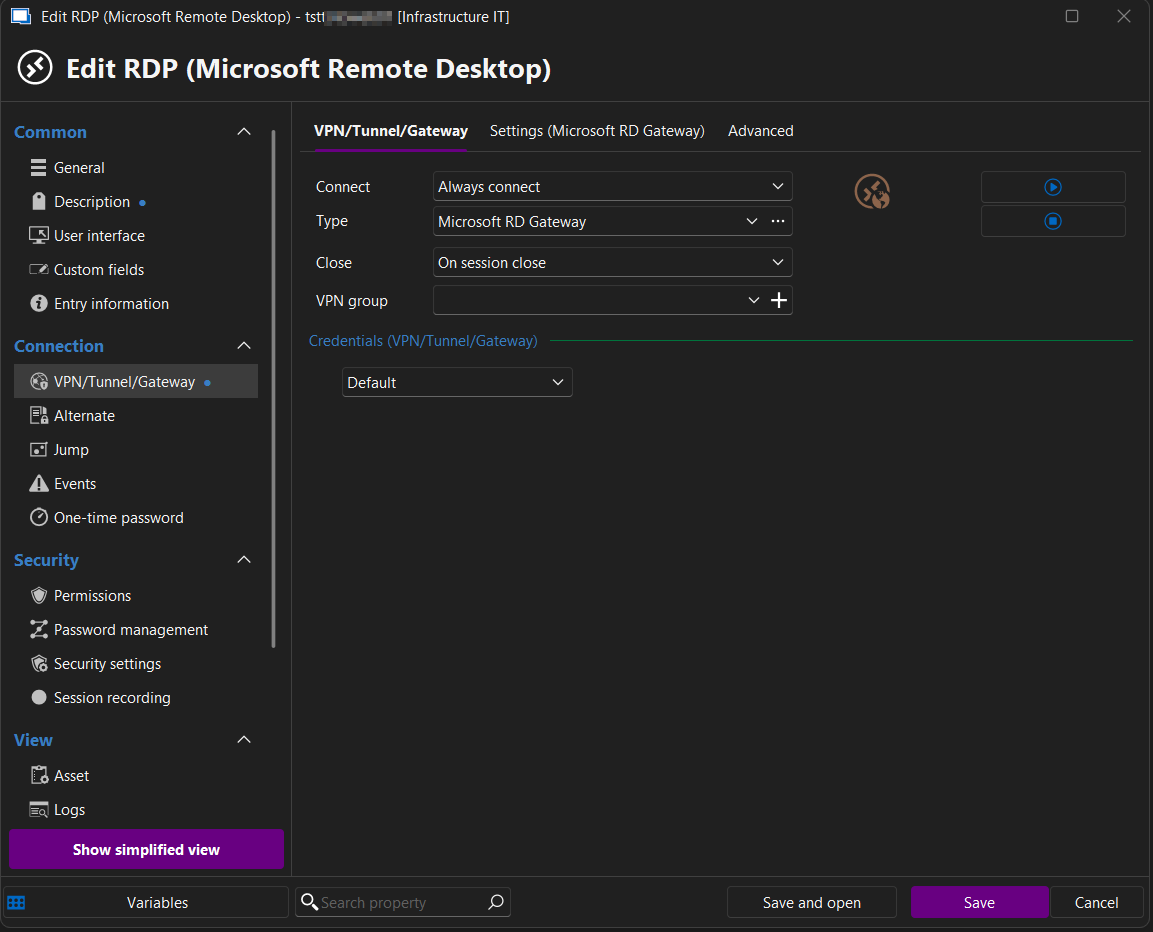
VPN/Tunnel/Gateway tab:
Connect : Always connect
Type: Microsoft RD Gateway
Close : On session close
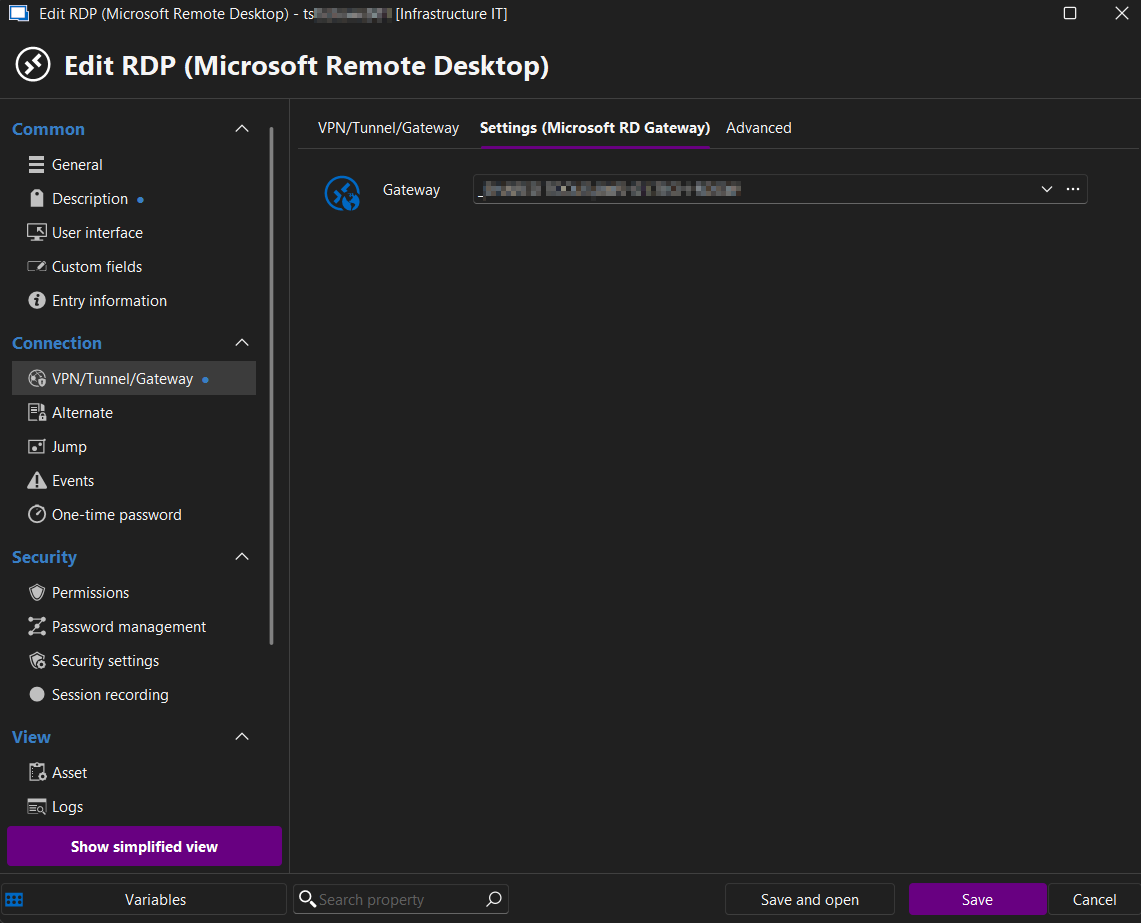
Settings (Microsoft RD Gateway)
Gateway: Custom value
I'll attach some screenshots:
I hope this helps.
If you need further information we can schedule a call.
Best regards,
Damien
REST API - Automation of server entries creation
On our side, we still need to be able to use a REST API to CRUD entries like Windows RDP connections, with parameters like name, credentials and so on
I can give you a more detailed use case if you want.
I did try the Powershell way but it's quite aberrant and anachronic in an environment that mostly relies on unix tools and API calls.
Script to automate entry creation in DVLS
Hi,
I created a script to create entries, for our automation process.
The goal is to be able to call the script with all required parameters, from our Gitlab CI runners.
I tried to create a pull request on your github but I couldn't.
So I'm pasting it here instead, feel free to add it to your collection.
Best regards,
Damien Daco
<#
.SYNOPSIS
Adds a single machine entry to Devolutions Server.
.DESCRIPTION
This script connects to a Devolutions Server instance and adds a new machine entry (RDP, SSH, Web, or VNC)
to a specified vault and folder. Credentials and connection details can be provided via parameters or environment variables.
.PARAMETER ServerUrl
The URL of the Devolutions Server instance.
.PARAMETER VaultId
The ID of the vault where the entry will be added.
.PARAMETER Name
The display name of the machine entry.
.PARAMETER HostName
The hostname or IP address of the machine.
.PARAMETER ConnectionType
The type of connection (RDP, SSH, Web, VNC).
.PARAMETER Folder
The folder name where the entry will be placed.
.PARAMETER Description
(Optional) Description for the entry.
.PARAMETER Username
(Optional) Username for the connection.
.PARAMETER Password
(Optional) Password for the connection.
.PARAMETER Domain
(Optional) Domain for the connection.
.PARAMETER Group
The group or parent folder for the entry.
.EXAMPLE
pwsh Add-Entries.ps1 -Name "tsttotoweb01" -HostName "127.0.0.1" -ConnectionType "RDP" -Folder "TOTO2" -Description "TST TOTO WEB 01" -UserName "DTA01" -Password "Password1234!" -Domain "MY_DOMAIN" -Group "TESTING"
.NOTES
Author: Damien Daco
Version: 1.0
Date: July 10, 2025
#>
[CmdletBinding()]
param (
[ValidateNotNullOrEmpty()]
[string]$ServerUrl = $DVLSUrl,
[ValidateNotNullOrEmpty()]
[string]$VaultId = "00000000-0000-0000-0000-000000000000",
[ValidateNotNullOrEmpty()]
[string]$Name,
[ValidateNotNullOrEmpty()]
[string]$HostName,
[ValidateNotNullOrEmpty()]
[string]$ConnectionType,
[ValidateNotNullOrEmpty()]
[string]$Folder,
[string]$Description,
[string]$Username,
[string]$Password,
[ValidateNotNullOrEmpty()]
[string]$Domain,
[ValidateNotNullOrEmpty()]
[string]$Group
)
# Import the Devolutions Server module if not already imported
try {
if(-not (Get-Module -Name Devolutions.PowerShell -ErrorAction Stop)) {
Write-Host "Importing Devolutions.PowerShell module..." -ForegroundColor Cyan
Import-Module -Name Devolutions.PowerShell -Force -ErrorAction Stop
}
}
catch {
Write-Error "Failed to import Devolutions.PowerShell module: $_"
Write-Host "Troubleshooting steps:" -ForegroundColor Yellow
Write-Host "1. Verify you have permission to install modules" -ForegroundColor Yellow
Write-Host "2. Run 'Install-Module Devolutions.PowerShell -Scope CurrentUser -Force' manually" -ForegroundColor Yellow
Write-Host "3. Check for any PowerShell execution policy restrictions" -ForegroundColor Yellow
exit 1
}
[string]$ApplicationID = $env:DS_USER
[string]$ApplicationSecretKey = $env:DS_PASSWORD
[string]$DVLSUrl = $env:DS_URL
[securestring]$SecApplicationSecretKey = ConvertTo-SecureString $ApplicationSecretKey -AsPlainText -Force
[pscredential]$Creds = New-Object System.Management.Automation.PSCredential ($ApplicationID, $SecApplicationSecretKey)
# Add a new machine entry to Devolutions Server
function Add-MachineEntry {
param (
[string]$Name,
[string]$HostName,
[string]$ConnectionType,
[string]$Folder,
[string]$Description,
[string]$Username,
[string]$Password,
[string]$Domain,
[int]$Port,
[string]$Group,
[string]$VaultId
)
try {
# Check if entry already exists
Write-Host "Checking if entry '$Name' already exists ..." -ForegroundColor Cyan
$ExistingEntry = Get-DSEntry -VaultId $VaultId -FilterValue $Name -ErrorAction SilentlyContinue
if ($ExistingEntry) {
Write-Host "Entry '$Name' already exists. Skipping creation." -ForegroundColor Yellow
exit 0
} else {
Write-Host "Entry '$Name' does not exists. Creating..." -ForegroundColor Green
# Create entry parameters based on connection type
$EntryParams = @{
Name = $Name
HostName = $HostName
Description = $Description
VaultId = $VaultId
Group = $Group
}
if (-not [string]::IsNullOrEmpty($Username) -and -not [string]::IsNullOrEmpty($Password)) {
$EntryParams.Add('Username', $Username)
$EntryParams.Add('Password', $Password)
}
# Add port if specified
if ($Port -gt 0) {
$EntryParams.Add('Port', $Port)
}
# Create entry based on connection type
switch ($ConnectionType.ToLower()) {
"rdp" {
New-DSRDPEntry @EntryParams
}
"ssh" {
New-DSSSHShellEntry @EntryParams
}
"web" {
New-DSWebEntry @EntryParams
}
"vnc" {
New-DSVNCEntry @EntryParams
}
default {
Write-Warning "Unsupported connection type: $ConnectionType. Using generic connection."
New-DSConnection @EntryParams
}
}
Write-Host "Added $ConnectionType entry for $Name" -ForegroundColor Green
}
}
catch {
Write-Error "Failed to add entry for $Name`: $_"
exit 1
}
}
# Main script execution
try {
# Connect to Devolutions Server
$Response = New-DSSession -Credential $Creds -BaseURI $DVLSUrl -AsApplication
Add-MachineEntry -Name $Name -HostName $HostName -ConnectionType $ConnectionType `
-Description $Description -Username $Username `
-Password $Password -Domain $Domain `
-Group "$Group\$Folder" -VaultId $VaultId
# -Port ([int]::TryParse($Machine.Port, [ref]$null) )
Write-Host "Script completed successfully!" -ForegroundColor Green
}
catch {
Write-Error "An error occurred: $_"
exit 1
}
finally {
# Close the connection to Devolutions Server
Close-DSSession
Write-Host "Disconnected from Devolutions Server" -ForegroundColor Cyan
}
PowerShell scripting documentation
Hi Erica,
I'm having the same issues as Marcel.
The official documentation does not really explain anything about actual use cases.
Searching in your forums is very time consuming. Forums aren't meant to be documentation anyway.
The github is lacking examples.
For instance, I would need a full working example on how to create new RDP entries, running non-interactively, for an automation process.
Best regards,
Damien
REST API - Automation of server entries creation
Hi François,
Thanks for your reply.
Ideally we would need to do with via the REST API, because we want to do remote calls from our CI.
But if it's not possible, we can try the PowerShell way.
Can you tell me how these PowerShell tools work? Are they doing remote calls, or are they executed locally on the Devolutions server?
Is there a specific script for machine entry creation ?
Regards,
Damien
REST API - Automation of server entries creation
Hi,
We're using Devolutions server version 2025.1.11.0
We're automating the creation of our environments, and we would like to automate the creation of entries (Adding both Windows and Linux servers within our inventory)
Our automation tool is Gitlab CI.
We can run docker images, Python scripts etc.
Is there a way to create entries with Python?
I google quite a bit but I'm struggling to find the documentation.
Regards,
Damien Daco