REST API - Automation of server entries creation

Hi,
We're using Devolutions server version 2025.1.11.0
We're automating the creation of our environments, and we would like to automate the creation of entries (Adding both Windows and Linux servers within our inventory)
Our automation tool is Gitlab CI.
We can run docker images, Python scripts etc.
Is there a way to create entries with Python?
I google quite a bit but I'm struggling to find the documentation.
Regards,
Damien Daco
All Comments (11)
Hello,
We had a Python SDK in the past, but unfortunately, we removed it. We now focus on PowerShell tools and our public API. You could call our public API with Python. We do support entry creation through our public API, but it is limited to credential types for now. Let us know if you would like to use it for more operations, we work to improve it.
Best regards
François Dubois
Hi François,
Thanks for your reply.
Ideally we would need to do with via the REST API, because we want to do remote calls from our CI.
But if it's not possible, we can try the PowerShell way.
Can you tell me how these PowerShell tools work? Are they doing remote calls, or are they executed locally on the Devolutions server?
Is there a specific script for machine entry creation ?
Regards,
Damien
Hello Damien,
Sorry for the delay. The Powershell module is doing remote calls. You can install it on any host having connection with the Devolutions Server. We don't have a specific script for entry creation, but here is a documentation showing how to connect with Devolutions Server : https://docs.devolutions.net/powershell/dvls-powershell/powershell-connectivity/
You can have a look to cmdlet Get-DSEntry to get an example of your entry, New-DSEntryBase to create entry. Here is an example of what could be done :
$entryId = 'aab16c59-4108-4558-9010-12a086e769dc'
$e = Get-DSEntry -EntryId $entryId -AsRDMConnection

$p = Convert-XMLToPSCustomObject -XML $e.ConnectionInfo.data
$p.Connection | Add-Member -MemberType NoteProperty -Name Description -Value 'New Description' # Added description property
$p.Connection.Name = 'MyNewName' # Updated name property

$xml = Convert-PSCustomObjectToXML -Object $p
$e.ConnectionInfo.Data = $xml.OuterXml

New-DSEntryBase -FromRDMConnection $e.ConnectionInfo
Don't hesitate if you have questions, we will help with pleasure.
Best regards,
François Dubois
Hi - Wanted to ask for the DPS REST API to be brought inline with the functionality of the powershell module. It would greatly simplify configuration management.
Thanks,
Chris. Beck
Hello Chris,
Thank you for your feedback. We would like to be able to perform all operations available in the PowerShell module through the DVLS public API. However, to be honest, it is not something that can be done quickly. In the short term, we plan to add a way to manage the vault through the API and add endpoints to create folders in vaults. Could you give us a list of which operations would be most important to start with? We could try to add a few depending on our other priorities.
Best regards,
François Dubois
We have automated via a REST API from one of our systems and the powershell functionality creating customer folders and servers from templates. It would be even better if we could just use the DPS REST api to perform those CRUD activities.
On our side, we still need to be able to use a REST API to CRUD entries like Windows RDP connections, with parameters like name, credentials and so on
I can give you a more detailed use case if you want.
I did try the Powershell way but it's quite aberrant and anachronic in an environment that mostly relies on unix tools and API calls.
Hello,
Thank you for your feedback. Yes, I am interested to know your detailed use case. We would like to add an API endpoint to be able to create, update, and delete RDP entries, but manage only a few parameters. Don't hesitate to provide details if some fields are mandatory for you.
Best regards,
François Dubois
Hello,
Thank you for your feedback. Yes, I am interested to know your detailed use case. We would like to add an API endpoint to be able to create, update, and delete RDP entries, but manage only a few parameters. Don't hesitate to provide details if some fields are mandatory for you.
Best regards,
I would be happy to get on a call and show you the output of our API endpoint and what we do with powershell and want to be able to do via the rest API
Hello,
Thank you for your feedback. Yes, I am interested to know your detailed use case. We would like to add an API endpoint to be able to create, update, and delete RDP entries, but manage only a few parameters. Don't hesitate to provide details if some fields are mandatory for you.
Best regards,
Hi François,
Here is the kind of entry we want to automate :
RDP Session
These are the parameters that we need:
Name : Custom value
Folder : Custom value
Display : Default (Embedded (tabbed))
Host : Default (Host configured)
Credentials : Default (Username and password)
OR :
Credentials : Find by name (user vault)
General tab parameters :
Host : Custom IPv4 address
RDP Type : Normal
Username : Custom user name
Domain : Custom domain name
Password: Custom password
RD Gateway tab:
Automatically detect RD Gateway settings
OR:
Do not use the RD Gateway server
VPN/Tunnel/Gateway tab:
Connect : Always connect
Type: Microsoft RD Gateway
Close : On session close
Settings (Microsoft RD Gateway)
Gateway: Custom value
I'll attach some screenshots:
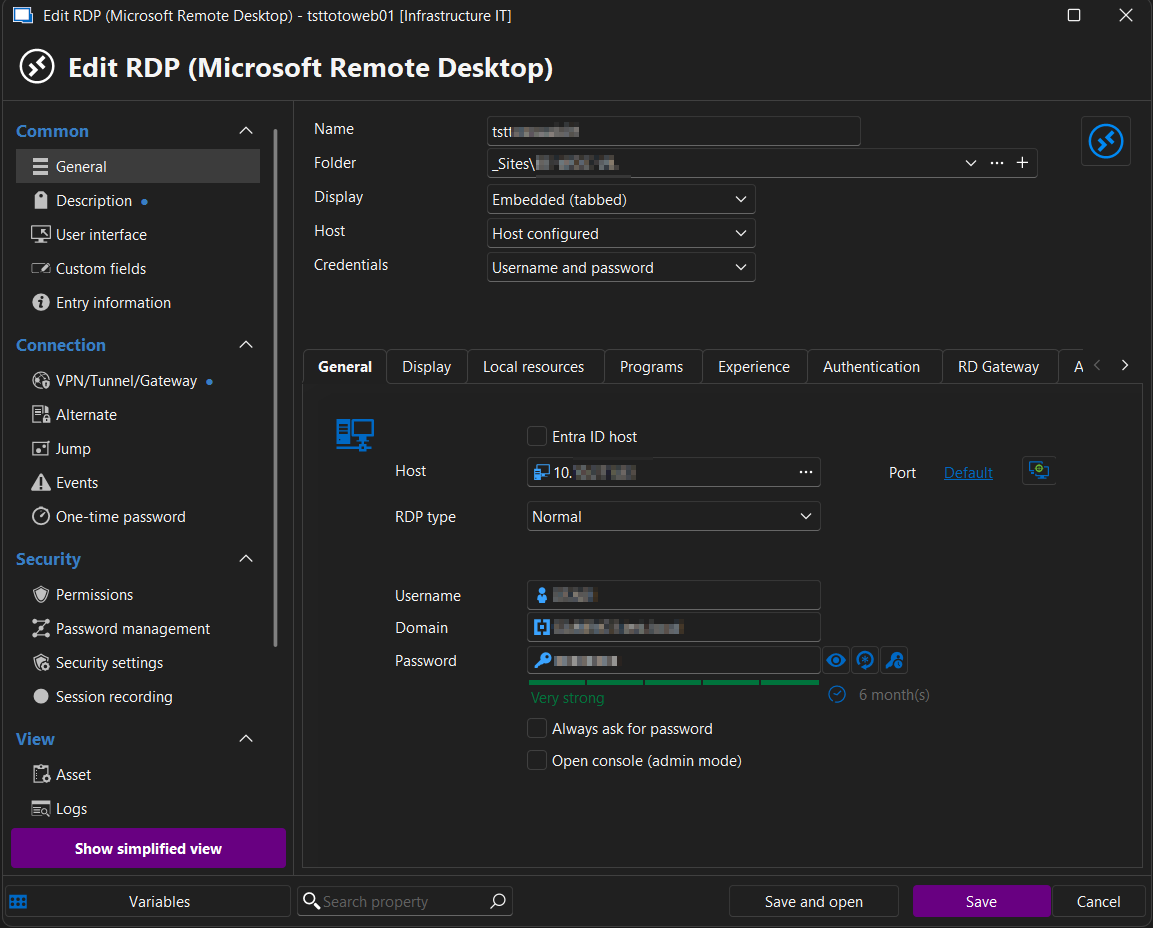
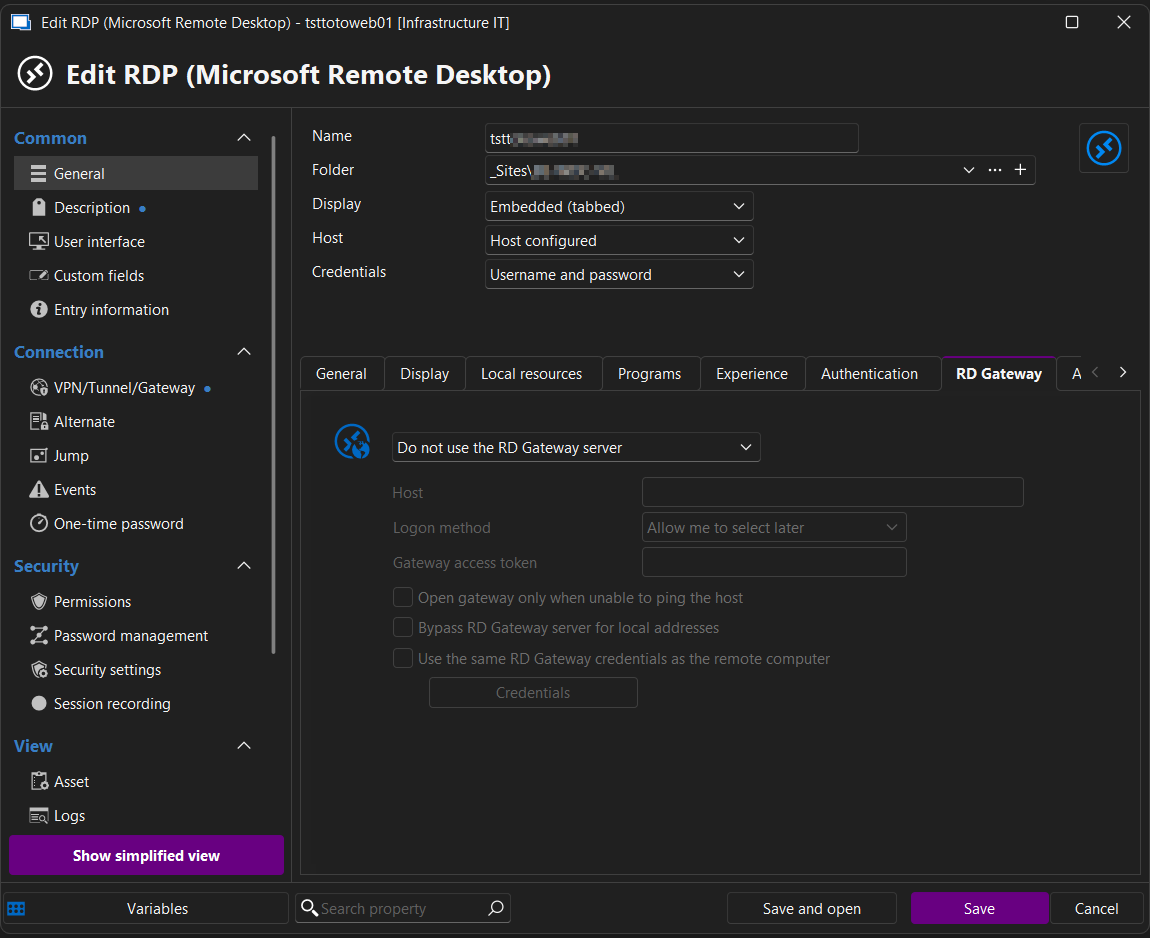
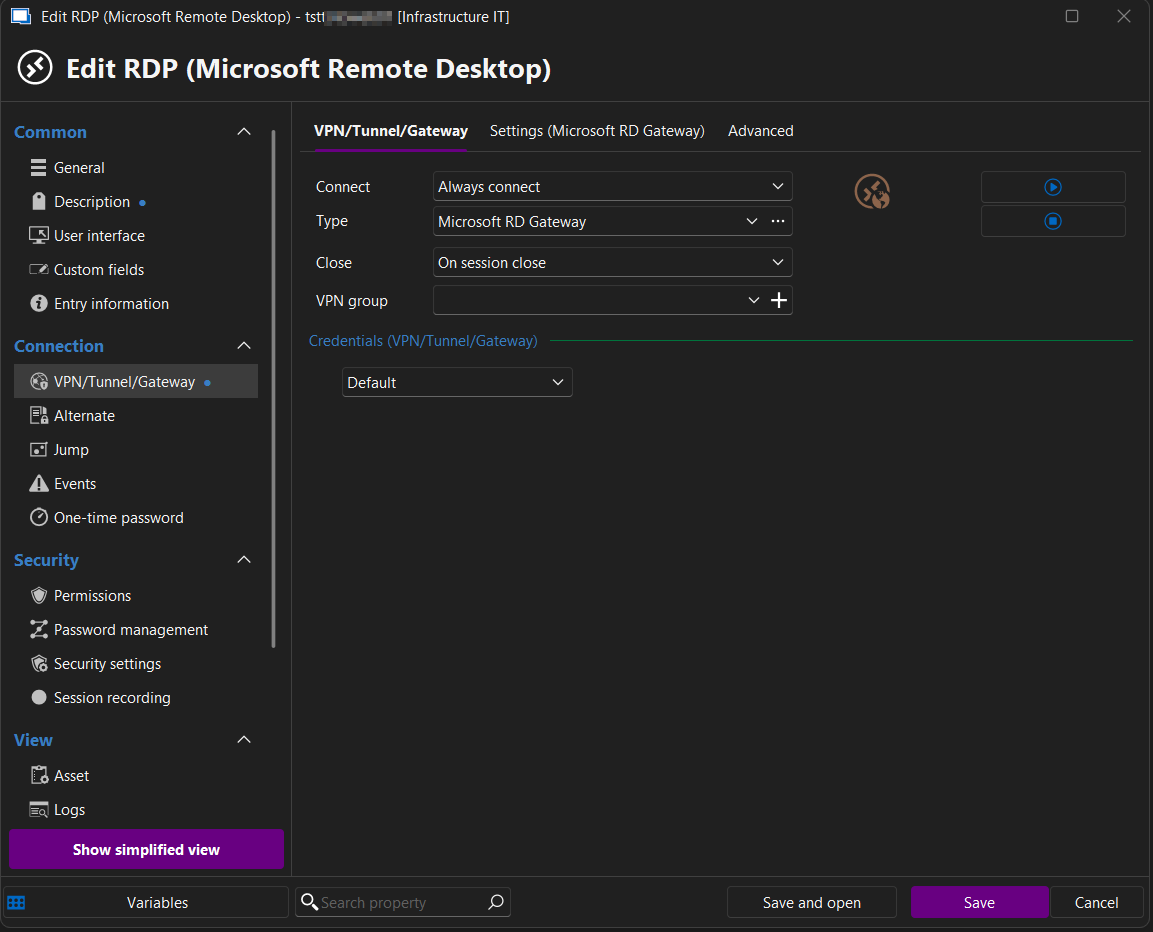
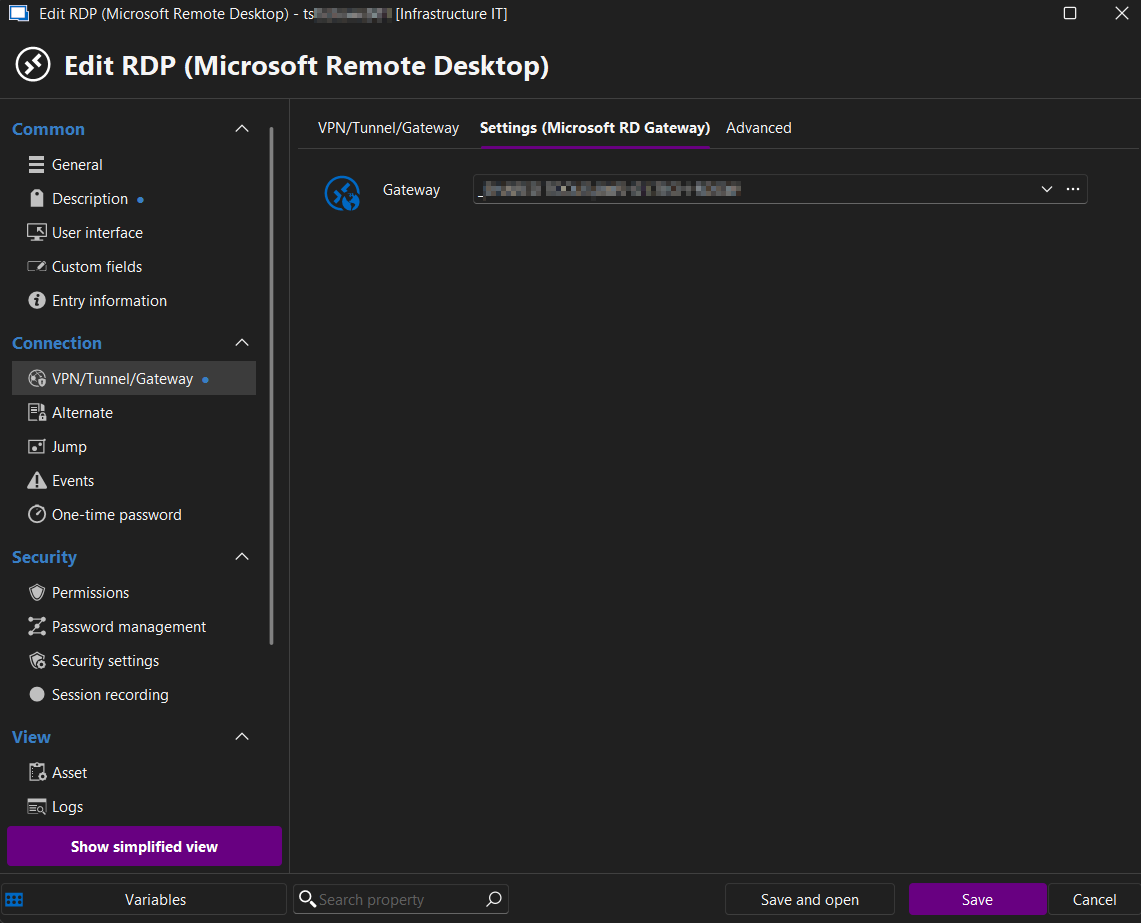
I hope this helps.
If you need further information we can schedule a call.
Best regards,
Damien
Hello Damien,
Thank you for your feedback. It helps clarify the parameters you want to set, and it aligns with what I anticipated. You wish to set numerous parameters that could be challenging at present. For instance, if you want to set the Gateway, you need a method to access the Gateway list with all relevant information through the API to obtain the Gateway ID and configure it in the connection. Nonetheless, we now have a starting point for what you want to set for those connections. Thank you very much for your feedback, we will explore it further and post back here once we have an update.
Best regards,
François Dubois