stanislavmotycka
Possible regression: YubiKey PKCS#11 ECDSA signing on Linux
Ad 1) 2025.2.1.5 (I still install RDM from DEB)
Ad 2) /usr/lib/x86_64-linux-gnu/libykcs11.so
Ad 3) ssh-rsa A**************************************************************************************************************************************************************************************************************************************************************************************************************************************************************************************************************D Public key for PIV Authentication
Ad 4)
- 'Use smart card' is enabled, regarding PIN, I have tried both to set it in entry, and to set it manually, when asked for it during authentication process
- private key or certificate is NOT set in the entry
- 'Use SSH authentication agent' is not enabled
Ad 5) log records:
[11/12/2026 4:23:35 PM] Devolutions.ProtocolsSharp: 2026.9.28.2 OS: Linux
[11/12/2026 4:23:35 PM] SSH session: Failed to initiate PKCS11 ECDSA signing
@stanislavmotycka
Native OpenSSH successfully authenticates using the same PKCS#11 provider as RDM: /usr/lib/x86_64-linux-gnu/libykcs11.so, with the SSH agent disabled (IdentityAgent=none).
The successful sequence is: PIV PIN → YubiKey blinks → touch → server account password → login.
In RDM, after entering the PIV PIN, the YubiKey does not start blinking for touch. The SSH tab closes immediately with Failed to initiate PKCS11 ECDSA signing (ProtocolsSharp 2026.9.28.2, Linux).
USB OTP is disabled and PIV remains enabled. The server requires both public-key and password authentication.
Possible regression: YubiKey PKCS#11 ECDSA signing on Linux
Ad 1) 2025.2.1.5 (I still install RDM from DEB)
Ad 2) /usr/lib/x86_64-linux-gnu/libykcs11.so
Ad 3) ssh-rsa A**************************************************************************************************************************************************************************************************************************************************************************************************************************************************************************************************************D Public key for PIV Authentication
Ad 4)
- 'Use smart card' is enabled, regarding PIN, I have tried both to set it in entry, and to set it manually, when asked for it during authentication process
- private key or certificate is NOT set in the entry
- 'Use SSH authentication agent' is not enabled
Ad 5) log records:
[11/12/2026 4:23:35 PM] Devolutions.ProtocolsSharp: 2026.9.28.2 OS: Linux
[11/12/2026 4:23:35 PM] SSH session: Failed to initiate PKCS11 ECDSA signing
Possible regression: YubiKey PKCS#11 ECDSA signing on Linux
RDM 2026.3.1.2, Devolutions.ProtocolsSharp 2026.9.28.2 fails with:
SSH session: Failed to initiate PKCS11 ECDSA signing
Provider: /usr/lib/x86_64-linux-gnu/libykcs11.so
Explicit PKCS#11 certificate method also fails. The YubiKey starts blinking.
OpenSSH with ssh -vvv -I /usr/lib/x86_64-linux-gnu/libykcs11.so user@host prompts for PIN and authenticates successfully.
The same setup worked in an older RDM version.
Linux distribution: Ubuntu 24.04.5 LTS
2026.3.1.1: 'CTRL+a d' shortcut for 'screen' session detaching doesn't work
CTRL+a d shortcut for session detaching (in 'screen' app) opens rdm machine properties instead of detaching the screen in terminal (in ssh session)
it doesn't work in rdm-2026.3.1.1
it works in rdm-2026.2.2.2
-----
RDM installed on Debian 13.7
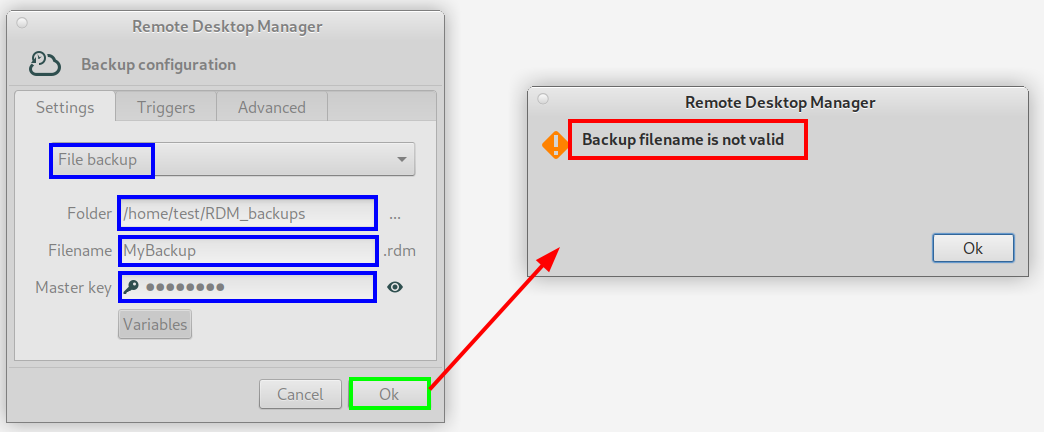
Backup filename is not valid
Linux distro: Debian 12.11
Remote Desktop Manager version: 2025.1.1.5 (installed as deb package)
Problem: Any backup filename isn't accepted in Backup configuration.