
Kyle
Crashing upon starting RDP session
@Simon Duguay Létourneau
Does it only appear when launching an RDP session?
Yes. I can launch a tunnel, and a ssh connection to a gateway without issue, only upon launching a RDP session.
Also, are you using the performance profiler under Help → Performance profiling?
I am not. This is the output from the terminal window that I am launching RDM from. I have just tried to use the Performance profiling, and upon running it, I saw a few messages regarding openvpn. The same messages I see on version 2.1.5 that works.
Here is a portion of the terminal output, that appears on version 2.1.5, this is where the crash is happening on newer versions, but continues on without issue on 2.1.5.
[12:44:11:987] [1933977:001d82fb] [DEBUG][com.freerdp.core.nego] - [nego_connect]: state: NEGO_STATE_NLA
[12:44:11:987] [1933977:001d82fb] [DEBUG][com.freerdp.core.nego] - [nego_attempt_nla]: Attempting NLA security
[12:44:11:987] [1933977:001d82fb] [DEBUG][com.freerdp.core.nego] - [nego_send_negotiation_request]: RequestedProtocols: [SSL|HYBRID][0x00000003]
[12:44:11:085] [1933977:001d82fb] [DEBUG][com.freerdp.core.nego] - [nego_process_negotiation_response]: RDP_NEG_RSP::flags = { [0x1f] |EXTENDED_CLIENT_DATA_SUPPORTED|DYNVC_GFX_PROTOCOL_SUPPORTED|RDP_NEGRSP_RESERVED|RESTRICTED_ADMIN_MODE_SUPPORTED|REDIRECTED_AUTHENTICATION_MODE_SUPPORTED }
[12:44:11:085] [1933977:001d82fb] [DEBUG][com.freerdp.core.nego] - [nego_recv]: selected_protocol: [HYBRID][0x00000002]
[12:44:11:085] [1933977:001d82fb] [DEBUG][com.freerdp.core.nego] - [nego_attempt_nla]: state: NEGO_STATE_FINAL
[12:44:11:085] [1933977:001d82fb] [DEBUG][com.freerdp.core.nego] - [nego_connect]: Negotiated [HYBRID][0x00000002] security
[12:44:11:085] [1933977:001d82fb] [DEBUG][com.freerdp.core.nego] - [nego_try_connect]: nego_security_connect with PROTOCOL_HYBRID
[12:44:11:258] [1933977:001d82fb] [DEBUG][com.freerdp.core.nla] - [nla_set_early_user_auth]: Early User Auth active: false
[12:44:11:258] [1933977:001d82fb] [DEBUG][com.freerdp.core.nla] - [nla_set_state]: -- NLA_STATE_INITIAL	--> NLA_STATE_INITIAL
[12:44:11:258] [1933977:001d82fb] [DEBUG][com.winpr.sspi] - [InitSecurityInterfaceExA]: InitSecurityInterfaceExA
[12:44:11:258] [1933977:001d82fb] [DEBUG][com.freerdp.core.auth] - [credssp_auth_init]: Using package: Negotiate (cbMaxToken: 12256 bytes)
[12:44:11:258] [1933977:001d82fb] [DEBUG][com.freerdp.core.auth] - [credssp_auth_setup_client]: Acquired client credentials
[12:44:11:258] [1933977:001d82fb] [DEBUG][com.winpr.sspi.NTLM] - [ntlm_change_state]: change state from NTLM_STATE_INITIAL to NTLM_STATE_INITIAL
[12:44:11:258] [1933977:001d82fb] [DEBUG][com.winpr.sspi.NTLM] - [ntlm_change_state]: change state from NTLM_STATE_INITIAL to NTLM_STATE_NEGOTIATE
[12:44:11:258] [1933977:001d82fb] [DEBUG][com.winpr.sspi.NTLM] - [ntlm_write_negotiate_flags]: Write flags [0xe20882b7] NTLMSSP_NEGOTIATE_UNICODE|NTLMSSP_NEGOTIATE_OEM|NTLMSSP_REQUEST_TARGET|NTLMSSP_NEGOTIATE_SIGN|NTLMSSP_NEGOTIATE_SEAL|NTLMSSP_NEGOTIATE_LM_KEY|NTLMSSP_NEGOTIATE_NTLM|NTLMSSP_NEGOTIATE_ALWAYS_SIGN|NTLMSSP_NEGOTIATE_EXTENDED_SESSION_SECURITY|NTLMSSP_NEGOTIATE_VERSION|NTLMSSP_NEGOTIATE_128|NTLMSSP_NEGOTIATE_KEY_EXCH
Crashing upon starting RDP session
Just a update. I have since tried just running WLOG_LEVEL=DEBUG remotedesktopmanager on version 2025.3.1.1. And I still got crash. It does not happen I'd say it happens about 50% of the time now upon opening a RDP session.
here is the terminal output. I also am not seeing any log get created.
[10:08:41:954] [1302725:001418bd] [DEBUG][com.freerdp.core.rdp] - [rdp_client_transition_to_state][0x7f5a4800cf20]: CONNECTION_STATE_INITIAL --> CONNECTION_STATE_NEGO
[10:08:41:954] [1302725:001418bd] [DEBUG][com.freerdp.core] - [freerdp_tcp_is_hostname_resolvable]: resetting error state
[10:08:41:955] [1302725:001418bd] [DEBUG][com.freerdp.core] - [freerdp_tcp_default_connect]: resetting error state
[10:08:41:955] [1302725:001418bd] [DEBUG][com.freerdp.core] - [freerdp_tcp_default_connect]: connecting to peer ::1
[10:08:41:955] [1302725:001418bd] [DEBUG][com.freerdp.core.nego] - [nego_connect]: state: NEGO_STATE_NLA
[10:08:41:955] [1302725:001418bd] [DEBUG][com.freerdp.core.nego] - [nego_attempt_nla]: Attempting NLA security
[10:08:41:955] [1302725:001418bd] [DEBUG][com.freerdp.core.nego] - [nego_send_negotiation_request]: RequestedProtocols: [SSL|HYBRID][0x00000003]

(RemoteDesktopManager:1302725): Gtk-WARNING **: 10:08:41.965: Invalid text buffer iterator: either the iterator is uninitialized, or the characters/pixbufs/widgets in the buffer have been modified since the iterator was created.
You must use marks, character numbers, or line numbers to preserve a position across buffer modifications.
You can apply tags and insert marks without invalidating your iterators,
but any mutation that affects 'indexable' buffer contents (contents that can be referred to by character offset)
will invalidate all outstanding iterators

(RemoteDesktopManager:1302725): Gtk-WARNING **: 10:08:41.965: Invalid text buffer iterator: either the iterator is uninitialized, or the characters/pixbufs/widgets in the buffer have been modified since the iterator was created.
You must use marks, character numbers, or line numbers to preserve a position across buffer modifications.
You can apply tags and insert marks without invalidating your iterators,
but any mutation that affects 'indexable' buffer contents (contents that can be referred to by character offset)
will invalidate all outstanding iterators
Segmentation fault         (core dumped) WLOG_LEVEL=DEBUG remotedesktopmanager
Crashing upon starting RDP session
Alright, interesting findings.
I updated and tested on version 2025.3.1.1:
Lauch via .desktop file:
crash upon launching RDP session.
Launch via terminal using remotedesktopmanager which is /usr/bin/remotedesktopmanager
crashes upon launching RDP
terminal output.
[10:21:33:980] [3677221:003823a2] [WARN][com.freerdp.core.rdp] - [log_build_warn_cipher][0x7fb36000fcd0]: *************************************************
[10:21:33:980] [3677221:003823a2] [WARN][com.freerdp.core.nego] - [nego_enable_aad]: This build does not support AAD security, disabling.

(RemoteDesktopManager:3677221): Gtk-WARNING **: 10:21:33.985: Invalid text buffer iterator: either the iterator is uninitialized, or the characters/pixbufs/widgets in the buffer have been modified since the iterator was created.
You must use marks, character numbers, or line numbers to preserve a position across buffer modifications.
You can apply tags and insert marks without invalidating your iterators,
but any mutation that affects 'indexable' buffer contents (contents that can be referred to by character offset)
will invalidate all outstanding iterators

(RemoteDesktopManager:3677221): Gtk-WARNING **: 10:21:33.985: Invalid text buffer iterator: either the iterator is uninitialized, or the characters/pixbufs/widgets in the buffer have been modified since the iterator was created.
You must use marks, character numbers, or line numbers to preserve a position across buffer modifications.
You can apply tags and insert marks without invalidating your iterators,
but any mutation that affects 'indexable' buffer contents (contents that can be referred to by character offset)
will invalidate all outstanding iterators
Segmentation fault         (core dumped) remotedesktopmanager
Launch via WLOG_LEVEL=DEBUG remotedesktopmanager
Able to launch RDP sessions without crashing.
Additional Info:
RDP session goes through a proxyjump host/gateway. Connecting to the proxyjump host directly without activating a RDP session does not crash RDM at all.
GTK Version: Version : 1:3.24.51-1
Crashing upon starting RDP session
Problem:
Starting any RDP session causes Remote Desktop Manager to immediately crash.
OS: Arch Linux
Last known good version: 2025.2.1.5
AUR Git commit hash: bc726c148d2681207126a5d49ce70770a1d42758
Affected versions: All versions after 2025.2.1.5
Steps to reproduce:
Launch Remote Desktop Manager versions greater than 2025.2.1.5 on Arch.
Start any RDP session.
Observe that RDM crashes instantly.
Additional information:
Debug level is set to 1.
No logs appear under Help → Application Logs when the crash occurs.
This issue is consistent across all attempts with affected versions.
If there are any tests you would like me to run, let me know.
SSH agent does not start
Do you have kwallet installed on your machine ? We found that the issue isn't related to KDE, but rather to the KWallet secrets service providers. We were able to get it working by following the steps outlined in this blog.
Please give it a try and let us know if it resolves the issue for you.
Thanks, that pointed me in the right direction
My issue wasn't with KWallet specifically, but it effectively was the same problem. I just assumed that RDM's internal ssh agent would set the SSH_AUTH_SOCK. I’m using gnome-keyring as my secrets provider instead of KWallet and many on Arch + Hyprland + SDDM, getting gnome-keyring to work properly at login is tricky, so I had kind of been putting off addressing it.
Anyway, I got it working now. I used the startup script from the blog you linked, adapted into my own startup.sh script, which I have Hyprland run on session startup. That takes care of launching the keyring daemon with SSH support.
In addition, I added this line to my .bashrc to make sure the SSH_AUTH_SOCK variable is set in terminal sessions:
SSH_AUTH_SOCK=$(gpgconf --list-dirs agent-ssh-socket 2>/dev/null || echo "$XDG_RUNTIME_DIR/keyring/ssh")
Now SSH_AUTH_SOCK is properly set, and RDM is able to use the agent as expected. I’ll probably refine my setup later, but this fix is working well for now. Appreciate the help.
SSH agent does not start
It seems that KDE doesn't start the SSH agent automatically at boot. Since the SSH_AUTH_SOCK environment variable isn't set in the KDE session, the system can't connect to the agent.
One of our team members was able to reproduce the issue, and we may have identified a potential fix. I’ll let you know once we’ve confirmed a solution.
ok. Just a heads up, I am running Arch with Hyprland, no KDE on my specific system. So I am likely getting the same thing. But just wanted to clarify that my system is different from OP's KDE Neon distro.
SSH agent does not start
I forgot to mention that you need to set the Debug Level to 1 in your preferences for the ~/.rdm/RemoteDesktopManager.debug file to be generated.
ah ok, that makes sense. Here is the log.
[5/16/2025 11:32:51 AM]DEBUG SecurityDataSource.IsSupported is False, exiting Devolutions.RemoteDesktopManager.Business.DataSources.SQLiteSecuritySubDataSource
[5/16/2025 11:32:51 AM]DEBUG Migrating data - up to date
[5/16/2025 11:32:57 AM]DEBUG KeyAgentLog LOG_TYPE_VERBOSE: Devolutions Protocols version: 2025.4.9.1 Linux

[5/16/2025 11:32:57 AM]DEBUG KeyAgentLog LOG_TYPE_MESSAGE: No agent socket availableSSH agent does not start
Hello,
You can find the SSH agent logs at: ~/.rdm/RemoteDesktopManager.debug
that file does not exist. I did find something interesting though, but its from 5/8.
Here is the file structure for the .rdm in home dir.
.rdm
00000000-0000-0000-0000-00000dc11114
B69E1FF0-E56F-4011-B208-AB6B7C076DF4
│ PlayList
│ SessionLogs
│ │ │ a7ded21a-fdda-4a92-ba90-ab3ceaf0bc79.log
│ │ └ e746c485-c421-4364-ab06-98fa00fa7588.log
│ │ Favorites.xml
│ └ Mru.xml
Templates
│ ApplicationTray.ico
│ Connections.db
│ Connections.log
│ RemoteDesktopManager.bak
│ RemoteDesktopManager.cfg
│ RemoteDesktopManager.enb
│ RemoteDesktopManager.enc
│ RemoteDesktopManager.exb
│ RemoteDesktopManager.ext
│ RemoteDesktopManager.log
│ RemoteDesktopManager.log.db
│ RemoteDesktopManager.lyt
│ RemoteDesktopManager.stb
└ RemoteDesktopManager.stvI found this log in SessionLogs->e746c485.... (this might be referring to an agent user, as I have a lot of that in my config, referencing agents that have been deleted after the system was setup, etc.)
[5/8/2025 3:15:58 PM] Devolutions Protocols version: 2025.4.9.1 Linux
[5/8/2025 3:15:58 PM] Failed to connect agent, system error: %d
[(2) No such file or directory]
[5/8/2025 3:15:58 PM] Bytes sent: 1268, Bytes received: 1629
[5/8/2025 3:15:58 PM] Packets sent: 4, Packets received: 5
[5/8/2025 3:15:58 PM] Kex completed: 1
Its old. But interesting the only thing mentioning the agent in those files. I might try uninstalling and re-installing without using the AUR.
SSH agent does not start
ok I have updated. bad news.
RDM = 2025.1.1.5
I set the SSH Agent to verbose level 0, 1, and 2, same error. No log output, in terminal, nor in help>application logs. completely empty.
side note, I did try disabling my gnome keyring, to no avail.
SSH agent does not start
ok thank you. i'll keep an eye out.
SSH agent does not start
Was there ever a resolution here? I am experiencing the same issue. No logs are avail. I have included screenshots below. I suspect it's something on a system level.
OS: Arch Linux x86_64
Kernel: 6.14.4-zen1-2-zen
Uptime: 33 mins
Packages: 1567 (pacman)
Shell: bash 5.2.37
Resolution: 2560x1440
DE: Hyprland
Theme: Breeze-Dark [GTK2/3]
Icons: kora-pgrey [GTK2/3]
Terminal: tmux
CPU: Intel i5-6600K (4) @ 4.300GHz
GPU: AMD ATI Radeon RX 6600/6600 XT/6600M
Memory: 6188MiB / 15799MiB

Remote Desktop Manager: 2025.1.1.3
Maybe this is a Wayland issue, as I am pretty confident that OP's distro defaults to wayland.
here is the attempted starting of ssh agent.
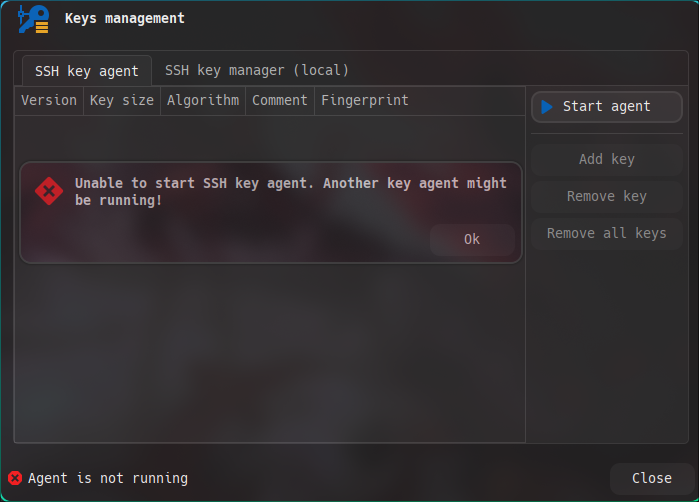
Here is the output that I have from terminal. (I ran RDM from terminal, to see if I can get logs, and tried to launch ssh agent from there)

Here is logs page, and preferences set for logs.
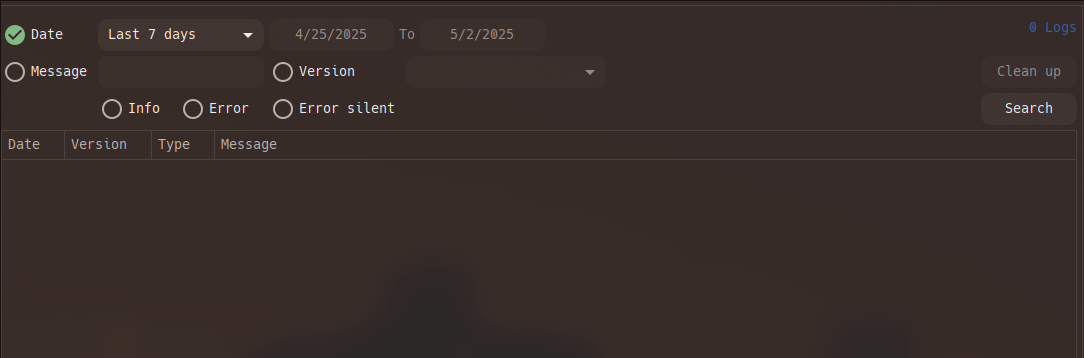
Got this after opening the logs tab, in RDM-- in the terminal.

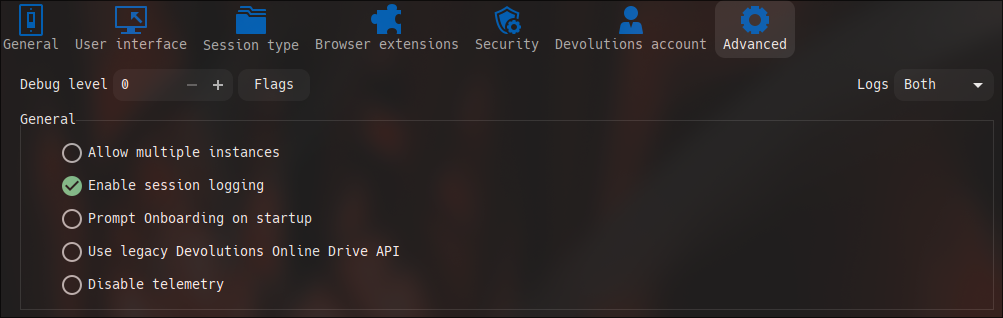
O and here. To show no agent is running.

unable to launch RDM terminal (arch & wayland)
I solved it. Check the last edit.
The issue wasn't that the fonts were not installed, it was that I did not have a backup font enabled in font.conf. I simply had to add a few backups to font.conf and reload the cache. Than all worked well.
unable to launch RDM terminal (arch & wayland)
I believe it is a font issue, but looking at the other posts I was unable to follow the steps that they were able to follow to fix/bypass the issue. Perhaps font is a red-herring here and I have a different issue.
first this is the error I am getting
   at Devolutions.Protocols.Xterm.SetTerminalFont()
   at Devolutions.Protocols.Xterm.GraphicsInit()
   at Devolutions.Protocols.XtermSsh..ctor()
   at Devolutions.Protocols.XtermSshContainer.CreateTerminal()
   at Devolutions.Protocols.XtermContainer..ctor()
   at Client.Views.Embedded.EmbeddedNativeSSHTunnelView.CreateTerminal()
   at Client.Views.Embedded.EmbeddedNativeSSHTunnelView..ctor(EmbeddedConnectionResult result, Builder builder)
   at Devolutions.RemoteDesktopManager.Business.Connectors.EmbeddedNativeSshTunnelConnector.CreateFrame(ConnectionEngine engine, EmbeddedConnectionResult result)
   at Devolutions.RemoteDesktopManager.Business.Connectors.EmbeddedConnector.Connect(Connection connection, OpenConnectionMode openConnectionMode, IForm undockedWindow)
   at Devolutions.RemoteDesktopManager.Managers.ConnectionManager.OpenConnection(ConnectionEngine engine, Connection connection, OpenConnectionParameter parameter, IForm undockedWindow)
   at Devolutions.RemoteDesktopManager.Managers.ConnectionManager.OpenConnections(ConnectionEngine engine, Connection[] connectionList, OpenConnectionParameter parameter, Boolean isPlaylist)
   at Devolutions.RemoteDesktopManager.Managers.ActionManager.DoOpenConnection(ConnectionEngine engine, IConnectionSource source, Connection[] currentConnections, OpenConnectionParameter openConnectionParameter)
   at Devolutions.RemoteDesktopManager.Managers.ActionManager.OpenConnections(ConnectionEngine engine, OpenConnectionMode openConnectionMode, IConnectionSource source, Boolean checkOpenedConnection, Boolean noJump)
   at Devolutions.RemoteDesktopManager.Managers.ActionStateManager.<>c.<get_OpenSessionState>b__368_2(ConnectionEngine engine, IConnectionSource source)
   at Client.Views.Controls.ConnectionTreeView.OnButtonPressed(Object sender, ButtonPressEventArgs arg)
   at InvokeStub_ButtonPressEventHandler.Invoke(Object, Span`1)
   at System.Reflection.MethodBaseInvoker.InvokeWithFewArgs(Object obj, BindingFlags invokeAttr, Binder binder, Object[] parameters, CultureInfo culture)
Steps to reproduce:
initiate any connection that opens a terminal. In my case all connections.
My setup:
Arch Linux, using the AUR package. https://aur.archlinux.org/packages/remote-desktop-manager
Wayland, specifically Hyprland (I have seen other users seem to not have a issue with wayland.. could be wrong? I have also tried running in xwayland mode, I don't think its a wayland issue tbh)
I have gateways that I use as tunnels to access my servers in a enterprise environment. So on windows, I typically just launch a RDP connection which prompts the gateway and the tunnel to activate, which briefly activates a terminal. I believe this launching of a terminal is the problem.
this is the first time I am trying to get RDM working on linux, and overall I am fairly new to RDM. That said I was able too verify all of my connections outside of RDM. I am not 100% sure RDM is configured properly, as I have simply loaded a backup of my windows version on to linux. But I do not believe RDM server configuration to be a issue, as at the very least the backup file works perfect on windows.
I have gone into
file>preferences>session type>terminal>terminal fontand set it as various fonts. Hack font, hack nerd font, and a few others. Font size sitting between 10-14.RDM Version 2025.1.1.3
I am leaning toward it being a font issue. But like I said earlier, the steps I tried to follow in some other posts don't seem to be working and or lining up for me.
Edit: Some more things I have tried.
changed GTK default font to various fonts. Monospace regular, Hack regular, Hack Nerd monospace, all default size as 10...
I open RDM, change the default font inside of the settings for terminal, to match whatever I have for GTK default. restart RDM. same result.
Maybe there is another font source for RDM? Perhaps its pulling a setting from somewhere else on my system, which is why its failing to render.
Edit2: SOLVED!!!!!
Problem: RDM doesn't seem to play well with Hack Nerd Font Mono as the primary system monospace font. On setups like mine (Arch Linux with Hyprland and a minimal config), fonts are often managed manually using a custom fonts.conf.
The fix is to add fallback fonts in your fonts.conf file. This way, if an app like RDM or xterm fails to load your primary font, it can gracefully fall back to a second or third choice without crashing or showing blank text. Just make sure to run fc-cache -fv to reload the cache.
For more details check the wiki. https://wiki.archlinux.org/title/Font_configuration
What really threw me off was the terminal font setting in RDM. I saw something about an override option, but I couldn’t find it, maybe I misunderstood. Either way, setting the terminal font in RDM didn’t seem to make a difference. The issue was with the system not being able to load the font at all, so even if RDM tried to use it, it failed. Once I set up proper fallback fonts in Fontconfig, everything worked fine.