
toni
Session recording rights
I need this feature too
password reset not working on debian 11
there is no sudo package installed on the system
in the provider i use the root user who doesn't need sudo
password reset not working on debian 11
i can do an interactive login with putty
here is a screenshot
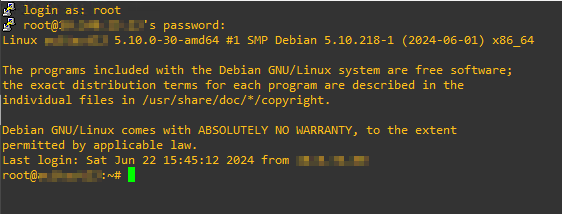
password reset not working on debian 11
i created a ssh local user provider for a debian 11 box with root user credentials
test connection works
scan configuration runs without error but doesn't return any users
i the log i see the following error:
SshExpectException - Time out when trying to find '[sudo] password for root: '
at Devolutions.Server.Helpers.Ssh.SshNetTerminal.Expect(String expectedString)
at Devolutions.Server.Pam.SshCommand.SshExpectation.Execute(PamCredentialBO bo, SshTerminal shell)
at Devolutions.Server.Pam.SshCommand.SshCommandFlow.<>c__DisplayClass7_0.<Execute>b__0(SshBaseElement p)
at System.Collections.Generic.List`1.ForEach(Action`1 action)
at Devolutions.Server.Pam.SshCommand.SshCommandFlow.Execute(PamCredentialBO bo, SshTerminal shell)
at Devolutions.Server.Pam.BO.PamSshCommandBO.Execute(PamCredentialBO bo, SshTerminal ssh)
i manually created a pam user which exists on the debian box and "check synchronization status" is successful
but if i click on "reset password" the following error occurs:
SshExpectException - Time out when trying to find 'password:'
at Devolutions.Server.Helpers.Ssh.SshNetTerminal.Expect(String expectedString)
at Devolutions.Server.Pam.SshCommand.SshExpectation.Execute(PamCredentialBO bo, SshTerminal shell)
at Devolutions.Server.Pam.SshCommand.SshCommandFlow.<>c__DisplayClass7_0.<Execute>b__0(SshBaseElement p)
at System.Collections.Generic.List`1.ForEach(Action`1 action)
at Devolutions.Server.Pam.SshCommand.SshCommandFlow.Execute(PamCredentialBO bo, SshTerminal shell)
at Devolutions.Server.Pam.BO.PamSshCommandBO.Execute(PamCredentialBO bo, SshTerminal ssh)
dvls version 2024.2.3.0
vmware dashboard via gateway
vmware dashboard works now
but the vmrc is not working
if i right click a vm in the dashboard and click connect to establish a vmrc, a new tab opens but it stays blank
console connection mode is set to embedded
i enabled the console proxy in the vcenter
but it didn't help
vmware dashboard via gateway
how can i use vmware dashboard via devolutions gateway ?
if i create a new "vmware dashboard" entry i can only select "devolutions gateway tunnel" but not "devolutions gateway"
i use
rdm 2024.1.29.0
server 2024.1.14.0
gateway 24.2.1
thx
toni