
DayDve
SSH agent does not start
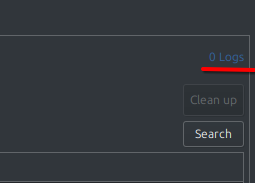
I have no entries in "Application Logs".
If this is important, the program is installed from the Deb package.
No other agents are used.
SSH agent does not start
Hi!
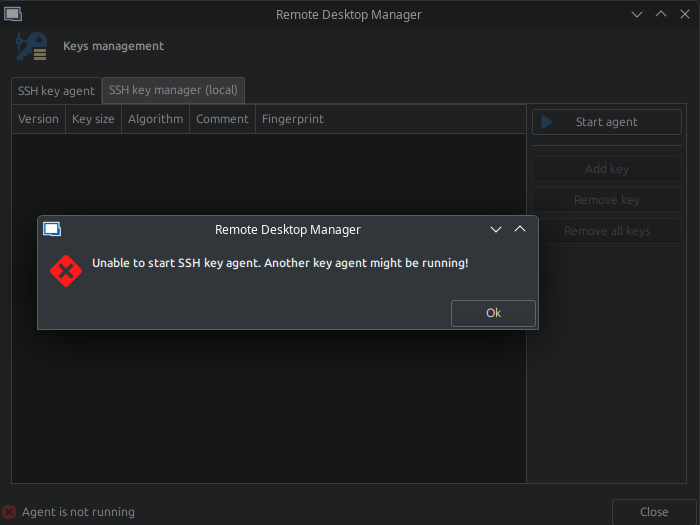
When I try to launch an SSH-key agent, I get an error message that it is not possible to launch an agent, since perhaps another agent has been launched.
Other agents are not launched.
Relaunch of the program does not help.
RDM version: 2025.1.0.15
OS information:
Distributor ID: Neon
Description:    KDE neon 6.3
Release:        24.04
Codename:       noble
PowerShell sessions broken after upgrade RDM to 2025.1.0.12
Hello! I confirm the fix. Now everything works. Thank you very much!
PowerShell sessions broken after upgrade RDM to 2025.1.0.12
Hello!
After upgrading the RDM from version 2024.3.2.5 to the version 2025.1.0.12, sessions based on the PowerShell were broken.
Just blinking the console window and closes.
Using the screenshot, it was possible to "catch" the text of the console window.
The argument '--InputFormatDefault' is not recognized as the name of a script file. Check the spelling of the name, or if a path was included, verify that the path is correct and try again.

Usage: pwsh[.exe] [-Login] [[-File] <filePath> [args]]
                  [-Command { - | <script-block> [-args <arg-array>]
                                | <string> [<CommandParameters>] } ]
                  [-CommandWithArgs <string> [<CommandParameters>]
                  [-ConfigurationName <string>] [-ConfigurationFile <filePath>]
                  [-CustomPipeName <string>] [-EncodedCommand <Base64EncodedCommand>]
                  [-ExecutionPolicy <ExecutionPolicy>] [-InputFormat {Text | XML}]
                  [-Interactive] [-MTA] [-NoExit] [-NoLogo] [-NonInteractive] [-NoProfile]
                  [-NoProfileLoadTime] [-OutputFormat {Text | XML}]
                  [-SettingsFile <filePath>] [-SSHServerMode] [-STA]
                  [-Version] [-WindowStyle <style>]
                  [-WorkingDirectory <directoryPath>]

       pwsh[.exe] -h | -Help | -? | /?

PowerShell Online Help https://aka.ms/powershell-docs

All parameters are case-insensitive.
Environment information:
lsb_release -a
No LSB modules are available.
Distributor ID: Neon
Description:    KDE neon 6.3
Release:        24.04
Codename:       noble
pwsh --version
PowerShell 7.5.0Downgrade the version to 2024.3.2.5 fixed the problem.
Add xdg-desktop-portals support
Some GTK-applications, when run in KDE, may use xdg-desktop-portals to display system file open/save dialogs instead of GTK dialogs.
To do this, just set the environment variable GTK_USE_PORTAL=1 before launching such an application.
However, as far as I understand, RDM does not support portals.
Therefore, setting this variable does not change anything - RDM continues to use GTK-dialogs.
Please add support for xdg-desktop-portals.
GTK-dialogs are poor and primitives.
This application requires Microsoft .NET Framework 4.7. RDM Linux v.2023.3.1.*
Hello.
I installed the program update.
I confirm that the problem has been resolved.
Thank you very much.
This application requires Microsoft .NET Framework 4.7. RDM Linux v.2023.3.1.*
Hello!
Since version 2023.3.1.3, when creating a "powershell" session, or when trying to open the properties of an existing "powershell" session, this error occurs:
"This application requires Microsoft .NET Framework 4.7"

It is not possible to create a new "powershell" session or copy or edit an existing "powershell" session.
Existing "powershell" sessions start and run without errors.
Up until version 2023.3.0.8, this error was not observed, i created/edited "powershell" sessions without problems.
OS information:
PRETTY_NAME="KDE neon 5.27"
NAME="KDE neon"
VERSION_ID="22.04"
VERSION="5.27"
VERSION_CODENAME=jammy
ID=neon
ID_LIKE="ubuntu debian"
HOME_URL="https://neon.kde.org/"
SUPPORT_URL="https://neon.kde.org/"
BUG_REPORT_URL="https://bugs.kde.org/"
PRIVACY_POLICY_URL="https://kde.org/privacypolicy/"
UBUNTU_CODENAME=jammy
LOGO=start-here-kde-neon
Kernel information (uname --kernel-name --kernel-release --kernel-version --machine --processor):
Linux 6.2.0-39-generic #40~22.04.1-Ubuntu SMP PREEMPT_DYNAMIC Thu Nov 16 10:53:04 UTC 2 x86_64 x86_64