
mickohrberg
RDM 2024.1.2.3-1 for Fedora 40 in FIPS mode Cryptography error
Hi,
Unfortunately we figured out that one of the algorithm we use for obfuscation ( TripleDES ) is not supported by FIPS since early 2024.
We will not be able to provide a solution for this issue on our end since it would require an overwhelming amount of work.
You might be able to use RDM if you can enable TripleDES in your supported algorithms policy.
Regards,
Understood - thank you very much for looking into it!
RDM fails to start on Fedora 41, plasma/Wayland, with Nvidia drivers
Good morning!
After renaming the .rdm directory to dot.rdm, remotedesktopmanager starts just fine! My apologies, as that should have been one of the first steps I tried.
Thank you!
RDM fails to start on Fedora 41, plasma/Wayland, with Nvidia drivers
It'll start, show the application window for about a second, then disappear and issue the following:
(RemoteDesktopManager:34469): Gtk-CRITICAL **: 13:59:35.516: gtk_widget_grab_default: assertion 'gtk_widget_get_can_default (widget)' failed
Gdk-Message: 13:59:36.339: Error 71 (Protocol error) dispatching to Wayland display.
Some (perhaps) pertinent packages with versions:
plasma-workspace-wayland-6.2.3-1.fc41.x86_64
xorg-x11-server-Xwayland-24.1.4-1.fc41.x86_64
xorg-x11-drv-nvidia-560.35.03-5.fc41.x86_64
Kernel version 6.11.7-300.fc41.x86_64
Thank you!
Smart Card for Linux
That was exactly what I needed - thank you kindly!
Smart Card for Linux
Greetings! Eagerly awaiting the RDP smart card option for Linux (currently running version 2024.2.2.3) - in the meantime I've played around a bit with the SSH smart card, and after adding the certs per above instructions, upon trying to connect to an SSH host, I get the following:
Dynamic lib error: /usr/lib/devolutions/RemoteDesktopManager/opensc-pkcs11: cannot open shared file: No such file or directory
Unable to load PKCS11 lib: /usr/lib/devolutions/RemoteDesktopManager/opensc-pkcs11
Bytes sent: 1320, Bytes received: 1085
Packets sent: 4, Packets received: 5
Kex completed: 1
Plus a modal box that says:
Error: FAIL
Code: -1
I know I have an opensc-pkcs11.so in /usr/lib64, but there isn't one in /usr/lib/devolutions/RemoteDesktopManager - much less one without the .so suffix. Is this path a configurable item?
Thanks!
RDM 2024.1.2.3-1 for Fedora 40 in FIPS mode Cryptography error
David,
You bet - please see:
# openssl version
OpenSSL 3.2.1 30 Jan 2024 (Library: OpenSSL 3.2.1 30 Jan 2024)
# openssl list -digest-algorithms
Legacy:
  RSA-MD4 => MD4
  RSA-MD5 => MD5
  RSA-RIPEMD160 => RIPEMD160
  RSA-SHA1 => SHA1
  RSA-SHA1-2 => RSA-SHA1
  RSA-SHA224 => SHA224
  RSA-SHA256 => SHA256
  RSA-SHA3-224 => SHA3-224
  RSA-SHA3-256 => SHA3-256
  RSA-SHA3-384 => SHA3-384
  RSA-SHA3-512 => SHA3-512
  RSA-SHA384 => SHA384
  RSA-SHA512 => SHA512
  RSA-SHA512/224 => SHA512-224
  RSA-SHA512/256 => SHA512-256
  RSA-SM3 => SM3
  BLAKE2b512
  BLAKE2s256
  id-rsassa-pkcs1-v1_5-with-sha3-224 => SHA3-224
  id-rsassa-pkcs1-v1_5-with-sha3-256 => SHA3-256
  id-rsassa-pkcs1-v1_5-with-sha3-384 => SHA3-384
  id-rsassa-pkcs1-v1_5-with-sha3-512 => SHA3-512
  MD4
  md4WithRSAEncryption => MD4
  MD5
  MD5-SHA1
  md5WithRSAEncryption => MD5
  ripemd => RIPEMD160
  RIPEMD160
  ripemd160WithRSA => RIPEMD160
  rmd160 => RIPEMD160
  SHA1
  sha1WithRSAEncryption => SHA1
  SHA224
  sha224WithRSAEncryption => SHA224
  SHA256
  sha256WithRSAEncryption => SHA256
  SHA3-224
  SHA3-256
  SHA3-384
  SHA3-512
  SHA384
  sha384WithRSAEncryption => SHA384
  SHA512
  SHA512-224
  sha512-224WithRSAEncryption => SHA512-224
  SHA512-256
  sha512-256WithRSAEncryption => SHA512-256
  sha512WithRSAEncryption => SHA512
  SHAKE128
  SHAKE256
  SM3
  sm3WithRSAEncryption => SM3
  ssl3-md5 => MD5
  ssl3-sha1 => SHA1
  whirlpool
Provided:
  { 2.16.840.1.101.3.4.2.10, SHA3-512 } @ default
  { 2.16.840.1.101.3.4.2.6, SHA-512/256, SHA2-512/256, SHA512-256 } @ default
  { 2.16.840.1.101.3.4.2.4, SHA-224, SHA2-224, SHA224 } @ default
  { 1.3.14.3.2.26, SHA-1, SHA1, SSL3-SHA1 } @ default
  { 2.16.840.1.101.3.4.2.7, SHA3-224 } @ default
  { 2.16.840.1.101.3.4.2.9, SHA3-384 } @ default
  { 2.16.840.1.101.3.4.2.3, SHA-512, SHA2-512, SHA512 } @ default
  { 2.16.840.1.101.3.4.2.5, SHA-512/224, SHA2-512/224, SHA512-224 } @ default
  { 2.16.840.1.101.3.4.2.12, SHAKE-256, SHAKE256 } @ default
  { 2.16.840.1.101.3.4.2.2, SHA-384, SHA2-384, SHA384 } @ default
  { 2.16.840.1.101.3.4.2.8, SHA3-256 } @ default
  { 2.16.840.1.101.3.4.2.1, SHA-256, SHA2-256, SHA256 } @ default
  { 2.16.840.1.101.3.4.2.11, SHAKE-128, SHAKE128 } @ default
  { 2.16.840.1.101.3.4.2.10, SHA3-512 } @ fips
  { 2.16.840.1.101.3.4.2.6, SHA-512/256, SHA2-512/256, SHA512-256 } @ fips
  { 2.16.840.1.101.3.4.2.4, SHA-224, SHA2-224, SHA224 } @ fips
  { 1.3.14.3.2.26, SHA-1, SHA1, SSL3-SHA1 } @ fips
  { 2.16.840.1.101.3.4.2.7, SHA3-224 } @ fips
  { 2.16.840.1.101.3.4.2.9, SHA3-384 } @ fips
  { 2.16.840.1.101.3.4.2.3, SHA-512, SHA2-512, SHA512 } @ fips
  { 2.16.840.1.101.3.4.2.5, SHA-512/224, SHA2-512/224, SHA512-224 } @ fips
  { 2.16.840.1.101.3.4.2.12, SHAKE-256, SHAKE256 } @ fips
  { 2.16.840.1.101.3.4.2.2, SHA-384, SHA2-384, SHA384 } @ fips
  { 2.16.840.1.101.3.4.2.8, SHA3-256 } @ fips
  { 2.16.840.1.101.3.4.2.1, SHA-256, SHA2-256, SHA256 } @ fips
  { 2.16.840.1.101.3.4.2.11, SHAKE-128, SHAKE128 } @ fips
#
Thank you!
RDM 2024.1.2.3-1 for Fedora 40 in FIPS mode Cryptography error
Hello,
I have created a ticket, and we will investigate this issue. We will keep you updated.
Gabriel,
Thank you very much!
RDM 2024.1.2.3-1 for Fedora 40 in FIPS mode Cryptography error
In trying to connect to an existing Google Drive configuration (created with Windows version) from linux, I get the following error:
OpenSslCryprographicException - error:0308010C:digital envelope routines::unsupported
   at Interop.Crypto.CheckValidOpenSslHandle(SafeHandle handle)
   at System.Security.Cryptography.TripleDesImplementation.CreateTransform(Byte[] rgbKey, Byte[] rgbIV, Boolean encrypting)
   at Devolutions.Utils.ObfuscationUtils.GetEncryptorTransform(String key)
   at Devolutions.Utils.ObfuscationUtils.ObfuscateInternal(Byte[] bytes, String key)
   at Devolutions.Utils.ObfuscationUtils.Obfuscate(Byte[] bytes, String key)
   at Devolutions.RemoteDesktopManager.Business.RDPConnection.set_Password(String value)
   at Client.Views.Connections.ConnectionSettings.RDPConnectionSettingsView.SaveInConnection(Connection connectionToSave)
   at Client.Windows.ConnectionSettings.BaseConnectionSettingsWindow.Save()
   at InvokeStub_EventHandler.Invoke(Object, Span`1)
   at System.Reflection.MethodBaseInvoker.InvokeWithFewArgs(Object obj, BindingFlags invokeAttr, Binder binder, Object[] parameters, CultureInfo culture)
Also:
# update-crypto-policies --show
FIPS:AD-SUPPORT:SHA1
# fips-mode-setup --check
FIPS mode is enabled.
Initramfs fips module is enabled.
The current crypto policy (FIPS:AD-SUPPORT:SHA1) is based on the FIPS policy.
#
Any troubleshooting steps I can take, please let me know.
Thank you in advance!
RDM 2023.3.1.3_x86_64 libvte requirement
I've been informed that the hotfix should be live right now, RDM version 2023.3.1.4.
David,
Yessir, it's installing perfectly fine now :) Thanks!
RDM 2023.3.1.3_x86_64 libvte requirement
Yes unfortunately we shipped the latest version with a dependency issue. We are shipping a hotfix as I speak so be on the lookout for another update soon.
David,
Most excellent - thank you!
RDM 2023.3.1.3_x86_64 libvte requirement
I just downloaded rhe x86_64 RPM of RDM 2023.3.1.3 to upgrade my currently installed 2023.3.0.8-1.x86_64, on Fedora 39, and getting this error:
# yum update ./RemoteDesktopManager_2023.3.1.3_x86_64.rpm
Last metadata expiration check: 2:21:12 ago on Wed Dec 20 10:55:54 2023.

Dependencies resolved.

 Problem: cannot install the best update candidate for package RemoteDesktopManager-2023.3.0.8-1.x86_64

  - nothing provides libvte-2.91-0 needed by RemoteDesktopManager-2023.3.1.3-1.x86_64 from @commandline

================================================================================
 Package                  Arch       Version             Repository        Size
================================================================================
Skipping packages with broken dependencies:

 RemoteDesktopManager     x86_64     2023.3.1.3-1        @commandline     260 M

Transaction Summary
================================================================================
Skip  1 Package

Nothing to do.

Complete!
#
Looking at what I have installed though, I do have vte 2.91, just under a different name:
# rpmquery -a | grep vte291
vte291-0.74.1-1.fc39.x86_64
# rpmquery -al vte291 | grep libvte
/usr/lib64/libvte-2.91.so.0
/usr/lib64/libvte-2.91.so.0.7400.1
#
I don't have a Debian system to test on, so I cannot say if .deb packages would exhibit the same behavior.
Thinking I'm overlooking something on my end, but can't figure out what. Any input would be greatly appreciated. Thanks!!
Smart Card for Linux
Simon,
That would be fantastic, and much appreciated!
Smart Card for Linux
Oh I see!
So I started my own ssh-agent, made sure SSH_AUTH_SOCK was correctly set, and then started remotedesktopmanager from the command line, and now the ssh agent starts up/connects perfectly. I can thus add pkcs11 certs from my smartcard from the command line (ssh-add -s /usr/lib64/opensc_pkcs11.so in my case) , but the GUI doesn't appear to allow adding anything other 'regular' files. The option to add smartcard certs in the GUI would be a fantastic convenience!
Smart Card for Linux
Simon - thank you!
Got it for RDP, thanks! As for the SSH agent, it makes sense - except when I try to start the agent, since one was started at login, I get an error that another agent is running.
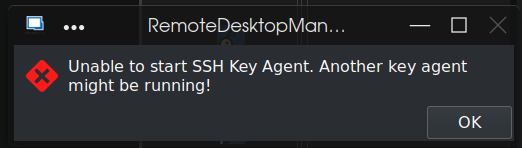
That ssh-agent is currently in a [defunct] state and the associated /tmp/ssh-* directory is removed - that's why I was curious as to the possibility of either attaching to an existing ssh-agent ($SSH_AUTH_SOCK & $SSH_AUTH_PID), or starting a separate ssh-agent (there can be multiple running, even if that's not optimal).
Thank you!
Smart Card for Linux
Greetings! Just discovered this neat product! My main desktop is a RedHat variant, and I'm wondering if I just need to RTFM some more, or if I've simply missed how use smart cards for SSH and RDP connections - or, is that possible in Linux?
On a side note - is there a way to attach to an existing ssh-agent?
Thanks in advance!