
p_zwet
Create Entry / Folder / Permission - Devolution Server Vault
Great thanks!
Create Entry / Folder / Permission - Devolution Server Vault
Hi Richard,
See pictures below.
The Principals are:
4f55fb27-c0fc-4e5b-b2b9-f5678efdede6 = Outcom of: $RoleID = $((Get-DSRole -All).data | Where-Object {$_.name -like "*Domain Group"}).id
adae0f16-39f1-4967-92fa-7f4a10526c90 = Outcom of: $UserID = $((Get-DSUser -All).data | Where-Object {$_.name -like "$($VaultFolder)@*"}).id
So I am for sure the f978ba6c-a68d-45bc-9678-2f06d2855b7b is the Powershell application :)
But how to retrieve it by name....
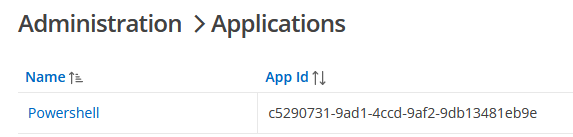
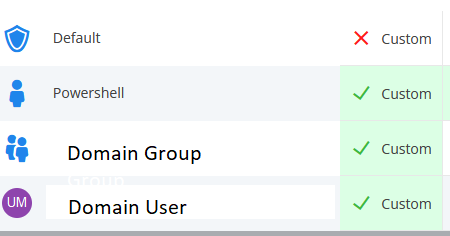

Only Powershell has Access

Create Entry / Folder / Permission - Devolution Server Vault
Thanks, then… it is not de appliication Id I am looking for.
when adding permissions true the gui I can select users, groups and the created application.
when setting the rights true the gui en listing them with powershell I see another Id than the application id.
Create Entry / Folder / Permission - Devolution Server Vault
Wich command do we need to use to get de application ID.
So we can you de
Get-DSRole for Groups
Get-DSUser for Users
Application ?
Create Entry / Folder / Permission - Devolution Server Vault
Thanks for the fast reply.
do you have more info about the $userID1 and $UserId2 including RoleId$
I think I need to lookup the existing user and Role in Devolution to get the Ids?
Create Entry / Folder / Permission - Devolution Server Vault
We have the capability to create an entry (Username/Password) in a Devolution Server Vault using the latest Devolution PowerShell module, specifically with the Get-DSEntry and New-DSEntry cmdlets.
We are seeking guidance on how to accomplish the following tasks:
Create a Folder in the Devolution Server Vault
Vault Name: TestVault
Option to create a folder named "X"
Set Permissions on the Newly Created Folder "X"
Either remove all permissions or disable inherited permissions
Add Permissions for User Domain\UserX