Create Entry / Folder / Permission - Devolution Server Vault

We have the capability to create an entry (Username/Password) in a Devolution Server Vault using the latest Devolution PowerShell module, specifically with the Get-DSEntry and New-DSEntry cmdlets.
We are seeking guidance on how to accomplish the following tasks:
- Create a Folder in the Devolution Server Vault
- Vault Name: TestVault
- Option to create a folder named "X"
- Set Permissions on the Newly Created Folder "X"
- Either remove all permissions or disable inherited permissions
- Add Permissions for User Domain\UserX
All Comments (10)
Hello,
For the folder creation, you can use the following:
$vaultid = $((Get-DSVault -All).data | where {$_.name -eq 'TestVault'}).id
$Folder = New-DSFolder -Name 'X' -VaultID $vaultid
For setting the permission, you can set them with the following, it will remove inherited at the same time:
$folderid = (Get-DSEntry -FilterValue "X" -VaultID $vaultid).data.id

$Permissions = @(
                [RemoteDesktopManager.PowerShellModule.Private.models.ConnectionPermission]@{
                    IsEmpty  = $false
                    Override = [RemoteDesktopManager.PowerShellModule.Private.enums.SecurityRoleOverride]::Custom
                    Right    = [RemoteDesktopManager.PowerShellModule.Private.enums.SecurityRoleRight]::View
                    Roles    = @($UserId1, $UserId2, $RoleId1)
                },
                [RemoteDesktopManager.PowerShellModule.Private.models.ConnectionPermission]@{
                    IsEmpty  = $false
                    Override = [RemoteDesktopManager.PowerShellModule.Private.enums.SecurityRoleOverride]::Inherited
                    Right    = [RemoteDesktopManager.PowerShellModule.Private.enums.SecurityRoleRight]::Edit
                    Roles    = @($UserId1, $UserId2, $RoleId1)
                }
            )

Set-DSEntityPermissions -EntityId $folderid -Permissions $Permissions
Best regards,
Richard Boisvert
Thanks for the fast reply.
do you have more info about the $userID1 and $UserId2 including RoleId$
I think I need to lookup the existing user and Role in Devolution to get the Ids?
Hello,
My pleasure!
Getting the ID of users and user groups (roles) is very similar to retrieving the ID of the vault. You can use the following:
#user group ID
$RoleID = $((Get-DSRole -All).data | where {$_.name -eq 'group name'}).id

#user ID
$UserID = $((Get-DSUser -All).data | where {$_.name -eq 'user name'}).id
Best regards,
Richard Boisvert
Wich command do we need to use to get de application ID.
So we can you de
- Get-DSRole for Groups
- Get-DSUser for Users
- Application ?
Hello,
You can refer to https://docs.devolutions.net/kb/devolutions-powershell/devolutions-server/powershell-connectivity/#method-2-using-devolutions-server-cmdlets for more information on the application ID, more specifically https://docs.devolutions.net/server/web-interface/administration/security-management/applications/ in it.
Best regards,
Richard Boisvert
Thanks, then… it is not de appliication Id I am looking for.
when adding permissions true the gui I can select users, groups and the created application.
when setting the rights true the gui en listing them with powershell I see another Id than the application id.
Hello,
You can grab the Application ID from Administration > Applications; the PowerShell module does not allow it to retrieve them. That said, you can add the applications inside a user group and then assign the permissions for the user group.
This would be preferred if you lose access to the application's secret. This way, you can re-add a new application to the appropriate user group(s).
Best regards,
Richard Boisvert
Hi Richard,
See pictures below.
The Principals are:
4f55fb27-c0fc-4e5b-b2b9-f5678efdede6 = Outcom of: $RoleID = $((Get-DSRole -All).data | Where-Object {$_.name -like "*Domain Group"}).id
adae0f16-39f1-4967-92fa-7f4a10526c90 = Outcom of: $UserID = $((Get-DSUser -All).data | Where-Object {$_.name -like "$($VaultFolder)@*"}).id
So I am for sure the f978ba6c-a68d-45bc-9678-2f06d2855b7b is the Powershell application :)
But how to retrieve it by name....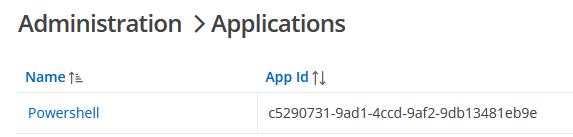
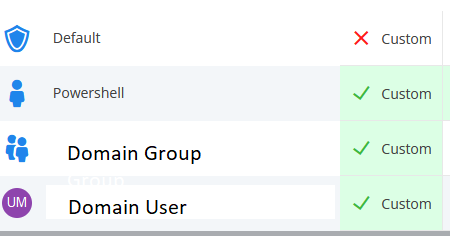

Only Powershell has Access
Rights2.png
Rights.png
AccesRights.png
AppID.png
Hello,
You are correct; my apologies. The ID of the Application entry is not the same as the App ID.
It is not the most intuitive, but the information can either be retrieved from a previously assigned permission, like you did, or with the developer tools (F12), in the Network tab, while in the web interface, under Administration > Applications: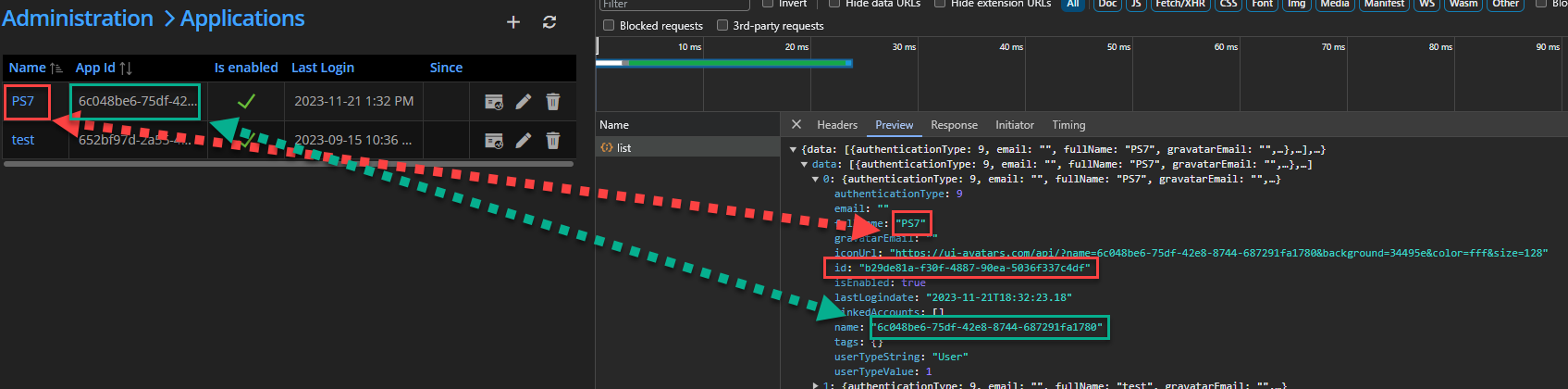
Best regards,
Richard Boisvert
e5ba5785-2dfb-4e45-9c5b-59f6656e45b4.png
Great thanks!