
info67
SSH Session Copy/Paste behavior
Hi Simon,
I think I might get used to that ;-)
Thanks,
juergen
SSH Session Copy/Paste behavior
Hi there,
is there a way to get the Windows style copy/paste behavior on the SSH Terminal of the Linux Version? I really miss the ability to mark text and paste with a right click.
I use Linux Mint.
Thank you and kind regards,
juergen
RDP Sessions on Linux Mint requesting Installation Path (version 2022.1.2.2)
Hi Juergen,
If I understand correctly you are saying that opening your RDP session is working fine in embedded (tabbed) but when you are trying to open it externally it doesn't works after you click on "OK" in the installation path window?
What credential type are you using for your RDP session?
Regards,
Hi Gabriel,
not exactly ;-). It works externally as well after I acknowledge the Path Question. When i configure the same Connection to "tabbed", this is not necessary.
The Credentials are configured at Connection Level:
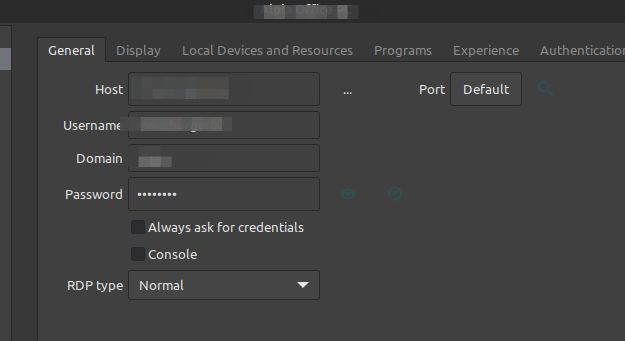
regards,
juergen
RDP Sessions on Linux Mint requesting Installation Path (version 2022.1.2.2)
Hi,
same behaviour here, but I am not able to resolve it with the Information given. Hostname is not an issue here.
I also use a .xml Datasource created on Windows. When I am doing the steps from above with commandline the RDP Connection works fine (have to enter Password, as stated).
So I tried to create a new RDP Entry for the same host on Linux, which comes up with the same Message Window but only when I select "Display: external".
A tabbed session just jumps in.
Any Hints?
Thanks, juergen