RDP Sessions on Linux Mint requesting Installation Path (version 2022.1.2.2)
RDP Sessions on Linux Mint requesting Installation Path (version 2022.1.2.2)

Hi,
I am a long time RDM user on Windows and have recently installed to a linux desktop (Linux Mint 20) and am running into what I believe is a simple problem.
When I attempt to open a RDP session to a host, I am prompted with a new dialog box requesting the "Installation Path" (see below)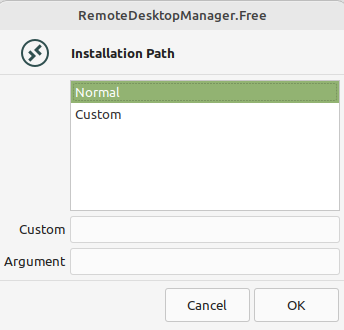
I am not able to find wher eor how to use this dialog. I have freeRDP and Remmina installed, but cannot get RDM to utilise these binaries. I recall in the Windows version there are options to select the binaries for the session types bu cannot find this parallel in the linux version.
I have had a look through the forum and cannot see anyone else having this issue which is why I suspect its something I am doing.
I have tried the following in an attempt to get it working:
- Reinstalling using the DEB file (and removing the ~/.rdm directory),
- Turing off sandboxing
- Installing/Removing Remmina and freeRDP
Any help would be appreciated.
Screenshot from 2022-04-26 16-53-48.png
All Comments (14)
Hi,
The "Normal" option will try to use xfreerdp and assume it is in your PATH, so the actual command will be "xfreerdp ...paramaters..."
If you can run xfreerdp from a terminal, RDM should be able to use it. As a reference, the ubuntu package needed is freerdp2-x11, it might be similar on Mint
Let me know if this helps
Regards
Jonathan Lafontaine
Hi,
The "Normal" option will try to use xfreerdp and assume it is in your PATH, so the actual command will be "xfreerdp ...paramaters..."
If you can run xfreerdp from a terminal, RDM should be able to use it. As a reference, the ubuntu package needed is freerdp2-x11, it might be similar on Mint
Let me know if this helps
Regards
-> I am running into the same "issue" and just like OP it seems to me it is something I am doing wrong / not understanding correctly. I have been a very grateful user of RDM on Windows for years now.
I have switched to Linux (PopOS 22.04) for two of my main machines. Thought "yippie, I can just copy my .rdm file over and hit the ground running".
It wasn't supposed to be that easy, I believe. I installed the freerdp2-x11 package and can launch from the terminal. Remmina works just fine.
But when I try to open the RDP session from RDM (2022.3.08, local data source), nothing seems to happen. It looks like it is trying to open a window but that then just closes without an error message.
Any ideas to help a fellow Admin out?
Hello rraggl,
Thank you for the details, our offices are closed for the Holidays, but we will verify with the engineering department when we are back!
Best Regards,
Richard Boisvert
Hi,
To help figure out the issue could you try to following steps?
Launch the RDP session from RDM but when asked to choose between normal and custom, press cancel. (This will generate the RDP config file but won't remove it)
From a terminal, use the following command xfreerdp "/tmp/RDM/RDP.rdp" /from-stdin /relax-order-checks +glyph-cache (this is what RDM will use to start your session)
If this connects, our next step will be to find why RDM cannot start the same process successfully.
If this fails however, we'll, hopefully, have xfreerdp error log in the terminal.
Jonathan Lafontaine
Hi,
To help figure out the issue could you try to following steps?
Launch the RDP session from RDM but when asked to choose between normal and custom, press cancel. (This will generate the RDP config file but won't remove it)
From a terminal, use the following command xfreerdp "/tmp/RDM/RDP.rdp" /from-stdin /relax-order-checks +glyph-cache (this is what RDM will use to start your session)
If this connects, our next step will be to find why RDM cannot start the same process successfully.
If this fails however, we'll, hopefully, have xfreerdp error log in the terminal.
Hello Jonathan,
Thank you very much for getting back to me so quickly.
The first command gives me the following response:
user@pop-os:~$ xfreerdp "/tmp/RDM/RDP.rdp" /from-stdin /relax-order-checks +glyph-cache
[22:34:07:834] [277078:277078] [ERROR][com.freerdp.client.common] - Failed to open RDP file /tmp/RDM/RDP.rdp
The log gives the following:
user@pop-os:~$ xfreerdp log
[22:35:44:202] [277180:277180] [WARN][com.freerdp.client.common.cmdline] - ----------------------------------------
[22:35:44:202] [277180:277180] [WARN][com.freerdp.client.common.cmdline] - Using deprecated command-line interface!
[22:35:44:202] [277180:277180] [WARN][com.freerdp.client.common.cmdline] - This will be removed with FreeRDP 3!
[22:35:44:202] [277180:277180] [WARN][com.freerdp.client.common.cmdline] - ----------------------------------------
[22:35:44:202] [277180:277180] [WARN][com.freerdp.client.common.compatibility] - log -> /v:log
[22:35:44:202] [277180:277180] [WARN][com.freerdp.client.common.compatibility] -
[22:35:44:202] [277180:277181] [INFO][com.freerdp.client.x11] - No user name set. - Using login name: rraggl
[22:35:45:607] [277180:277181] [ERROR][com.freerdp.core] - freerdp_tcp_is_hostname_resolvable:freerdp_set_last_error_ex ERRCONNECT_DNS_NAME_NOT_FOUND [0x00020005]
Hmm, looks like RDP.rdp in /tmp/RDM wasn't created. If you start your session in RDM but leave the Normale, Custom window open, do you have RDP.rdp in /tmp/RDM ?
Jonathan Lafontaine
Hmm, looks like RDP.rdp in /tmp/RDM wasn't created. If you start your session in RDM but leave the Normale, Custom window open, do you have RDP.rdp in /tmp/RDM ?
Hello Jonathan,
There is an .rdp file, but it bears the name it has in RDM and not the RDP.rdp that was referring to earlier:
user@pop-os:/tmp/RDM$ ls
Company-RDS01.rdp  HtmlAssets
user@pop-os:/tmp/RDM$
Oh, right, the file uses the entry's name.
Your command will be xfreerdp "/tmp/RDM/Company-RDS01.rdp" /from-stdin /relax-order-checks +glyph-cache
Jonathan Lafontaine
Oh, right, the file uses the entry's name.
Your command will be xfreerdp "/tmp/RDM/Company-RDS01.rdp" /from-stdin /relax-order-checks +glyph-cache
Hello Jonathan,
Ah, that even makes sort of sense... ;-) And with that I was finally able to solve it:
When I tried to do this, it asks me for the Gateway password even though the gateway information is entered in RDM and results in the following error message
user@pop-os:~$ xfreerdp  "/tmp/RDM/Company-RDS01.rdp" /from-stdin /relax-order-checks +glyph-cache
GatewayPassword:
[09:18:34:744] [8689:8690] [ERROR][com.freerdp.core] - rdg_establish_data_connection:freerdp_set_last_error_ex ERRCONNECT_ACCESS_DENIED [0x00020016]
Which I figured odd, considering the access credentials are the same as in the Windows RDM client (which is working fine) or in Remmina.
Based on this I tried several variations of the username / domain credential part which didn't do anything. However, only then I did notice that the "Host" field information for ALL the imported Servers from the Windows version are empty and I could not edit the field, it seemed.
So I made a "fresh" set of RDS access credentials (the same as in Remmina) and that seems to do the trick: After fiddling around with variations of the user / domain credentials (in Remina it is my AD users mail adress, in other places it's domain\username) I finally got it to load! Eureka!
So, long story short: it seems the Export <-> Import from the Windows version is not working 100 % correctly / omits some data.
Thank you very much for your support!
Hi
I'm glad you got it to work and we will investigate the export/import process as this seems to be the cause of all this.
And for clarification
When I tried to do this, it asks me for the Gateway password even though the gateway information is entered in RDM
This is by design, we don't export your password for security reasons. RDM monitors the xfreerdp process and feeds the password when appropriate.
Regards
Jonathan Lafontaine
Hi,
same behaviour here, but I am not able to resolve it with the Information given. Hostname is not an issue here.
I also use a .xml Datasource created on Windows. When I am doing the steps from above with commandline the RDP Connection works fine (have to enter Password, as stated).
So I tried to create a new RDP Entry for the same host on Linux, which comes up with the same Message Window but only when I select "Display: external".
A tabbed session just jumps in.
Any Hints?
Thanks, juergen
Hi Juergen,
If I understand correctly you are saying that opening your RDP session is working fine in embedded (tabbed) but when you are trying to open it externally it doesn't works after you click on "OK" in the installation path window?
What credential type are you using for your RDP session?
Regards,
Gabriel Dubois
Hi Juergen,
If I understand correctly you are saying that opening your RDP session is working fine in embedded (tabbed) but when you are trying to open it externally it doesn't works after you click on "OK" in the installation path window?
What credential type are you using for your RDP session?
Regards,
Hi Gabriel,
not exactly ;-). It works externally as well after I acknowledge the Path Question. When i configure the same Connection to "tabbed", this is not necessary.
The Credentials are configured at Connection Level: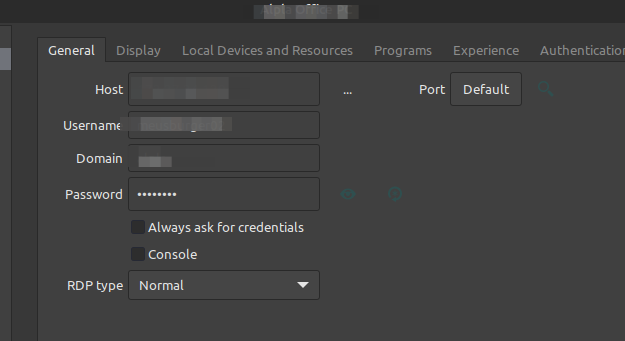
regards,
juergen
grafik.png
Hello Juergen,
I created a ticket to see how we can improve this process so you don't have to select an option on this window each time you open a RDP session in external.
Regards,
Gabriel Dubois