
dirkvdriel
Improved VMware synchronizer with PowerShell
Sorry for asking about the error. You was clear enough in your script.
I have change the part of the script. And now it's working like a charm! so many thanks.
@RDM dev-team, you have to pay this person and us this script in your RDM sync optio
:-)
Improved VMware synchronizer with PowerShell
Thanks again. off course I want to share the error. I change the $c to 4 and than this happend:
New-RDMSession : Cannot bind argument to parameter 'Name' because it is an empty string.
At C:\Users\adm_dvdriel\AppData\Local\Temp\2\RDM\b9e9d4ab-0e07-495e-88ba-c373342bad84.ps1:63 char:106
+ ... lsType Inherited -PSConnection (New-RDMSession -Name $cur[-1] -Group ...
+ ~~~~~~~~
+ CategoryInfo : InvalidData: (:) [New-RDMSession], ParameterBindingValidationException
+ FullyQualifiedErrorId : ParameterArgumentValidationErrorEmptyStringNotAllowed,RemoteDesktopManager.PowerShellModule.NewRDMSessionCommand
Get-RDMSession : Cannot validate argument on parameter 'Name'. The argument "*****-004-AP01" does not belong to the set "*****-002-XAT1,*****-003-AP01,*****-003-DC01,*****-**3-FS01,*****-**4-XA01,
*****-**5-DC01,*****-**5-XA01,*****-**6-AP01,*****-**6-FS01,*****-**7-XA01,*****-**8-AP01,*****-**9-AP01,*****-**9-FS01,*****-010-AP01,*****-010-DC01,*****-010-FS01,*****-011-DC01,*****-011
-FS01,*****-011-XA01,*****-013-AP02,*****-013-FS01,*****-013-WB01,*****-013-XA01,*****-015-AP02,*****-015-DC01,*****-015-FS01,*****-016-AP01,*****-016-XA01,*****-017-AP01,*****-017-DB01,0303
09-019-XA01,*****-021-AP01,*****-021-FS01,*****-022-DC01,*****-022-FS01,*****-022-XA01,*****-023-FS01,*****-023-XA01,*****-023-XA02,*****-023-XA04,*****-024-AP01,*****-024-XA01,*****-025-AP0
1,*****-025-AP03,*****-025-FS01,*****-025-XA01,*****-027-AP01,*****-028-DC01,*****-028-XA01,*****-029-AP01,*****-029-FS01,*****-998-AP01,*****-998-XA01,Claranet Cloud Interconnect II"
specified by the ValidateSet attribute. Supply an argument that is in the set and then try the command again.
At C:\Users\adm_dvdriel\AppData\Local\Temp\2\RDM\b9e9d4ab-0e07-495e-88ba-c373342bad84.ps1:45 char:31
+ $s = Get-RDMSession -Name $_.Name -GroupName $g -CaseSensitive -E ...
+ ~~~~~~~
+ CategoryInfo : InvalidData: (:) [Get-RDMSession], ParameterBindingValidationException
+ FullyQualifiedErrorId : ParameterArgumentValidationError,RemoteDesktopManager.PowerShellModule.GetRDMSessionCommand
Get-RDMSession : Cannot validate argument on parameter 'Name'. The argument "*****-013-AP01" does not belong to the set "*****-**2-XAT1,*****-**3-AP01,*****-**3-DC01,*****-**3-FS01,*****-**4-XA01,
*****-**5-DC01,*****-**5-XA01,*****-**6-AP01,*****-**6-FS01,*****-**7-XA01,*****-**8-AP01,*****-**9-AP01,*****-**9-FS01,*****-010-AP01,*****-010-DC01,*****-010-FS01,*****-011-DC01,*****-011
-FS01,*****-011-XA01,*****-013-AP02,*****-013-FS01,*****-013-WB01,*****-013-XA01,*****-015-AP02,*****-015-DC01,*****-015-FS01,*****-016-AP01,*****-016-XA01,*****-017-AP01,*****-017-DB01,0303
09-019-XA01,*****-021-AP01,*****-021-FS01,*****-022-DC01,*****-022-FS01,*****-022-XA01,*****-023-FS01,*****-023-XA01,*****-023-XA02,*****-023-XA04,*****-024-AP01,*****-024-XA01,*****-025-AP0
1,*****-025-AP03,*****-025-FS01,*****-025-XA01,*****-027-AP01,*****-028-DC01,*****-028-XA01,*****-029-AP01,*****-029-FS01,*****-998-AP01,*****-998-XA01,Claranet Cloud Interconnect II"
specified by the ValidateSet attribute. Supply an argument that is in the set and then try the command again.
At C:\Users\adm_dvdriel\AppData\Local\Temp\2\RDM\b9e9d4ab-0e07-495e-88ba-c373342bad84.ps1:45 char:31
+ $s = Get-RDMSession -Name $_.Name -GroupName $g -CaseSensitive -E ...
+ ~~~~~~~
+ CategoryInfo : InvalidData: (:) [Get-RDMSession], ParameterBindingValidationException
+ FullyQualifiedErrorId : ParameterArgumentValidationError,RemoteDesktopManager.PowerShellModule.GetRDMSessionCommand
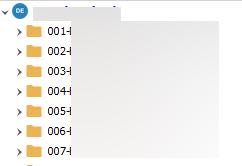
And this what I see in RDM folder structure:
When I run your original script, it runs with the follow errors:
Get-RDMSession : Cannot validate argument on parameter 'Name'. The argument "****-011-XA01" does not belong to the set "011-name1,******-011-FS01" specified by the ValidateSet attribute. Supply an
argument that is in the set and then try the command again.
At C:\Users\adm_dvdriel\AppData\Local\Temp\2\RDM\bf6ebfa9-ce6e-4c9b-84d4-3fa1f2141bb4.ps1:43 char:31
+ $s = Get-RDMSession -Name $_.Name -GroupName $g -CaseSensitive -E ...
+ ~~~~~~~
+ CategoryInfo : InvalidData: (:) [Get-RDMSession], ParameterBindingValidationException
+ FullyQualifiedErrorId : ParameterArgumentValidationError,RemoteDesktopManager.PowerShellModule.GetRDMSessionCommand
Get-RDMSession : Cannot validate argument on parameter 'Name'. The argument "****-025-XA01" does not belong to the set "025-name2,******-025-AP03" specified by the ValidateSet attribute. Supply
an argument that is in the set and then try the command again.
At C:\Users\adm_dvdriel\AppData\Local\Temp\2\RDM\bf6ebfa9-ce6e-4c9b-84d4-3fa1f2141bb4.ps1:43 char:31
+ $s = Get-RDMSession -Name $_.Name -GroupName $g -CaseSensitive -E ...
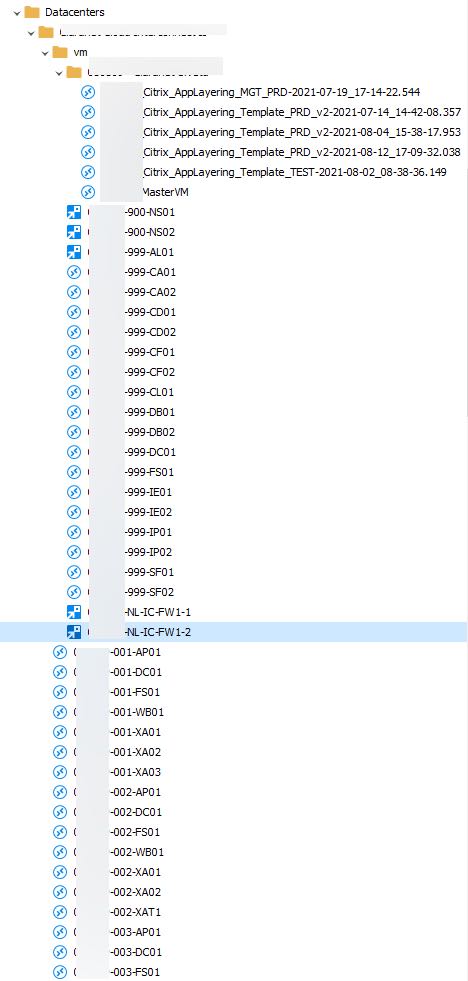
The folder structure is the same as in vmware:
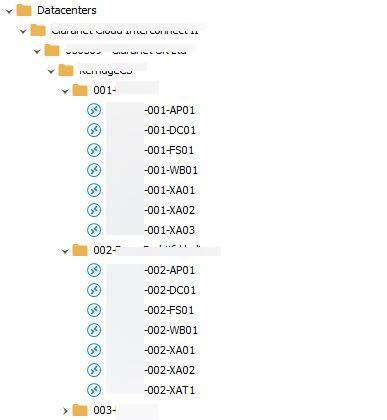
And what my wish is:
and thanks again for reading and hopefully for answer this :-)
Improved VMware synchronizer with PowerShell
Thanks for the feedback, I try to study how I can make changes in your script but that will take a long time.
If I change the rows with the part that you made for me, It doesn't work that way.
I receive on every vm an error but he create the vm but not in the folder that I thought.
What I try is this.
The default that you made is a folder structure, like:
vm/Datacenters/<cluster>/<folder1>/Customer Name\ .... location of the vm's.......
Is it easy to change it to:
Customer Name\ .... location of the vm's.......
In other words, only the last folder is needed to be imported (in my case).
I hope that you will give me the right direction how to change this.
for now, already many thanks for your help so far!
Improved VMware synchronizer with PowerShell
This is really great script! thanks.
I am not that good in scripting!
May you can help me with the follow question?
The script create the follow folder structure in RDM:
VMware \ Datacenters \ HA group name \ Subfolder1 \ Subfolder 2 \ Foldername of the customer \ vmname
is its possible to ignore everything exept the last foldername and vmname. so that only the following folders will be create in the root folder from RDM?
Foldername of the customer \ vmname
I hope that you can help me out?!
Regards,
Dirk