Improved VMware synchronizer with PowerShell
I found that the built-in vSphere (VMware) synchronizer was not meeting our needs, in particular that you can only choose VMRC or RDP. We use both, with most of our Windows servers utilizing RDP and others requiring VMRC.
This script requires:
- VMware PowerCLI
- A Credential entry for your VMware environment
- Manually running the script when you want to update OR schedule the script to run, load the RDM cmdlet, and connect to the database beforehand
Write-Host 'Loading PowerCLI...'
Import-Module VMware.PowerCLI
$id = @{ID = 'your-guid-here-please'} #ID for vSphere local admin credential object
Write-Host 'Connecting to vSphere...'
$vsphere = 'your.vsphere.server.com'
$srv = Connect-VIServer -Server $vsphere -Credential (New-Object System.Management.Automation.PSCredential((Get-RDMSessionUserName @id), (Get-RDMSessionPassword @id)))
Get-VM | % {
    # calculate expected group path based on VM folder
    $g = $(
        $folder = $_.Folder
        $path = $null
        while ($folder -ne $null) {
            # root folder is 'vm', ignore it
            if ($folder.Name -cne 'vm') {
                if ($path -eq $null) {
                    $path = $folder.Name
                } else {
                    $path = '{0}\{1}' -f $folder.Name, $path
                }
            }
            if ($folder.ParentFolder -ne $null) {
                $folder = $folder.ParentFolder
            } else {
                $folder = $folder.Parent
            }
        }
        # you can change what toplevel group to put the VMs in below
        'VMware\{0}' -f $path
    )
    # calculate expected session type based on VM guest type ID
    if ($_.GuestId -match '^win(dows|XP|Net|Longhorn)') {
        $ct = 'RDPConfigured'
        $h = $_.Name
    } else {
        $ct = 'VMRC'
        $h = $vsphere
    }
    # find existing session
    # XXX: Get-RMDSession uses ValidateSet to check if the session is present in the group.
    #      this causes a non-suppressable error message and does not assign to $s.
    #      because of this, we have to set $s to null and even if it is working OK we will get spammed with ParameterArgumentValidationErrors.
    $s = $null
    $s = Get-RDMSession -Name $_.Name -GroupName $g -CaseSensitive -ErrorAction SilentlyContinue
    if ($s) {
        if ($s.ConnectionType.ToString() -ne $ct) {
            # delete session of wrong type
            Remove-RDMSession -ID $s.ID
            $s = $null
        }
    }
    # create new session if it does not exist
    if (-not $s) {
        # create folders that do not exist
        # XXX: probably breaks on any vm folders with backslashes in the name, if that's possible
        $split = $g.Split('\')
        $cur = New-Object System.Collections.ArrayList
        while ($cur.Count -lt $split.Count) {
            $cur.Add($split[$cur.Count]) | Out-Null
            $curstr = $cur -join '\'
            if (-not (Get-RDMSession -Name $cur[-1] -GroupName $curstr -ErrorAction SilentlyContinue)) {
                Set-RDMSessionCredentials -CredentialsType Inherited -PSConnection (New-RDMSession -Name $cur[-1] -Group $curstr -Type Group) -SetSession
            }
        }

        $s = New-RDMSession -Name $_.Name -Host $h -Group $g -Type $ct
        Set-RDMSessionCredentials -PSConnection $s -CredentialsType Inherited
        $s.OpenEmbedded = $true
        $s.AuthentificationLevel = 'ConnectDontWarnMe'
        if ($ct -eq 'VMRC') {
            $s.VMRC.VMWareConsole = 'VMWareVMRC8'
        }
    }
    # things to update regardless of if the session was just created or if it already existed
    $s.Description = $_.Notes
    if ($ct -eq 'VMRC') {
        $s.VMRC.VMid = $_.Id.Remove(0, 15)
    }
    Set-RDMSession -Session $s
    # push it down the pipe to the GridView
    $s
} | Out-GridView
Update-RDMUI
Disconnect-VIServer $srv -Force -Confirm:$false
Pause
Session is attached.
Regards.
Update VMs.rdm
All Comments (9)
Hello,
Thank you very much for the script.
Regards
David Hervieux
This is really great script! thanks.
I am not that good in scripting!
May you can help me with the follow question?
The script create the follow folder structure in RDM:
VMware \ Datacenters \ HA group name \ Subfolder1 \ Subfolder 2 \ Foldername of the customer \ vmname
is its possible to ignore everything exept the last foldername and vmname. so that only the following folders will be create in the root folder from RDM?
Foldername of the customer \ vmname
I hope that you can help me out?!
Regards,
Dirk

Hi Dirk,
Just to make sure I understand, are you searching for a separate script or was it regarding the script above?
Best regards,
Eric St-Martin
or was it regarding the script above?
Were that the case, replace $g with:
    $folder = $_.Folder
    $cur = New-Object System.Collections.ArrayList
    while ($folder -ne $null) {
        $cur.Insert(0, $folder.Name)
        if ($folder.ParentFolder -ne $null) {
            $folder = $folder.ParentFolder
        } else {
            $folder = $folder.Parent
        }
    }
    # if VM is not 5 or more folders deep, ignore it and go to next
    if ($cur.Count -lt 5) { return }
    # ignore 5 path elements: vm/Datacenters/<cluster>/<folder1>/<folder2>
$g = $cur.GetRange(5, $cur.Count - 5) -join '\'Thanks for the feedback, I try to study how I can make changes in your script but that will take a long time.
If I change the rows with the part that you made for me, It doesn't work that way.
I receive on every vm an error but he create the vm but not in the folder that I thought.
What I try is this.
The default that you made is a folder structure, like:
vm/Datacenters/<cluster>/<folder1>/Customer Name\ .... location of the vm's.......
Is it easy to change it to:
Customer Name\ .... location of the vm's.......
In other words, only the last folder is needed to be imported (in my case).
I hope that you will give me the right direction how to change this.
for now, already many thanks for your help so far!
Based on your initial requirements it should work. However, based on your last reply there is only 1 subfolder you are wanting to skip and not 2. If that is the case then you should change the line $c = 5 to 4. Unfortunately since I don't have your environment I can't test it, and you didn't provide the error you were receiving... :)As I mentioned the patch will skip 5 path elements. The root of the environment is always vm, the next level is the datacenter object (i.e. every vCenter environment you have configured at each site), the next is the cluster, and all the levels after that are the folders set up in your environment. Setting $c to 4 will skip one less path element, so in your example
vm/Datacenters/<cluster>/<folder1>/Customer Name\ .... location of the vm's.......
the first four will be ignored, leaving
Customer Name\ .... location of the vm's.......
Haven't looked at it for a while so it's actually Datacenters/<cluster>/vm/<folder1>/<folder2>/...
Regards.
Thanks again. off course I want to share the error. I change the $c to 4 and than this happend:
New-RDMSession : Cannot bind argument to parameter 'Name' because it is an empty string.
At C:\Users\adm_dvdriel\AppData\Local\Temp\2\RDM\b9e9d4ab-0e07-495e-88ba-c373342bad84.ps1:63 char:106
+ ... lsType Inherited -PSConnection (New-RDMSession -Name $cur[-1] -Group ...
+ ~~~~~~~~
+ CategoryInfo : InvalidData: (:) [New-RDMSession], ParameterBindingValidationException
+ FullyQualifiedErrorId : ParameterArgumentValidationErrorEmptyStringNotAllowed,RemoteDesktopManager.PowerShellModule.NewRDMSessionCommand
Get-RDMSession : Cannot validate argument on parameter 'Name'. The argument "*****-004-AP01" does not belong to the set "*****-002-XAT1,*****-003-AP01,*****-003-DC01,*****-**3-FS01,*****-**4-XA01,
*****-**5-DC01,*****-**5-XA01,*****-**6-AP01,*****-**6-FS01,*****-**7-XA01,*****-**8-AP01,*****-**9-AP01,*****-**9-FS01,*****-010-AP01,*****-010-DC01,*****-010-FS01,*****-011-DC01,*****-011
-FS01,*****-011-XA01,*****-013-AP02,*****-013-FS01,*****-013-WB01,*****-013-XA01,*****-015-AP02,*****-015-DC01,*****-015-FS01,*****-016-AP01,*****-016-XA01,*****-017-AP01,*****-017-DB01,0303
09-019-XA01,*****-021-AP01,*****-021-FS01,*****-022-DC01,*****-022-FS01,*****-022-XA01,*****-023-FS01,*****-023-XA01,*****-023-XA02,*****-023-XA04,*****-024-AP01,*****-024-XA01,*****-025-AP0
1,*****-025-AP03,*****-025-FS01,*****-025-XA01,*****-027-AP01,*****-028-DC01,*****-028-XA01,*****-029-AP01,*****-029-FS01,*****-998-AP01,*****-998-XA01,Claranet Cloud Interconnect II"
specified by the ValidateSet attribute. Supply an argument that is in the set and then try the command again.
At C:\Users\adm_dvdriel\AppData\Local\Temp\2\RDM\b9e9d4ab-0e07-495e-88ba-c373342bad84.ps1:45 char:31
+ $s = Get-RDMSession -Name $_.Name -GroupName $g -CaseSensitive -E ...
+ ~~~~~~~
+ CategoryInfo : InvalidData: (:) [Get-RDMSession], ParameterBindingValidationException
+ FullyQualifiedErrorId : ParameterArgumentValidationError,RemoteDesktopManager.PowerShellModule.GetRDMSessionCommand
Get-RDMSession : Cannot validate argument on parameter 'Name'. The argument "*****-013-AP01" does not belong to the set "*****-**2-XAT1,*****-**3-AP01,*****-**3-DC01,*****-**3-FS01,*****-**4-XA01,
*****-**5-DC01,*****-**5-XA01,*****-**6-AP01,*****-**6-FS01,*****-**7-XA01,*****-**8-AP01,*****-**9-AP01,*****-**9-FS01,*****-010-AP01,*****-010-DC01,*****-010-FS01,*****-011-DC01,*****-011
-FS01,*****-011-XA01,*****-013-AP02,*****-013-FS01,*****-013-WB01,*****-013-XA01,*****-015-AP02,*****-015-DC01,*****-015-FS01,*****-016-AP01,*****-016-XA01,*****-017-AP01,*****-017-DB01,0303
09-019-XA01,*****-021-AP01,*****-021-FS01,*****-022-DC01,*****-022-FS01,*****-022-XA01,*****-023-FS01,*****-023-XA01,*****-023-XA02,*****-023-XA04,*****-024-AP01,*****-024-XA01,*****-025-AP0
1,*****-025-AP03,*****-025-FS01,*****-025-XA01,*****-027-AP01,*****-028-DC01,*****-028-XA01,*****-029-AP01,*****-029-FS01,*****-998-AP01,*****-998-XA01,Claranet Cloud Interconnect II"
specified by the ValidateSet attribute. Supply an argument that is in the set and then try the command again.
At C:\Users\adm_dvdriel\AppData\Local\Temp\2\RDM\b9e9d4ab-0e07-495e-88ba-c373342bad84.ps1:45 char:31
+ $s = Get-RDMSession -Name $_.Name -GroupName $g -CaseSensitive -E ...
+ ~~~~~~~
+ CategoryInfo : InvalidData: (:) [Get-RDMSession], ParameterBindingValidationException
+ FullyQualifiedErrorId : ParameterArgumentValidationError,RemoteDesktopManager.PowerShellModule.GetRDMSessionCommand
And this what I see in RDM folder structure: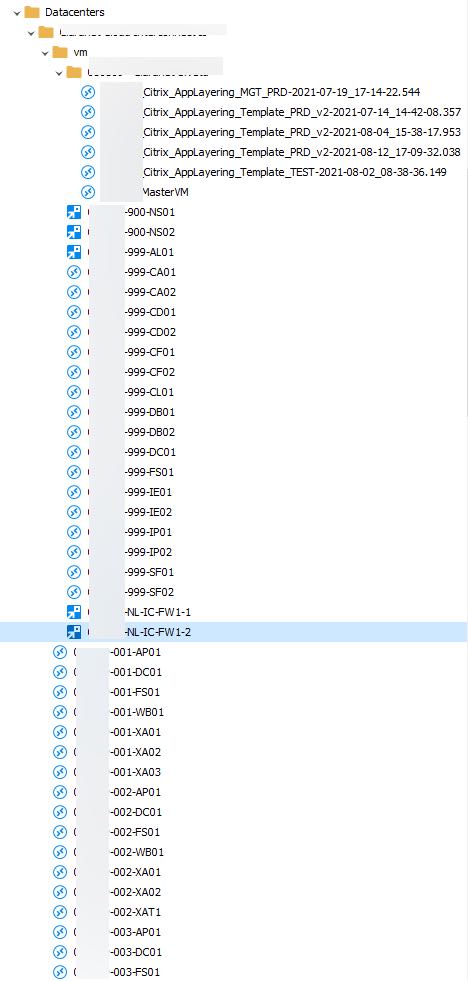
When I run your original script, it runs with the follow errors:
Get-RDMSession : Cannot validate argument on parameter 'Name'. The argument "****-011-XA01" does not belong to the set "011-name1,******-011-FS01" specified by the ValidateSet attribute. Supply an
argument that is in the set and then try the command again.
At C:\Users\adm_dvdriel\AppData\Local\Temp\2\RDM\bf6ebfa9-ce6e-4c9b-84d4-3fa1f2141bb4.ps1:43 char:31
+ $s = Get-RDMSession -Name $_.Name -GroupName $g -CaseSensitive -E ...
+ ~~~~~~~
+ CategoryInfo : InvalidData: (:) [Get-RDMSession], ParameterBindingValidationException
+ FullyQualifiedErrorId : ParameterArgumentValidationError,RemoteDesktopManager.PowerShellModule.GetRDMSessionCommand
Get-RDMSession : Cannot validate argument on parameter 'Name'. The argument "****-025-XA01" does not belong to the set "025-name2,******-025-AP03" specified by the ValidateSet attribute. Supply
an argument that is in the set and then try the command again.
At C:\Users\adm_dvdriel\AppData\Local\Temp\2\RDM\bf6ebfa9-ce6e-4c9b-84d4-3fa1f2141bb4.ps1:43 char:31
+ $s = Get-RDMSession -Name $_.Name -GroupName $g -CaseSensitive -E ...
The folder structure is the same as in vmware: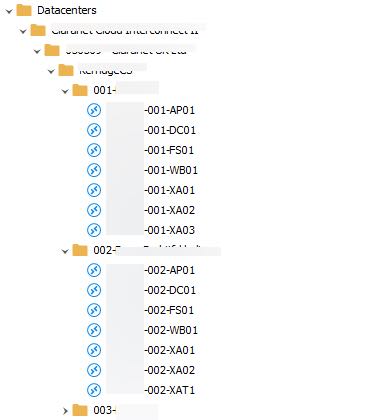
And what my wish is: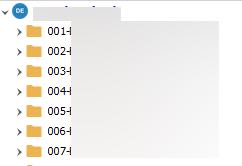
and thanks again for reading and hopefully for answer this :-)
nice-to-hace.jpg
original-run.jpg
error-run.jpg
Those errors are expected and unavoidable. It is documented in this comment:
    # find existing session
    # XXX: Get-RMDSession uses ValidateSet to check if the session is present in the group.
    #      this causes a non-suppressable error message and does not assign to $s.
    #      because of this, we have to set $s to null and even if it is working OK we will get spammed with ParameterArgumentValidationErrors.
But more to the point, I just realized I calculated the folder count backwards. If you only care about the final 2 path elements (session and folder), it is this simple:
$g = $_.Parent.Name
If you do want to explicitly check for and only utilize VMs that are nested 5 folders or deeper, I have updated my post above with a working example.
Regards.
Sorry for asking about the error. You was clear enough in your script.
I have change the part of the script. And now it's working like a charm! so many thanks.
@RDM dev-team, you have to pay this person and us this script in your RDM sync optio
:-)