
devolutions-pw-hub
Webbrowser Interface <--> Desktop Application
Hello Maxime
many thanks for your Answer - i think our user will ask later this questions :-)
Have a good day
kurt
Webbrowser Interface <--> Desktop Application
a good morning
Access to Password Hub is posible via Web browser (Chrome, Edge...) and the Desktop Application.
It's there a difference between the both? Example: is one access more secure or "faster", is a functional difference?
Thanks for answers and best regards
kurt
Devolutions Cloud Importer (2nd)
Hi Maxime
Ooooh?! Sorry,
I didn't realize that I can also import via RDM (without the Importer) - a right mouse click away.
I had already read in the blog or see in webinar (?) that the DPH can be used as "Data Sources" and allready connected bevor :-)
Now, last night i've imported the complet RDM DB (more than 3000 entries) in de DPH. Great! So far everything looks very good inclisive the sub conn.
A big thank you and have a good weekend
kurt
Devolutions Cloud Importer
Hi, many thanks for your fast response. It's great!
Many thanks and a good day
Devolutions Cloud Importer (2nd)
Hi
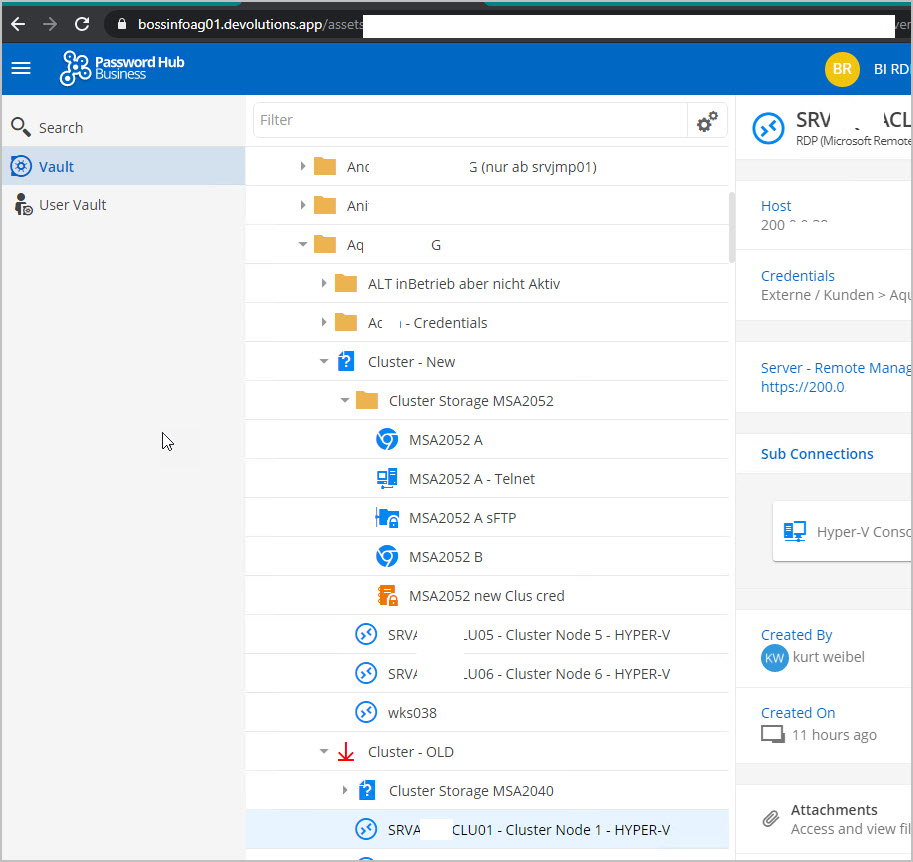
I've another "problem". When i import all the entries (from RDM exportt file .rdm) then the "Sub Connections" wouldn't import in the right maner. They are not in the DPH tree. They are a "single" Entry. When look the picturethe yello marked entries in the most left are sub connections. On the right side are the same yellow marked entries without the a "Folder" entry.
The green's are with the folder but missing in the DPH Vault after import.
But, when i, as an example, import only the folder Aqu... then all ok and thre tree look like in RDM.
Best regards
Devolutions Cloud Importer
Hello an good morning
i export our RDM DB (3500 Entries) in a .rdm file and then try to import in a Password Hub Enterprise vault (trial licence). Many entries are imported but after complete, a pop up comes and the error message in the file is this text below.
Many thanks for a answer
=======================
[2021-04-21 14:56:47]ERROR SILENT HTTP Response:
Devolutions.Hub.Clients.ApiException: The HTTP status code of the response was not expected (0).
Status: 0
Response:
at Devolutions.Hub.Clients.HubClient.<InsertManyEntriesAsync>d__70.MoveNext()
--- End of stack trace from previous location where exception was thrown ---
at System.Runtime.CompilerServices.TaskAwaiter.ThrowForNonSuccess(Task task)
at System.Runtime.CompilerServices.TaskAwaiter.HandleNonSuccessAndDebuggerNotification(Task task)
at System.Runtime.CompilerServices.TaskAwaiter`1.GetResult()
at Devolutions.Hub.Clients.HubClient.<>c__DisplayClass69_0.<<InsertManyEntries>b__0>d.MoveNext()
--- End of stack trace from previous location where exception was thrown ---
at System.Runtime.CompilerServices.TaskAwaiter.ThrowForNonSuccess(Task task)
at System.Runtime.CompilerServices.TaskAwaiter.HandleNonSuccessAndDebuggerNotification(Task task)
at System.Runtime.CompilerServices.TaskAwaiter`1.GetResult()
at Devolutions.Hub.Clients.HubClient.InsertManyEntries(Guid vaultId, IEnumerable`1 entriesToPut)
at Devolutions.RemoteDesktopManager.Managers.DevolutionsHubImporterManager.ImportEntries(List`1 connectionsToImport, Guid vaultID, Boolean changeID)