
kukucz
How to set password in Domain Group
Hi.
Thank you for help and instruction.
But your sample code doesn't work.
Last line of code give me error:
Set-RDMSessionPassword : Parameter set cannot be resolved using the specified named parameters.
I found that -Refresh parameter couldn't be used with -Session parameter.
But still this sample code not work properly when I remove -Refresh parameter .
After a few attempts I found that session ID after Set-RDMSession command is changed.
So when I run:
$s = New-RDMSession -Type "Group" -Name "PROD"
# Set all you properties here except the password
Set-RDMSession -Session $s -Refresh
$s.ID
$s2 = Get-RDMSession -Name "PROD"
$s2.ID
I see that:
$s.ID <> $s2.ID
So I modified sample code to:
$s = New-RDMSession -Type "Group" -Name "PROD"
# Set all you properties here except the password
Set-RDMSession -Session $s -Refresh
Update-RDMUI
$s = Get-RDMSession -Name "PROD"
$pwd = ConvertTo-SecureString "YourPasswordHere" -AsPlainText -Force
Set-RDMSessionPassword -Session $s -Password $pwd
But this still don't change password for Folder :)
I think that this is kind of bug because I tried the second version of Set-RDMSession command with -ID parameter:
$s = New-RDMSession -Type "Group" -Name "PROD"
# Set all you properties here except the password
Set-RDMSession -Session $s -Refresh
$pwd = ConvertTo-SecureString "YourPasswordHere" -AsPlainText -Force
$s = Get-RDMSession -Name "PROD"
Set-RDMSessionPassword -ID $s.ID -Password $pwd -Refresh
Update-RDMUI
And this code works ! When I check PROD folder properties Reveal Password option shows me: YourPasswordHere
Please:
1) check why Set-RDMSession -Session command couldn't change password
2) add some note to Set-RDMSession help page that this command should be use afterSet-RDMSession command.
Regards
Dariusz
How to set password in Domain Group
Hi.
I try create new Domain Group with data like in attached picture.
I can set domain name, domain user:
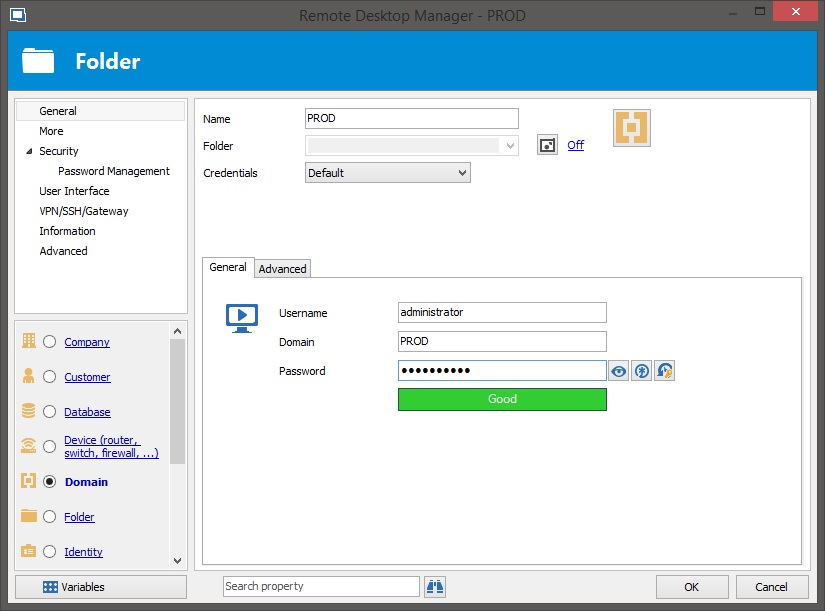
$s = New-RDMSession -Type "Group" -Name "PROD"
$s.GroupDetails.GroupType = "Domain"
$s.GroupDetails.Domain = "PROD"
$s.ActiveDirectoryConsole.UserName = "Administrator"
Is it possible to set domain password using ActiveDirectoryConsole.SafePassword property ?
I try use secure string variable with password but with no luck.
$password = "myPassword100%" | ConvertTo-SecureString -asPlainText -Force
$s.ActiveDirectoryConsole.SafePassword = $password
How to create different FOLDER entry types ?
Thank you.
Of course it is working ;)
Regards
Dariusz
How to create different FOLDER entry types ?
Hi.
How to create differentFolder entry types (Company, Site, Domain, Site, Server ...) ?
Using:
$session = New-RDMSession -Type "Group" -Name "GroupName"
I can create only general group type - Folder.
Thanks
Dariusz
PowerShell scripting - how to connect to datasource
Hi.
I have installed Remote Desktop Manager Free with Local Data Source (SQL file).
I try to prepare PowerShell script which will add entries to my RDM.
Probably I doing something wrong with DataSource connection initialization ( I didn't find good step by step sample in RDM help or in Internet resources).
Could someone give me some step by step sample how to set DatSource connection before New-RDMSession command ?
When type this commands in PowerShell console started with Administrator rights:
Get-RDMDataSource
ID Name Type
-- ---- ----
933f6e09-0061-43ad-b101-602d2827d964 Local Data Source SQLite
$ds = Get-RDMDataSource -Name "Local Data Source"
Set-RDMCurrentDataSource -DataSource $ds
$computerName = "wind10"
$session = New-RDMSession -Host $computerName -Type "RDPConfigured" -Name $computerName
Set-RDMSession -Session $session -Refresh
Update-RDMUI
I don't get any errors.
But when I start Remote Desktop Manager Free I have still empty connection tree without any entry (especially:
"wind10").
What I am doing wrong ?