PowerShell scripting - how to connect to datasource

Hi.
I have installed Remote Desktop Manager Free with Local Data Source (SQL file).
I try to prepare PowerShell script which will add entries to my RDM.
Probably I doing something wrong with DataSource connection initialization ( I didn't find good step by step sample in RDM help or in Internet resources).
Could someone give me some step by step sample how to set DatSource connection before New-RDMSession command ?
When type this commands in PowerShell console started with Administrator rights:
Get-RDMDataSource
ID Name Type
-- ---- ----
933f6e09-0061-43ad-b101-602d2827d964 Local Data Source SQLite
$ds = Get-RDMDataSource -Name "Local Data Source"
Set-RDMCurrentDataSource -DataSource $ds
$computerName = "wind10"
$session = New-RDMSession -Host $computerName -Type "RDPConfigured" -Name $computerName
Set-RDMSession -Session $session -Refresh
Update-RDMUI
I don't get any errors.
But when I start Remote Desktop Manager Free I have still empty connection tree without any entry (especially:
"wind10").
What I am doing wrong ?
All Comments (9)
Hello Dariusz,
the PowerShell scripting feature is only available in the Enterprise Version => Compare Editions
Regards,
Min
How do i change the data source to an online version? we dont use local...
Hello David,
To which data source you wanna connect? If its Hub Business you can have a look over this kb article.
Regards,
Min
Thanks, but I cant seem to connect...
Connect-HubAccount -Url https://dvps.dot.ca.gov/passvault/.devolutions.app -ApplicationKey 21e54969-2107-4bf9-b79f-05cd49c714b2 -ApplicationSecret "the secret from the appsource"
i keep getting a 404 error
Hello David,
I just tried it on my end, and it works normally: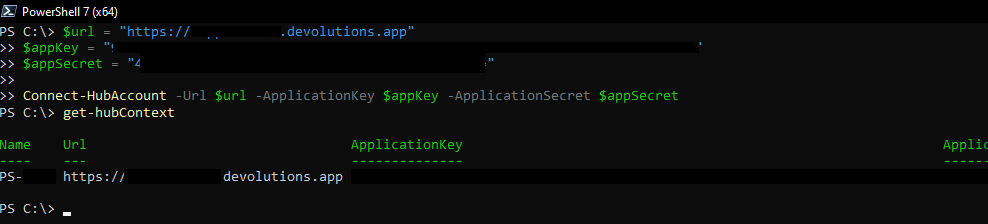
Please confirm your version of the module with Get-RDMInstance . The latest version is 2023.2.0.3 - https://www.powershellgallery.com/packages/devolutions.powershell
Best regards,
Richard Boisvert
4d8476b9-3c53-43fa-a07a-189c4e44d5e7.png
Hi,
What about VERBOSE: [New-DSSession] Server version: 2021.1.19.0?
Hello David,
Are you using a Devolutions Server data source or Hub Business? Connect-HubAccount is only for Hub Business.
Best regards,
Richard Boisvert
devolution server
Hello David,
In that case, you will need to use the method mentioned in the other thread you are posting in: https://forum.devolutions.net/topics/35076/introduction-of-our-github-repository-for-samples-and-scripts
Best regards,
Richard Boisvert