Unable to find Microsoft Remote Desktop

When I try to open a new RDP session, I get the message:
"Unable to find Microsoft Remote Desktop. Get it from the App" (see attached screenshot)
I've got the Mac version of Microsoft Remote Desktop installed, but I still get this message.
Researching this forum, it sounds like it should use the "embedded version".
Please advise.
2013-12-14_11-52-30.png
All Comments (8)
Hi,
Please check the information in this thread: http://forum.devolutions.net/topic8491-crash-when-quitting-rdp-and-saying-no.aspx#post36537
And let me know if that answers your question!
Thanks, Richard
Richard Markievicz
I tried clicking on "embedded" in preferences, but it still didn't work.
However, once I downloaded the latest version of the Microsoft Remote Desktop (the one from the App Store), it worked.
Thanks for your help!
Steve
The option in preferences just controls the default for new connections.
For existing connections, check the "Display" property. "External" means use the external client (MS RDP), "Embedded" and "Undocked" use the internal FreeRDP client (either in an embedded tab or an undocked window, respectively)
Hope that helps, Richard
Richard Markievicz
I downloaded the latest 1.0.4.0 and now cannot launch any of my RDP sessions. It started off by saying unable to find MS Remote Desktop, but following installing that, now every connection was to use MS RD! How do I revert to using the built in client?
was=wants to use
fixed by changing session type! Would be good to know this before installing upgraded version!!
Hi,
We had a configuration issue with a new setting introduce in version 1.0.3.0.
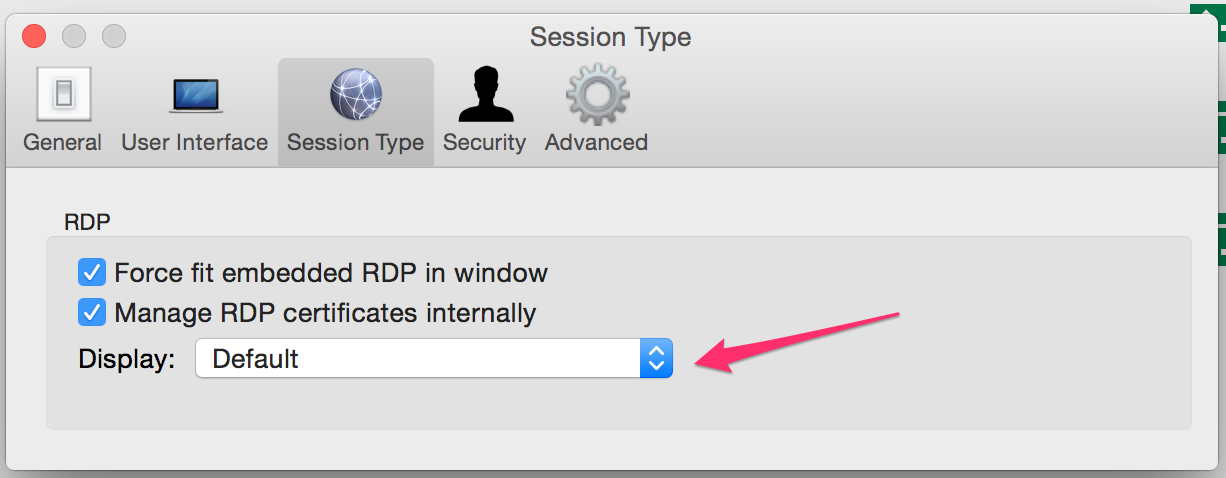
Go to the menu Remote Desktop Manager -> Preferences...
Select the session type and set the Display to the correct value.
You can now choose to force all of your session to open in external, embedded or undocked mode.
Choose default to use the Display configured in your session.
Is this what you meant by saying "fixed by changing the session type" ?
Thank you
Benoît Sansregret
PreferencesDisplayMode.png
Many thanks for the prompt reply, that is exactly what I meant!