RDM overwriting entries

Been running the enterprise demo of RDM for last few weeks and upgraded to this morning with the licence key that I bought. Upgraded to 9.0.10.0 earlier today.
I've hit around 230 entries in the local data source and each time I create a new entry, one of my entries vanishes/overwritten and the new entry appears. I've not tested other data sources, although assuming there's no limit on number of entries?
Has anyone else seen this issue? or is there a setting I'm missing at the moment?
Thanks,
Michael.
All Comments (23)
I am enjoying Remote Desktop Manager so far, however I am having an issue where If I try to add any more sessions (RDP), it will always overwrite the most recent one I added. For example, if I add "ServerA, www.servera.com" as a session, it will populate into my list. If I then add a new entry "ServerB, www.serverB.com" as an RDP session, the "ServerA" entry changes to "ServerB", overwriting it every time. I am stuck at the current number of sessions that I have and cant seem to add any more. Is this a bug or am I simply doing something incorrectly?
What type of local data source (XML or SQLite)?
We don't have a session limit.
It's the first we see the issue, we are trying to reproduce the issue.
Stéfane Lavergne
Very odd, your the second person to report the issue this today.
http://forum.devolutions.net/topic9663-rdm-overwriting-entries.aspx
What version 9.0.10.0?
What data source type are you using (SQL, XML, SQLite...)?
How many sessions?
Stéfane Lavergne
Its an SQLite, i've just tried creating a new SQLite data source and copying between - at 230 entries, the same behaviour occurs. If i create a new RDP session called test1 and then create another one called server2 - the test1 is gone and server2 is in its place.
FYI - I merged both forum topics
Stéfane Lavergne
I am using XML that I imported from my previous RDCman instance.
I'm still trying to reproduce. How are you creating the new session? Right-click -> New Entry, Edit -> New, dashboard link?
edited by stefane on 12/10/2013
Stéfane Lavergne
Right-click on group -> add session -> fill in server details -> OK
I've also tried Add entry -> RDP -> drag into group afterwards -> repeat with new server and that still overwrites the old one.
Yeah thats how i've done all of my entries, right-click Sessions -> Add -> Add Session
I started from fresh, no import and all entries manually added
Could one (or both) reproduce the issue on a new XML data source then send me the .xml file?
slavergne et devolutions dot net
Thanks
Stéfane Lavergne
If you configure this file and try to add does it work?
If the first add worked, how about a second add?
Stéfane Lavergne
Topic-9663.xml
I emailed you the XML file. For security reasons, if you could just analyze it and not post it here as an attachment I would appreciate it.
Stefane, did you have any luck withe Oninaig's xml output?
@mforrest
It looks like it might be due to the default template. Still working on trying to reproduce the issue on my side. Until I figure out more could you please run the following test for me.
1 - edit the session, Advance tab, take note of the Session ID
2 - add new entry, before you save, take note of the Session ID - save
3 - edit the session, take note of the Session ID
Are any of the ID's the same?
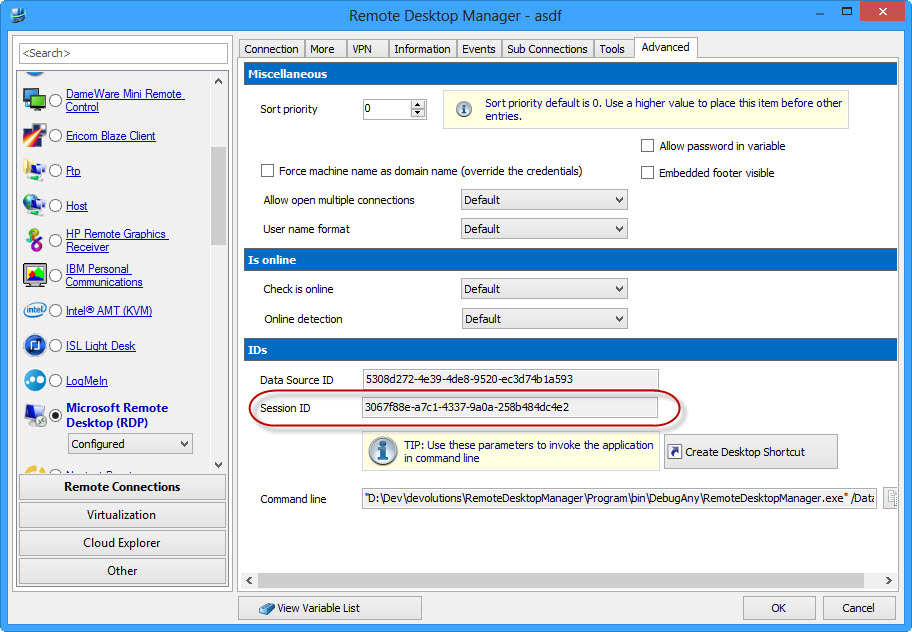
Stéfane Lavergne
12-11-2013 8-28-02 AM.jpg
If you add a different session type are you able to add a second or third session without crushing over the previous session?
Stéfane Lavergne
Could you also post (or private message) your application logs. Help -> View Application Logs
Thanks
Stéfane Lavergne
So created an RDP session called Test4 and it has the following details :-
Data Source ID : 13a87e0e-f938-4643-8bd5-4959ff69acf9
Session ID : 0215591e-5c2f-4c38-a4c4-f8d5a8bd9bd8
I then add a RDP new session and before finishing, clicking Advanced and the session id is :-
0215591e-5c2f-4c38-a4c4-f8d5a8bd9bd8 (same as the Test4 session).
If I add an SSH session, the Test4 session vanishes and up pops my sshtest2 session with id :-
0215591e-5c2f-4c38-a4c4-f8d5a8bd9bd8
So all session ids are the same and take over the last session...
As we suspected. Now the question is why are we seeing the same ID over and over again.
We are currently building a new version with more debug information. I will be ready in about 10 minutes. I will PM (private message) you with the download details when it's ready.
Regards,
Stéfane Lavergne
Yahoo!!! We have repro...
I was finally able to reproduce the issue. Should be easy to fix now.
Thank to both of you for your help.
I will post when a new build is available.
In the mean time, I have a work around:
Regards,
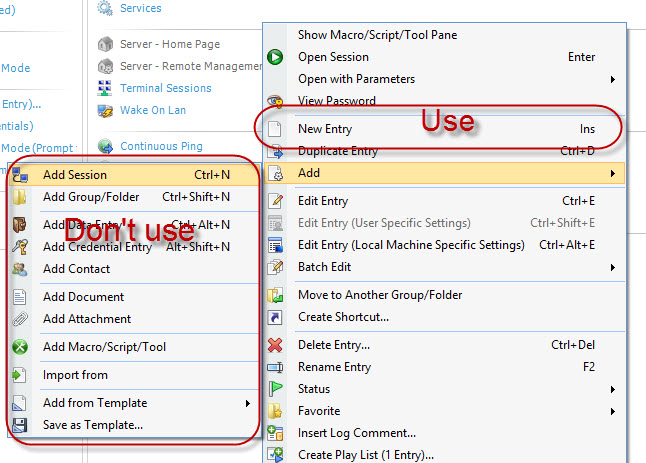
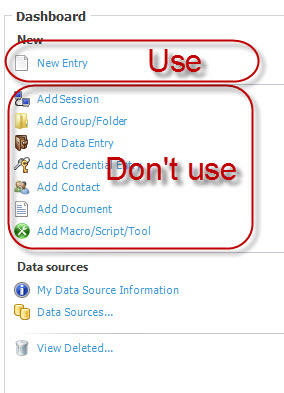
Stéfane Lavergne
12-11-2013 11-48-48 AM.jpg
12-11-2013 11-47-54 AM.jpg
I can confirm that workaround allows me to add new connections :-)
Just need to remember to not use my normal method. Thanks for the speedy/prompt service, very pleased with the product and looking forward to using it more and more.
The issue has been resolved, will be in the next build.
Regards,
Stéfane Lavergne
Any idea when the next build is due out then?
It's available now v9.0.11.0
Download here:
http://remotedesktopmanager.com/Home/Download
Regards,
edited by stefane on 12/12/2013
Stéfane Lavergne