3rd type of webpage authentication

I access AXIS cameras on a nearly daily basis. I've noticed that when logging in that I am presented a dialog box rather than a form or basic authentication method. I was hoping that someone would be able to tell me how to use RDM to enter the username and password for this type of authentication.
On a side note it would be nice if RDM could discover the MAC for a web host as well; currently it asks me to enter an IP address for the session.
This is a picture of the authentication dialog in Chrome:
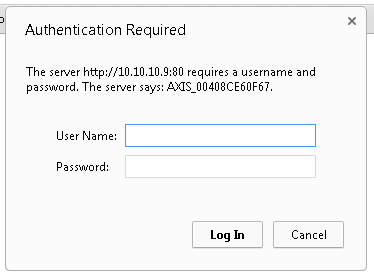
Webpage Login.PNG
All Comments (12)
Hi,
Unfortunately we don't have direct solution if it does not support the basic authentication. The only thin you could try is a typing macro.
I will have to do some investigation about the web MAC address because as far as I know I have no solution.
David Hervieux
I am trying the same type of entry. But I don't get anywhere to enter credentials, the page just says 401 Unauthorized.
Do you use embedded Chrome or embedded IE?
David Hervieux
I have tried both plus Firefox. Each one redirects me from http://10.10.10.1 to http://10.10.10.1/view/viewer_index.shtml?id=141
Same as hitting cancel on the login popup.
It's also for the Axis camera?
David Hervieux
Sorry, yes Axis M3007.
Yes might have to use the web browser extension instead of embedded.
David Hervieux
Tried lots of combinations. Only thing that brought up the login prompt was external....but that kinda defeats the purpose of having RDM enter credentials. Really not the best use since I'm setting up about 30 cameras between two buildings.
How else can we get RDM to input credentials?
Perhaps with a macro?
David Hervieux
ok, how would I use a macro to enter the login info?
You could use the variable and the auto typing macro. You can take a look at this help topic:
http://help.remotedesktopmanager.com/settings_events_autotypingmacro.htm?zoom_highlightsub=typing%2Bmacro
David Hervieux
Hi Michael,
This topic should also help - http://help.remotedesktopmanager.com/howto_typingmacro.htm
Best regards,
Jeff Dagenais