Massive Template issue

This is becoming a big issue for us
we create templates which are used to create all entries. When we create a new template this happens (see attached) if I delete them the template disappears, if I restore them the object comes back but the shared template does't. So I am have to recreate them again, this happens on 9.0.9.0 with cached on or off. This has happened several times.
All Comments (7)
here's a screen grab
templates.JPG
Sorry, this bug was introduced yesterday (in v9.0.9.0) when fixing this other issue: http://forum.devolutions.net/topic8429-template-duplicates.aspx
It's a UI only bug, for now don't touch the "empty named" sessions, they are in fact the shared templates being displayed in tree view. With the new build they will go away.
The fix has already been implemented and a release build is being built...
Regards,
Stéfane Lavergne
To late someone had already deleted them so I restored them and the objects came back but not the template. One thing I noticed is the blank entries don't appear with intelligent mode on but they do with cached mode off.
Did you try restoring the templates?
If you did restore your templates (as sessions), delete them again and let me know. I can write you a DB script to revert them so that you don't need to recreate them all.
If you didn't try to restore the "templates" great.
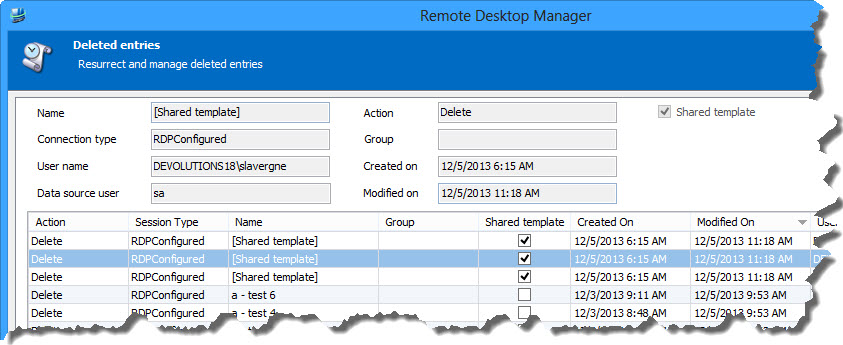
I will fix the Delete Entries functionality to properly display Templates and allow you to restore them properly.
This way you won't have to re-create all your templates but simply restore them.
Stéfane Lavergne
The code is building...
Here is the feature:
You will see your deleted shared templates (not the name, it's a limitation for now, we will fix in a future release). Select the template(s) and restore.
I will let you know when the build is done.
P.S. This will work on all your deleted templates ("not previously restored" and "the previously restored then re-deleted")
Regards,
Stéfane Lavergne
12-5-2013 11-27-09 AM.jpg
You can download the v9.0.10.0 build here:
http://download.devolutions.net/Setup.RemoteDesktopManager.9.0.10.0.exe
or
http://download.devolutions.net/Devolutions.RemoteDesktopManager.Bin.9.0.10.0.zip
Stéfane Lavergne
Thanks I recreated them anyway but the new release seems to have fixed all the problems including notifications not opening in a new window.